We’re excited to announce the launch of our MCP server for Apono administrators — giving security and DevOps teams the ability to surface complex access data instantly, without the endless API queries, spreadsheets, or manual digging that slows everyone down.
Admins are the guardians of access. But when they need answers like “Which users are included in this access flow?” or “Who has access to production?”, getting that data today can take hours. Teams often wrestle with APIs or cobble together manual exports, creating bottlenecks and frustration while slowing down audits and compliance.
The Admin MCP changes that.
Why MCPs Matter for Admins
AI assistants like Cursor, Claude, and Amazon Q are redefining how teams work. Instead of navigating multiple tools, admins can simply ask questions in natural language and get structured, reliable answers.
Model Context Protocol (MCP) makes this possible by connecting AI assistants directly to enterprise systems. Think of it as the “USB-C” of enterprise workflows — a standard that lets AI securely query and retrieve information from your most critical tools.
For admins, this means compliance checks, audits, and day-to-day governance tasks can be handled faster and with greater confidence.
How Apono’s Admin MCP Server Works
Our Admin MCP Server applies this model to access governance:
Interpret Intent — Understand the question an admin is asking.
Query Apono — Use MCP APIs to fetch resource, access flows, bundle, audit or scope data.
Surface Context — Expand group memberships, identify MFA policies, or show approval settings.
Deliver Outcome — Return structured, auditable answers that can be used for compliance, rightsizing, or troubleshooting.
All operations are logged to ensure full traceability and auditability.
What Admins Can Do
With the Apono MCP Server, admins can:
Answer Governance Questions Instantly — “Which access flows include this user, directly or through a group?”
Audit Configurations — Review all flows tied to production or requiring MFA.
Inspect Access Flows — Drill into who can request access, which resources are affected, and whether MFA or approvals are required.
Analyze Bundles — List bundles and permissions, or drill into a specific one (e.g., “What does the Prod Admin Bundle include?”).
Review Scopes — Show scope definitions, filtering rules, and how tags like env:production shape access.
Common Use Cases
Compliance Evidence — Gather data for SOC 2 or internal audits without days of prep.
Troubleshooting — Quickly see why a user can’t request access to a resource.
Rightsizing — Spot overly broad bundles or unused flows that increase risk.
Transparency — Show exactly how policies, conditions, and MFA requirements apply to critical environments.
Value Across the Lifecycle
The Apono Admin MCP Server makes life easier for security and compliance teams while improving governance across the board:
Simplify Audits — Compliance evidence is available on demand.
Reduce Overhead — No more hunting through APIs or multiple dashboards.
Improve Visibility — See how access is granted across users, groups, bundles, and scopes.
Strengthen Governance — Ensure least privilege is enforced with clarity and confidence.
Stay Ahead — Position your organization as an early adopter of AI-driven access governance.
Where You Can Use It
Admins can work directly in the tools they already use:
Chat: Cursor, Claude, Gemini, GitHub Copilot
Collaboration: Slack, Teams
LLM Consoles: Amazon Q and MCP-enabled assistants
This means admins don’t need to leave their workflow to chase down access data — it comes to them.
Get Started
With Apono’s Admin MCP Server, access governance becomes faster, smarter, and more auditable.
Admins can instantly surface the answers they need for compliance, troubleshooting, or security reviews — freeing up valuable time while keeping risk under control. Reach out to us to start the conversation and request a demo of the Apono Admin MCP Server today.
Apono Raises $34M Series B to Redefine Privileged Access for the Agentic Era
NEW YORK – November 18, 2025 – Apono, the cloud identity-security company pioneering Zero Standing Privilege (ZSP) access management, today announced a $34 million Series B led by U.S. Venture Partners (USVP), with participation from Swisscom Ventures, Vertex Ventures, 33N Ventures, and existing investors. The round brings Apono’s total funding to more than $54 million. Over the past year, Apono established product-market fit with a fourfold increase in client count.
Apono’s platform helps enterprises manage the explosion of cloud permissions by eliminating standing privileges, a long-standing vulnerability in identity and access management. Built on Just-in-Time (JIT) and Just-Enough-Access (JEA) models, Apono grants and revokes access dynamically based on real-time context and business logic, ensuring teams can move fast without compromising security.
The company’s vision anticipates a future where human and AI identities coexist and collaborate. As agentic systems proliferate, managing their access requires a level of automation, context-awareness, and scale that static IAM models can’t deliver. Apono’s dynamic permissioning engine meets that challenge by validating every access request in real time, enforcing security without slowing down developers or operations.
“The large-scale adoption of AI agents exponentially scales the problem of getting access right,” said Rom Carmel, Co-founder and CEO of Apono. “Achieving ZSP with a dynamic access management approach is the only sustainable way to secure Agentic operations at scale.”
Customers, including Intel, Hewlett Packard Enterprise, and Monday.com, rely on Apono to secure access across hybrid and multi-cloud environments while meeting compliance standards and accelerating incident response.
Jacques Benkoski, General Partner at USVP, will join Apono’s board. A longtime enterprise software investor, Jacques has helped scale leading cybersecurity companies, including Trusteer, Medigate, and Kenna Security. He will work closely with Rom Carmel, Ofir Stein, and the Apono team to help drive the company’s growth and leadership in the emerging field of agentic identity security.
“Apono is leading the next evolution of identity security – one that brings zero trust to identity access, following the zero trust of network access we’ve seen in recent years,” said Jacques Benkoski, General Partner at USVP. “The company’s dynamic, context-aware approach is exactly what enterprises need to secure both human and machine identities in the AI-driven era.”
The new funding will be used to accelerate development of AI-powered access intelligence and policy automation, expand go-to-market operations in the U.S. and new international markets, and scale Apono’s engineering and sales teams to meet growing enterprise demand.
Apono will be featured at AWS re:Invent, December 1–5, 2025, in Las Vegas, NV., where attendees can see live demos of its dynamic access platform built for this new era.
About Apono
Apono is redefining identity security with its Cloud Privileged Access Platform, purpose-built for the agentic AI era. Founded by cybersecurity and DevOps veterans, Apono empowers enterprises operating in modern cloud environments to eliminate standing privileges and adopt just-in-time, just-enough access across all identities – human, machine, and AI agents. Trusted by global Fortune 500 companies, Apono bridges the gap between security and engineering teams, enabling organizations to move fast without compromising security.
Cephalus Weaponizes Stolen RDP Credentials to Deploy Ransomware
New research out of AhnLab documents the Cephalus ransomware group has been aggressively exploiting stolen Remote Desktop Protocol (RDP) credentials to break into networks and execute rapid, destructive encryption campaigns.
The pattern is straightforward and brutal: credentials get you in, and once inside the attackers move fast to blind and break recovery.
How the Breach Works
According to the reporting in cybersecuritynews.com, the Cephalus crew is using tried and true tactics:
Credential-focused entry — Cephalus targets systems with exposed or weakly protected RDP and uses stolen or reused credentials to log in. They are having significant success where MFA is not enforced.
Low-noise access, high impact — Because RDP sessions with these legit creds look like normal user connections, attackers can operate with less immediate suspicion than with noisy exploit chains.
Post-Breach Activities
Recon & data grab — The operators move laterally, steal sensitive files, and stage exfiltration.
Disable defenses and backups — The malware disables Windows Defender real-time protection, removes Volume Shadow Copies, and terminates backup/database services (notably Veeam and Microsoft SQL Server) to prevent recovery and speed encryption.
Encrypt and extort — With defenses hamstrung and backups sabotaged, the group deploys ransomware across the estate and aggressively pursues extortion.
The Risk from Credential Compromise
Standing credentials that can log in to RDP are an attacker’s fast track: they bypass perimeter controls, enable hands-on-keyboard operations, and let operators neutralize defenses from the inside.
When credentials are reusable and access is always-on, an attacker’s path from access to impact is gut-wrenchingly short.
So how can organizations protect themselves in these cases?
Operational First Steps for Quick Security Wins
Close direct RDP exposure — Don’t expose RDP to the Internet. Put it behind VPN, RD Gateway, or a zero-trust access broker.
Require MFA— Enforce multi-factor authentication so stolen passwords alone can’t grant access.
Adopt Just-in-Time access — Provide elevated access privileges only when needed and revoke them automatically.
Harden backups & service privileges — Limit who can stop backup services, restrict backup admin rights, and test restores frequently.
Monitor for telltale signals — Alert on new RDP logins from unusual geographies, Defender disablement, VSS deletions, and mass service terminations.
Use dedicated admin accounts— Separate admin identities from day-to-day accounts and use them only for elevated tasks.
How Apono Secures RDP
Apono enables security teams to implement Zero Standing Privileges across their cloud and hybrid environments, including RDP access to machines hosted on AWS, Azure, GCP, and on-prem.
Here are just a few of the ways that Apono empowers teams to reduce their access risk while streamlining unimpeded access for engineers.
Eliminate standing access — Stop attackers from abusing always-on privileged access by shifting to Just-in-Time (JIT) access elevation for both humans and machines.
Reduce blast radius — Continuously rightsize privileges with data-driven recommendations so stolen credentials have far less ability to damage systems or stop recoveries.
Quarantine risky privileges without breaking things — Apply reversible deny policies to neutralize dangerous standing access immediately, preserving uptime while removing attacker pathways.
Centralize governance and detection — Tie JIT workflows, session brokering, and alerting into a single policy surface so you can block credential-driven attacks faster and recover more confidently.
Enforce MFA for sensitive access flows — Apono can require authenticator-app verification for JIT requests and logs MFA events to the audit trail so elevated sessions are tied to confirmed second-factor approval.
Ready to Take a Smarter Approach to Cloud Access?
Credential-based ransomware like Cephalus is predictable: it exploits access we already grant.
Eliminating standing privileges and making elevated access temporary removes the easiest path attackers use. If you want to quickly identify where those risks still exist, start with our Zero Standing Privileges (ZSP) Checklist and benchmark your current exposure.
9 Must Have Components for a Privileged Access Management Audit
Privileged accounts are often treated as background plumbing until something goes wrong. They sit across cloud consoles, databases, and pipelines and have the power to alter configurations or bring production to a halt, making them a favorite target of bad actors.
Credential theft surged 160% in 2025, making stolen identities one of the fastest-growing attack vectors. When those stolen credentials belong to privileged accounts, the exposure isn’t limited to one system; it can spread across the whole environment.
A privileged access management audit is one of the few ways to pressure-test your organization’s ability to withstand this reality: identifying where privileged access lives, how it’s controlled, and whether the guardrails actually hold when it matters.
What is a privileged access management audit?
A Privileged Access Management (PAM) audit is a structured review of how your organization grants, monitors, and controls elevated access. Unlike general access reviews, it focuses on the most sensitive accounts, such as administrators, database owners, CI/CD pipelines, and cloud root credentials, which, if misused, can lead to breaches and compliance failures.
From a compliance standpoint, a PAM audit demonstrates your organization’s adherence to frameworks like SOC 2, HIPAA, GDPR, and CCPA, which all require strict controls over privileged access. On the security side, the audit identifies risky standing permissions, unused or over-privileged accounts, and gaps in access governance that could be exploited in identity-based attacks such as credential theft or insider misuse.
PAM differs from Identity and Access Management (IAM) audits. IAM reviews look across the workforce to determine role appropriateness. PAM audits go deeper into the highest-risk accounts where a single misconfiguration can lead to lateral movement or critical outages.
Non-Human Identities: The Hidden Majority in PAM Audits
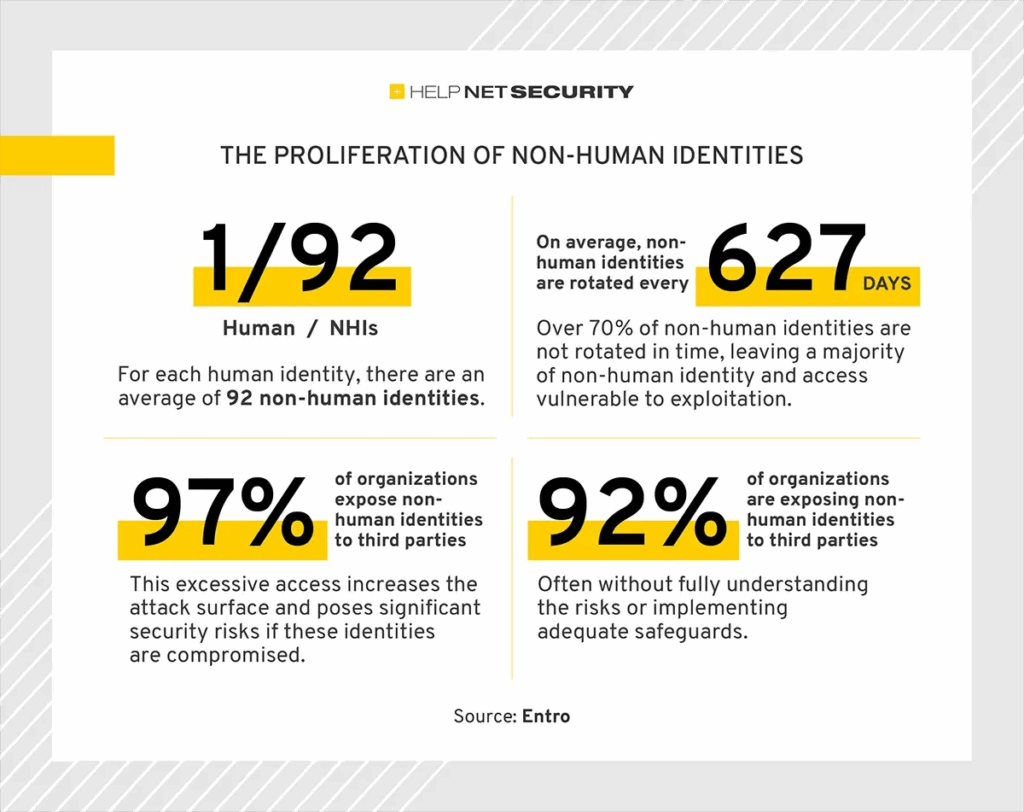
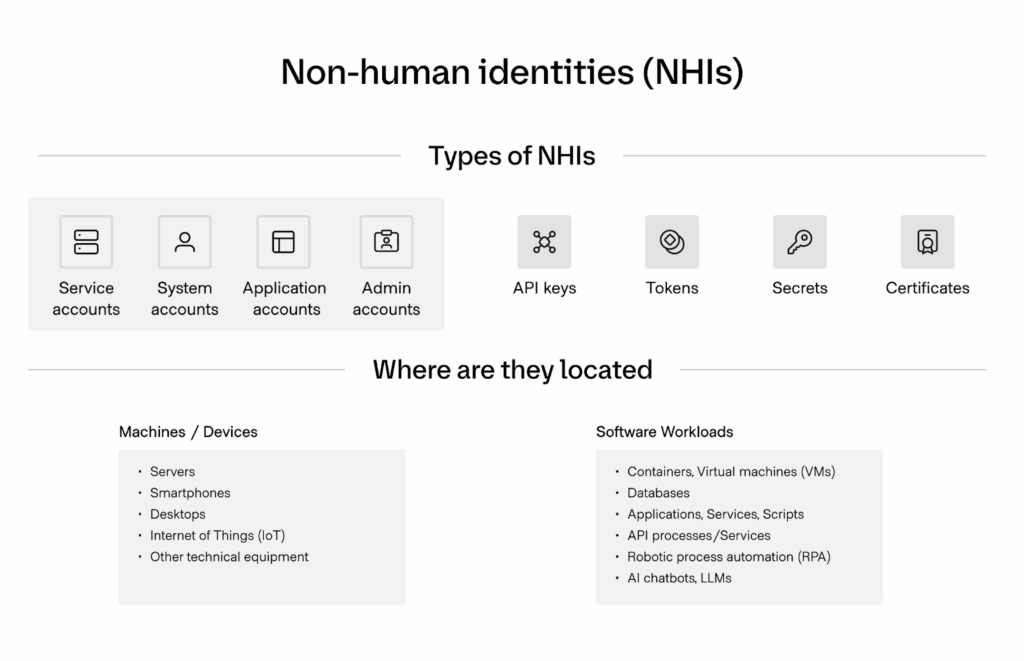
In modern cloud and SaaS environments, non-human identities (NHIs)—service accounts, API keys, machine identities, bots, and agents— outnumber human identities by 80:1. This proliferation introduces a lack of visibility over stale, long-lived tokens and over-privileged service accounts. When compromised, an NHI can be abused to conduct malicious activities, from exfiltrating data to moving laterally across systems and triggering destructive agent-to-agent chains. It’s more critical than ever to treat NHIs with the same rigour as human admins, such as moving NHIs from static, long-lived keys into automated Just-in-Time (JIT) and Just-Enough Privileges (JEP) flows.
5 Key Objectives of a Privileged Access Management Audit
A PAM audit tests whether access models can withstand real-world pressure, with five key goals.
1. Identify all Privileged Accounts
The starting point is a complete inventory of privileged accounts across infrastructure, SaaS, and hybrid environments. Shadow admins and dormant credentials often go unnoticed but can be exploited as entry points. Don’t forget that a complete inventory eliminates blind spots and extends to non-human identities, which often lack MFA or visibility but can be abused as powerful entry points.
2. Assess Least Privilege Enforcement
Auditors examine whether access is restricted to the minimum required, both in scope and time. Standing privileges or overly broad entitlements signal persistent risk, even if they are rarely used. The test is whether the least privilege is enforced in daily operations, not just written in policy.
3. Validate Authentication and Approval Workflows
How access is granted matters as much as who receives it. Auditors review whether workflows include measures such as multi-factor authentication, just-in-time approvals, and human oversight, and whether these steps are consistently applied.
4. Confirm Monitoring and Logging
Privileged activity must be traceable. Auditors look for detailed, tamper-resistant logs that link actions to specific identities and preserve enough context to support investigations. Strong logging is the foundation of accountability.
5. Ensure Compliance Alignment
Another tick-box for auditors is whether privileged access controls map directly to frameworks like SOC 2 and GDPR. This step is about demonstrating that practices meet external requirements, not just internal expectations.
9 Must-Have Components For a Privileged Access Management Audit
Here’s what auditors and regulators look for when assessing whether privileged access is secure and accountable.
1. Comprehensive Inventory of Privileged Accounts
Most organizations underestimate the number of privileged accounts in their environment. Privileged identities go beyond administrators in hybrid setups spanning SaaS platforms, cloud services, and legacy infrastructure. They include NHIs like API tokens and machine accounts, which rarely rotate credentials and fall outside the visibility of central IAM oversight.
Why it matters: Forgotten or orphaned accounts are common targets for attackers, since they often lack MFA or monitoring.
Auditors look for: A dynamic inventory that is continuously updated, not a static spreadsheet compiled ahead of an audit.
Best practice: Automate discovery and classification to identify all privileged identities, and assign a clear owner for each account’s lifecycle.Using a cloud-native access management platform provides continuous discovery across cloud and SaaS environments, making privileged identities visible and traceable.
2. Verification of Least Privilege Enforcement
Enforcing least privilege is one of the most complex parts of PAM and applies to human and non-human identities. Developers and administrators often accumulate entitlements beyond their needs over time. A PAM audit examines whether permissions are limited in scope, time-bound, and automatically revoked.
Why it matters: Standing privileges remain risky even when accounts are idle.
Auditors look for: Proof that access is temporary and scoped, including just-in-time provisioning, role-based permissions, and consistent automated revocation.
Best practice: Retire static admin groups for contextual, time-limited roles. Monitor exceptions closely to prevent privilege creep, which keeps security controls practical for engineering teams while reducing long-term exposure. Additionally, machine identities should be scoped to task-specific, short-lived permissions under a JEP model.
3. Access Request and Approval Workflows
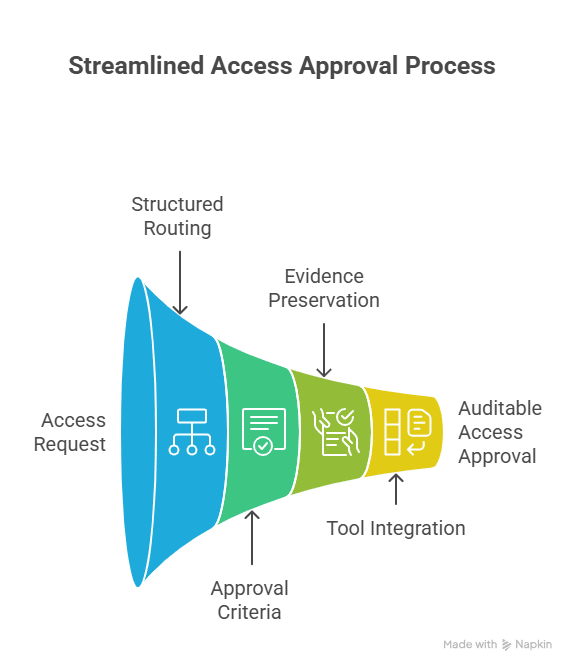
Privileged access needs to follow a clear, documented process. Ad hoc approvals over email or chat leave no reliable record and create gaps in accountability. Auditors determine whether requests are routed through structured channels, with approval criteria defined and evidence preserved for review.
Why it matters: Informal workflows make access decisions opaque and vulnerable to mistakes or bias.
Auditors look for: Request trails that record who requested access, who approved it, and why. Multi-factor approvals are now standard for high-risk requests.
Best practice: Integrate access workflows into the tools engineers already use. Approvals through Slack, Teams, or CLI allow teams to move quickly while leaving an auditable trail.
4. Session Monitoring and Logging
Once privileged access is granted, organizations need complete visibility into its use. PAM audits assess whether sessions can be reconstructed in detail, including logins and the commands executed, configurations changed, and data accessed.
Why it matters: Without detailed logs of privileged sessions, organizations lose both forensic evidence and accountability.
Auditors look for: Tamper-resistant logs tied to individual identities rather than shared accounts, and centralized for consistent retention and review.
Best practice: Route privileged activity logs into SIEM or SOAR platforms for correlation and alerting. Run regular spot checks to confirm accuracy so the data supports investigations and ongoing operations.
5. Automated Access Expiration and Revocation
Revoking access manually is error-prone. Under pressure, administrators often overlook accounts after projects close or roles change. PAM audits check whether expiration is built into the system by default.
Why it matters: Dormant accounts are a common attack vector. If unused rights remain active, they also contradict least-privilege principles.
Auditors look for: Expiration policies applied to human and machine identities, with revocation tied to triggers such as session end, project completion, or HR system updates.
Best practice: Use automated policies that enforce time-bound access. Schedule periodic reviews to catch exceptions or drift. Automation reduces the chance of oversight and keeps privileges aligned with actual need.
6. Break-Glass and On-Call Access Mechanisms
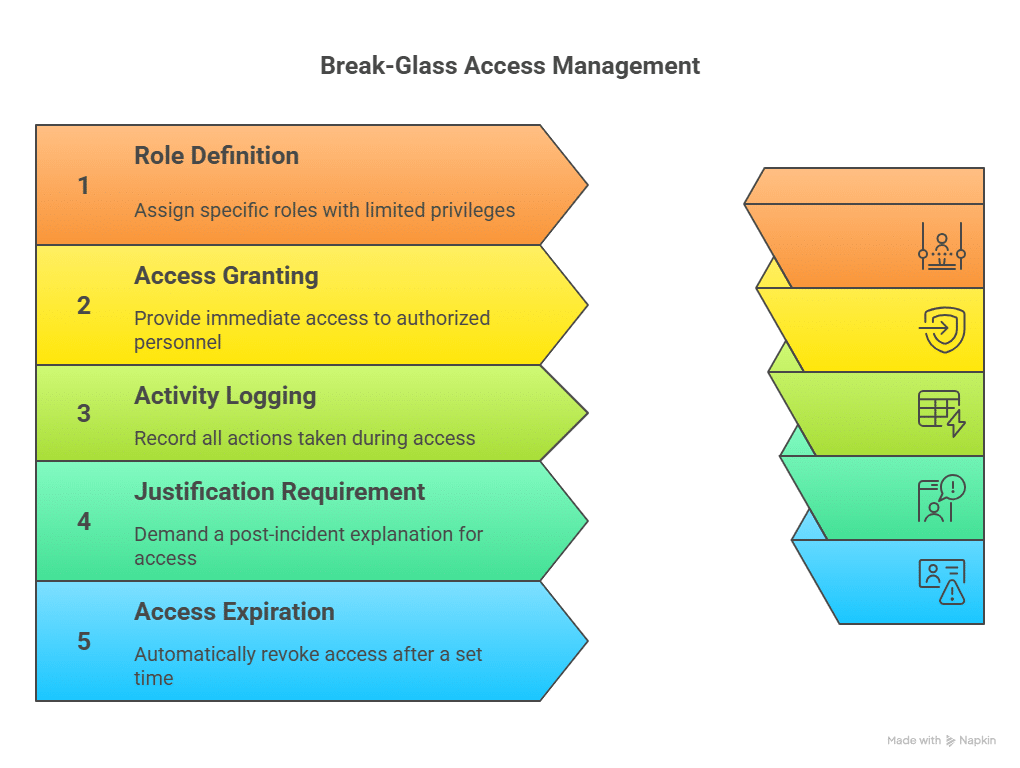
Outages and security incidents sometimes require immediate intervention. Break-glass mechanisms give engineers rapid access in those moments while keeping the activity logged and accountable.
Why it matters: High-pressure situations can lead teams to cut corners. Without structured emergency flows, organizations resort to insecure workarounds.
Auditors look for: Documented policies for break-glass use, detailed logs of each event, and retroactive approvals or justifications. They also expect access to be narrowly scoped and time-limited.
Best practice: Define emergency roles with limited privileges, require post-incident justification, and set automatic expiration. This best practice keeps response times fast while ensuring access remains auditable.
7. Compliance Alignment and Reporting
PAM controls must align with (and provide evidence for) established frameworks like SOC 2, HIPAA, GDPR, and ISO 27001.
Why it matters: Demonstrating compliance is often as critical as preventing breaches. Regulators, customers, and partners expect clear proof that privileged access is governed appropriately, supported by robust cloud security controls.
Auditors look for: Reports that link specific controls to compliance clauses, supported by evidence.
Best practice: Automate reporting so compliance data is produced continuously, rather than assembled only at audit time, which makes audit readiness part of daily operations.
8. Continuous Monitoring for Anomalous Behavior
PAM audits now look beyond static controls to how organizations detect anomalies, such as an API key suddenly accessing new regions or service accounts running commands outside their normal workflow.
Why it matters: Many attacks begin with stolen credentials that appear valid. Behavioral monitoring is often the only way to distinguish legitimate use from misuse, and it’s a core component of broader cyber resilience.
Auditors look for: Defined monitoring systems, clear escalation paths for alerts, and records showing how anomalies were investigated and resolved.
Best practice: Feed PAM activity data into SIEM platforms to flag suspicious patterns, and run tabletop exercises to validate detection and response. Apono’s cloud-native platform integrates privileged activity into security monitoring pipelines, giving teams faster visibility into high-risk behavior.
9. Vendor and Third-Party Access Controls
Vendors and contractors often need privileged access but don’t always receive the same level of oversight as internal staff. PAM audits examine how third-party accounts are provisioned, monitored, and retired.
Why it matters: Compromised vendor accounts can become the most straightforward path into critical systems.
Auditors look for: Defined onboarding and offboarding workflows, time-limited entitlements, and audit logs that cover external users as thoroughly as internal ones.
Best practice: Grant vendors just-in-time access with narrowly scoped privileges and automatic expiration. Incorporating offensive cybersecurity techniques into your testing program ensures these third-party controls are validated continuously, not just at audit time.
Table 1: Summary of PAM Audit Components
Component
Why it Matters
Auditors Look For
Best Practice
Comprehensive Inventory of Privileged Accounts
Forgotten or orphaned accounts are common attack targets.
Dynamic inventory continuously updated, not static spreadsheets.
Automate discovery & classification; assign lifecycle owners; use cloud-native discovery.
Verification of Least Privilege Enforcement
Standing privileges remain risky even when accounts are idle.
Proof that access is temporary, scoped, and revoked automatically.
Replace static admin groups with time-limited roles; monitor exceptions; use JEP for machine identities.
Access Request and Approval Workflows
Ad hoc approvals create gaps in accountability.
Clear request trails showing requester, approver, and reason.
Integrate workflows into Slack, Teams, or CLI with auditable trails.
Session Monitoring and Logging
Without detailed logs, forensic evidence and accountability are lost.
Tamper-resistant logs tied to identities and centralized for review.
Route logs into SIEM/SOAR; perform spot checks for accuracy.
Automated Access Expiration and Revocation
Dormant accounts are a common attack vector.
Expiration policies for human and machine identities with automatic revocation.
Use automated, time-bound policies; schedule periodic reviews.
Break-Glass and On-Call Access Mechanisms
Emergency access can bypass security without proper controls.
Documented policies, detailed logs, and retroactive justifications.
Define emergency roles with scoped privileges; require justification; enforce auto-expiration.
Compliance Alignment and Reporting
Clear proof of privileged access governance is required for regulators, customers, and partners.
Reports mapping controls to compliance clauses with supporting evidence.
Automate continuous compliance reporting to stay audit-ready.
Continuous Monitoring for Anomalous Behavior
Behavioral monitoring is often the only way to detect credential misuse.
Defined monitoring systems, escalation paths, and investigation records.
Integrate PAM data into SIEM; run tabletop exercises; use anomaly detection.
Vendor and Third-Party Access Controls
Compromised vendor accounts are a major entry point for attackers.
Onboarding/offboarding workflows, time-limited entitlements, and full audit logs.
Grant JIT access with scoped privileges; enforce MFA; log all vendor activity.
Closing the Gaps with Just-in-Time Access
Privileged access has always been highly risky, and the rise in credential theft shows that traditional controls are not enough. A PAM audit helps uncover weak points before they’re exploited, but audits alone don’t close the gaps.
Apono steps in to automate JIT access, eliminating standing permissions that attackers often abuse. Auto-expiring privileges ensure access is revoked as soon as it’s no longer needed. Plus, engineers can request access in Slack, Teams, or CLI with every step logged. In emergencies, Apono’s break-glass and on-call flows give immediate access but still record detailed logs of who accessed what and when. Book an Apono demo and explore how automated PAM audits save time and reduce risk.
Dynamic Roles, Real Security: Why On‑Demand Permissions Beat Pre‑Defined Policies
How context‑aware, short‑lived roles eliminate privilege sprawl and accelerate secure engineering without overburdening admins
Access management for remote resources has come a long way from VPNs and bastion hosts. The rise of cloud platforms, microservices and remote workforces has driven a shift toward Cloud-native security controls that integrate directly with AWS, Azure, GCP and Kubernetes. By talking directly to a cloud provider’s API, you avoid detours through proxy gateways, reducing latency and complexity.
Yet among Cloud-native platforms, there’s a stark difference in how they handle permissions. Some require security teams to pre‑create roles and permission sets, attaching them to identities or groups. Others assemble roles on the fly, taking into account who’s asking, what resource they need, why they need it and how sensitive it is. It’s a subtle but important distinction—one that determines whether your organization stays agile and secure or gets bogged down by privilege sprawl and bottlenecks when it comes to provisioning access.
When Pre‑created Roles Fall Short
Defining roles ahead of time seems sensible: you map out what engineers in a given team should be able to do and codify those permissions in your identity provider. Many platforms—even some cloud‑native ones—are built on this model. Administrators must build bundles of permissions in advance and decide who can use them.
In today’s dynamic environments, these pre‑created roles don’t age well. Consider the following pain points:
Privilege sprawl – To avoid constantly revisiting roles, teams often include more permissions than are strictly necessary. A role meant for reading logs might also permit deleting them. Over time, these broad privileges accumulate across dozens of roles, increasing the blast radius of any potential breach.
Under‑privilege and delays – When roles are kept too restrictive, engineers hit “permission denied” errors. They can’t deploy to a new serverless function or query a production database. Fixing the issue means filing a ticket, waiting for an admin to modify a role, and hoping it doesn’t take days. During incidents, those delays can be costly.
Admin overhead – Maintaining hundreds of roles is hard. Every new service, microservice or cloud account demands an update. When people change jobs or projects, someone has to grant and revoke the right roles. As environments scale, so does the administrative burden.
Poor fit for multi‑cloud and SaaS – Roles often live in one identity provider, while modern apps span clouds and SaaS. Mapping every permission into static roles is impractical—and they rarely offer clear insight into who actually has access to what.
Context is King: Building Roles on Demand
The alternative is to create permissions dynamically, directly on the resource at the moment of need. Rather than assigning users to broad roles, an API‑driven platform evaluates business context and environmental context to compose a least‑privilege role:
Who is requesting access? Engineer on call, contractor, service account?
What are they trying to do? Deploy code, view logs, run a database migration?
Which resource and environment? Staging cluster, production database, regulated customer environment?
What signals from ITSM and on‑call systems apply? Open ticket, incident notification, change request?
By combining these signals with live resource inventories and risk scores, the platform generates a granular IAM role or database policy. It grants only the permissions needed—no more, no less—and sets a short time‑to‑live. When the window expires or the user revokes it manually, the role disappears. This eliminates standing privileges, reducing the blast radius and shrinking the attack surface.
Unlike pre‑built roles, on‑demand roles adapt to changes automatically. Add a new AWS service or deploy a new Kubernetes namespace, and the platform knows how to grant access without manual intervention. There’s no catalogue of roles to keep up to date.
Reducing Operational Drag
From an admin and security perspective, the advantages of on‑the‑fly roles extend beyond basic convenience:
Smaller attack surface and blast radius – Because roles are scoped to a specific resource and task, each user’s exposure is minimized. Attackers can’t leverage dormant credentials or inherited permissions; they must contend with tightly scoped access that disappears quickly.
Streamlined governance – Contextual information from ticketing systems, change management processes and on‑call schedules flows into the decision engine. Policies can enforce that production access requires an open ticket or that only on‑call engineers can obtain write permissions. This aligns access control with existing governance workflows without introducing friction.
Reduced role maintenance – Administrators move from hand‑crafting roles to defining high‑level policies. They focus on what constitutes low, medium or high risk; which approvals are needed; and which external signals matter. The platform handles the mechanics of creating and expiring roles across clouds.
Managing Privilege Sprawl and Permission Delays
Static role environments suffer from two chronic issues: sprawl and permission delays.
Sprawl happens when pre‑created roles include unnecessary permissions that remain unused. A developer switches teams but retains the same broad access. A contractor’s role is never trimmed after the engagement ends. As unused privileges accumulate, the overall risk increases. Removing these permissions manually is error‑prone, and automated cleanup tools struggle to distinguish between needed and excess privileges.
Permission delays are the opposite problem: roles lack the right permissions, forcing engineers to request additional access. Each time an engineer hits a “permission denied” error, someone has to investigate and adjust a role. During an outage, waiting hours for the right permission can prolong downtime and damage customer trust.
By generating roles dynamically, you avoid both extremes. Permissions are granted only when justified and revoked when no longer needed. Engineers get exactly what they need, and nothing sticks around to clutter your environment or widen the attack surface.
Lightening the Admin Load
Role management is often viewed as administrative toil—necessary but not strategic. On‑demand role platforms transform it into a policy exercise. Security teams define guardrails:
Which operations require manual or self-serve approval versus automatic issuance?
What duration should elevated access last?
What external signals (incidents, change requests) gate access?
The platform then executes those rules at scale, interacting with IAM APIs, databases and Kubernetes RBAC to create and remove roles. Administrators no longer spend hours translating business requests into JSON policy documents; instead, they review policy changes and investigate exceptions.
Balancing Flexibility with Control
There’s no one‑size‑fits‑all solution. Organizations with static, on‑prem infrastructure might find that pre‑defined roles remain manageable. If your applications rarely change and your user base is small, a handful of roles may suffice. However, most security leaders are grappling with rapid cloud adoption, microservices and globally distributed teams. In these environments, static role catalogues cannot keep up without sacrificing security or productivity.
On‑demand roles strike a balance: they provide the flexibility engineers need to do their jobs while enforcing the controls security leaders require. By incorporating business context, identity information, risk signals and external workflows, they deliver least‑privilege access that adapts in real time and vanishes when no longer relevant.
API‑Based JIT Access vs Proxies: Streamlining Secure Cloud Permissions
Breaking down the trade-offs between API integration and proxy gateways for modern access management
The way organizations manage access has fundamentally shifted. In the past, infrastructure was mostly static—centralized data centers, long-lived servers, and predictable traffic patterns. You could rely on VPNs, firewalls, and a fixed set of roles in your identity provider. Access paths were clear, and change was infrequent.
But that’s no longer the case.
Today’s modern cloud environments are built for speed, scale, and change. Engineering teams push code constantly. Resources are ephemeral—spun up and torn down in minutes. Your infrastructure might span AWS, Azure, and GCP, including Kubernetes clusters, serverless functions, SaaS apps, and dynamic databases. And your workforce is distributed, collaborating across time zones and tools.
That complexity breaks traditional access models.
Static roles can’t keep up. The roles you define today may not fit the needs of tomorrow’s environment.
Network boundaries are disappearing. There’s no perimeter to defend when your resources live across clouds and regions.
Manual processes are too slow. Waiting on admins to update permissions or rotate credentials adds friction—and risk.
Visibility and control are fragmented. Especially when relying on proxies or legacy tools that don’t integrate well with modern workflows.
To address these challenges, two primary models have emerged for managing Just-in-Time (JIT) access:
Proxy-based architectures route user access through intermediary infrastructure.
API-based approaches connect directly with cloud provider APIs to manage access.
Below we explore where each approach has its strengths and where they may fit in for managing your environments.
1. Deployment and operational simplicity
Proxy‑based solutions grew out of on‑prem networks. They require you to install and manage proxy servers and/or client-side agents that sit between users and resources. That architecture introduces extra moving parts and forces you to re‑route traffic through dedicated gateways.
API‑driven platforms take a different tack. They integrate directly with your cloud and infrastructure providers. There are no network changes, no additional servers to maintain, no VPN or bastion host to babysit, and no additional client side component to install. Deployment happens through familiar automation tools—Terraform modules, CloudFormation templates, Helm charts—so you can add JIT controls without redesigning your network.
Key takeaways:
No infrastructure detours. API‑based solutions don’t require traffic to flow through proxies, so your existing architecture stays intact.
Lower maintenance overhead. Without gateways or agents to update, your ops team has less to patch and monitor.
Rapid roll‑out. If you’re already using infrastructure‑as‑code, you can embed access controls directly into your deployment pipelines.
No workflow disruptions. API-based solutions grant access without changing how users interact with cloud resources.
2. Dynamic, least‑privilege control
One of the biggest drawbacks of proxy‑based systems is their reliance on pre‑defined roles and session logs. Access is granted at a network or account level; if you need something more granular, an administrator has to create and maintain new roles.
Monitoring is very problematic because of the disconnect many times to the proxyed account they are using. Session logs that IR teams leverage see a single or obfuscated account and not the real person that was on the other side of the proxy.
API‑based platforms turn that model on its head. The more mature platforms do not depend on the precreated, static roles but instead evaluate business context and risk (think: the resource you’re touching, your current on‑call schedule, the justification in your ticket) and generate granular roles on the fly.
Those roles exist only as long as necessary—minutes or hours instead of days or weeks—so there’s no standing privilege to attack. Because the access decision happens at the resource level, you can grant “read‑only” on a specific S3 bucket or database schema instead of giving blanket access to an entire cloud account.
What that means for you:
Adaptive permissions. Policies can look at live data and decide how much access to grant.
No role bloat. You don’t have to create and maintain dozens of static roles in advance.
Proactive security. By eliminating standing credentials, you reduce the risk window for attackers.
Support for ephemeral resources. Access adapts in real time—even for short-lived infrastructure like containers or CI jobs.
3. Cloud‑native coverage and seamless integration
Proxies excel at securing SSH sessions into servers. But today’s infrastructure is more than SSH: it’s Kubernetes clusters, managed databases, serverless platforms and SaaS applications. Proxy tools often struggle outside of network‑level access because they weren’t built for it.
API‑based platforms are designed for this complexity. They connect via the native APIs of AWS, Azure, GCP and Kubernetes, understand cloud identities and roles, and speak the language of your CI/CD pipeline. They also integrate with collaboration tools like Slack and Teams so engineers can request and approve access without leaving their chat client.
For teams working across multiple clouds or adopting cloud‑native services, the differences are tangible:
Breadth of integrations. API solutions handle IaaS, PaaS and SaaS resources, not just SSH and RDP.
Developer‑friendly workflows. Access requests can be tied to Jira tickets, PagerDuty schedules or Slack messages.
Modern secrets management. API‑driven platforms can leverage cloud key stores or vaults, delivering seamless access rather than forcing engineers to juggle static credentials.
When a proxy makes sense
A proxy‑based system still has its place. If your environment is largely on‑prem, composed of long‑lived servers and network boundaries that rarely change, a proxy can provide a straightforward way to centralize control. It can be easier to bolt onto a static network where traffic patterns are predictable.
That said, you’ll need to accept the operational overhead—deploying and maintaining proxy nodes and clients, managing agent versions and steering traffic through those gateways. In environments where agility matters or where cloud adoption is accelerating, that trade‑off often becomes a liability.
Choosing the Right Fit for Modern Access Control
If your organization runs in the cloud, API-based JIT platforms offer the fastest path to enforcing least-privilege access—without the complexity of proxies or the rigidity of static roles.
Apono takes this further.
As a cloud-native platform, Apono delivers ephemeral, context-aware access directly on the resource. It evaluates real-time identity, risk, and business signals to automate just-in-time, just-enough permissions—eliminating manual role maintenance and reducing overexposure.
Proxy-based tools may work for static, on-prem environments—but they often fall short in modern, dynamic infrastructure.
Let us show you how Apono fits your cloud-native environment and book your personalized demo today.
TruffleNet Weaponizes Stolen Credentials to Target AWS
New details are emerging about a wave of intrusions into Amazon Web Services environments. Attackers are reportedly weaponizing AWS IAM, using it to validate stolen credentials and turn identity controls into a springboard for in-cloud abuse.
According to new research from Fortinent, attackers are leveraging the open source TruffleHog tool to automate testing of stolen AWS credentials in what they are calling the TruffleNet infrastructure.
In their report, researchers say that the hackers are abusing AWS IAM to actually test the validity of their stolen credentials using a GetCallerIdentity call.
Once inside their targets’ environments, attackers are exploiting the compromised infrastructure to carry out Business Email Compromise (BEC) attacks via AWS’s Simple Email Service (SES).
Additionally, Fortinent’s researchers observed that the attackers were using the AWS CLI to query the GetSendQuota API for SES. They believe these queries to be a part of the abuse of SES for use in their downstream attacks like the BEC attacks that have been cited in the researchers’ report.
Read Fortinent’s blog post for more info on how the attackers are leveraging open source tools and AWS infrastructure, as well as the tricks used for their BEC campaign.
How Compromised Identities Pave the Way for Higher-value Attacks
At this stage, the BEC attacks appear to be the “smash and grab” part of the plan.
But researchers note that the hackers are also leveraging their infiltration capabilities to carry out reconnaissance inside the compromised infrastructure.
This snooping around can be the crucial first step in future stages of their operations where attackers can go after sensitive resources like regulated data (think PII & PHI) as well as production environments that can harm the business.
There are a number of valuable take aways from this story that reinforce what we know surrounding the risks of compromised credentials:
We see the continued risk of stolen or otherwise compromised credentials. We know that credential compromise is a question of when and not if.
Attackers are becoming increasingly adept at leveraging not only the infrastructure of our cloud environments for their criminal activities. They are abusing the tools that we use for managing access privileges within our cloud infrastructure as part of their operations.
Hackers can leverage any standing access that a compromised identity may have to illicitly access resources like we see with the abuse of AWS SES.
The level of privileges attached to an identity matters. Researchers cite that while attempts to create new users failed, they apparently succeeded in compromising a user who had sufficient privileges to cause havoc with SES. Had they compromised an IAM user with the right privileges, then they could have made numerous identities.
How Apono Helps Secure Your AWS
Remove Standing Access
By eliminating standing access the attacker cannot use any attached privileges to access resources, even if an identity is compromised. By moving to a Just-in-Time (JIT) access model, all access is made available to identities, human or not, temporarily and instantaneously. This ensures that access privileges are not abused and improves developer velocity.
Minimize the Blast Radius
Continuously reduce privileges to support least-privilege ops via a Just-Enough (JEA) approach. Apono’s Access Discovery capabilities uncover overprivileged identities and provide data-driven recommendations on how to reduce privileges without impacting productivity, all based on real usage.
Simplify Remediations
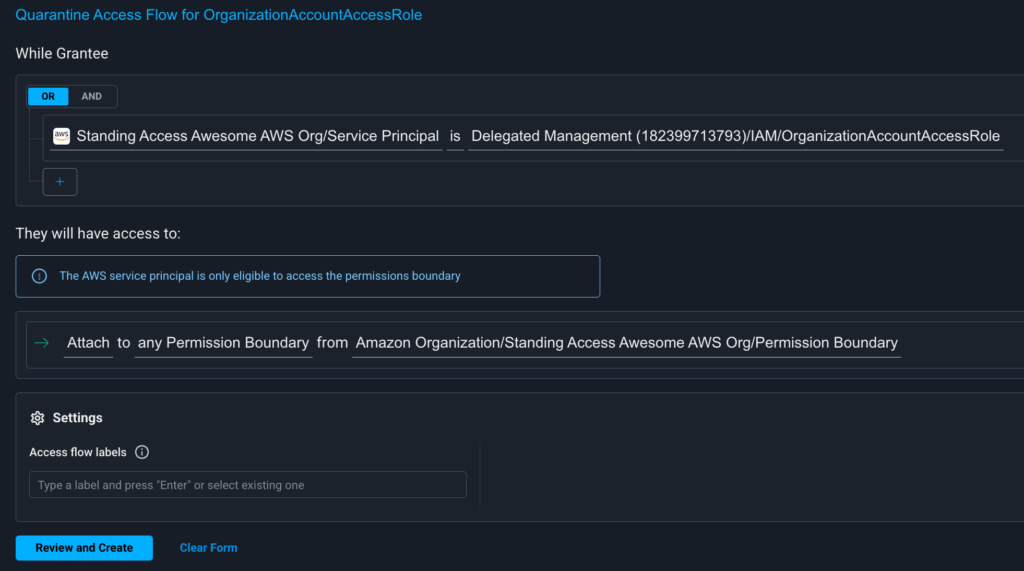
Apono’s approach to reducing privileges steps away from the binary of choosing to either leave risky privileges in place or revoking privileges that can break processes. Risky privileges can be quarantined via Access Flow deny policies, enabling security teams to quickly remove the risk and quickly reverting access if needed.
Apono enables organizations to adopt a Zero Standing Privileges (ZSP) approach in support of their Zero Trust initiatives.
Ready to Take a Smarter Approach to Cloud Access?
See how Apono can help your organization prevent credential-based attacks while keeping teams fast and productive. Visit apono.io/jit-and-jep/ to learn more about our platform or request a demo.
8 Best Cloud PAM Solutions in an AI World
AI is rewriting the rules of privileged access, but the rise of AI agents is creating a governance crisis. Threats like credential stuffing and privilege escalation are now accelerated by autonomous systems moving faster than humans can react.
82% of companies deploy autonomous AI agents, but 23% of IT teams admit those bots have already been tricked into revealing credentials—and fewer than half have guardrails in place. In modern infrastructure, machine identities now outnumber humans 80:1. These non-human identities (NHIs) power everything from APIs to AI pipelines, and each one needs access.
The problem? Legacy PAM tools, which remain vault-centric, weren’t built for this scale. Cloud PAM solutions step in with just-in-time, least-privilege access to shrink your attack surface and keep both humans and machines in check.
What are cloud PAM solutions?
Privileged Access Management (PAM) controls and monitors the use of accounts with elevated permissions. It is closely related to enterprise identity management, and traditional PAM meant vaults, long-lived credentials, heavy-handed approvals, and developer friction.
Cloud PAM solutions are the modern evolution of PAM, purpose-built for cloud-native and API-driven environments. Instead of relying on static roles and clunky approvals, cloud PAM delivers on-demand, time-bound access through automation and integrations. These solutions use Just-In-Time (JIT) access to issue ephemeral credentials that expire automatically, ensuring no leftover privileges are waiting to be exploited.
Cloud PAM is designed to secure not just human admins but also the massive number of non-human identities (service accounts, API keys, and ML pipelines) that dominate today’s AI-driven workloads.
Table 1: Legacy vs Cloud PAM
Feature
Legacy PAM
Cloud PAM
Architecture
Built for on-premises, data center environments
Cloud-native, API-first, designed for distributed systems
Access Model
Static roles and long-lived credentials stored in vaults
Just-In-Time (JIT) access with ephemeral, auto-expiring permissions
Deployment
Heavy agents, complex setup
Lightweight integrations, deploys quickly in cloud stacks
Scope of Protection
Focus on human administrators
Secures both human and non-human identities (service accounts, API keys, ML pipelines)
Scalability
Limited flexibility, difficult to scale across multi-cloud
Dynamic, scalable for cloud-native and AI workloads
Why Cloud PAM Solutions are Essential in an AI-Driven World
AI workloads bring massive growth in both human and non-human identities, and here are four reasons why cloud PAM solutions are superior for modern problems:
Scale with automation: Automates provisioning and revocation for thousands of service accounts, agents, and pipelines.
Simplify compliance: Automated logs and reports reduce the time and cost of preparing evidence for frameworks like HIPAA and SOC 2.
Extend zero trust: Applies strict verification and time-bound access to both human and non-human identities.
Reduce attack surface: Automated remediation and vulnerability management help eliminate standing privileges, shrinking the impact of stolen or misused credentials.
🔍 Evaluate Your Next Cloud PAM Move Not all PAM tools were built for AI-driven environments. Download the Access Platform Buyer’s Guide to see how leading security teams evaluate Cloud PAM capabilities — from Zero Standing Privilege to Non-Human Identity control.
Key Features to Look For in a Modern Cloud PAM Solution
Not all PAM platforms are built for cloud-native, AI-driven environments. When evaluating modern cloud PAM tools, these features should be at the top of your list:
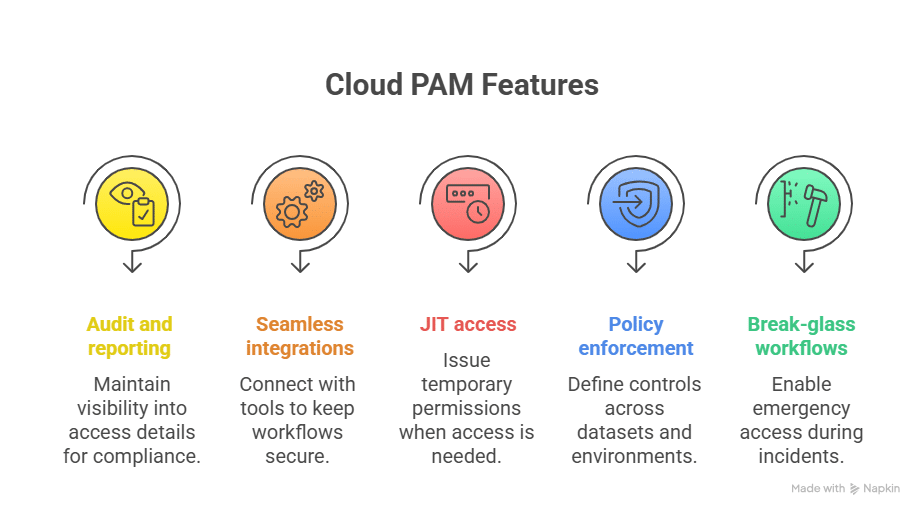
Comprehensive audit & reporting: Maintain full visibility into who accessed what, when, and why, which is critical for meeting compliance standards.
Seamless integrations: Connect easily with Slack, Teams, CI/CD pipelines, cloud providers, and AI dev tools to keep workflows fast and secure.
JIT access: Issue temporary, auto-expiring permissions so humans and non-human identities get access only when needed.
Granular policy enforcement: Define fine-grained controls across AI datasets, ML training clusters, APIs, and multi-cloud environments.
Break-glass and on-call workflows: Enable pre-approved emergency access during incidents without sacrificing control or visibility.
How to Choose the Best Cloud PAM Solutions for AI Workloads
With so many cloud PAM tools on the market, choosing the right one for AI-heavy environments means focusing on more than just credential storage. Here’s what to look for:
AI/ML integration support: Ensure the platform integrates smoothly with Kubernetes clusters, GPU workloads, data lakes, and other components of your ML pipeline.
Automation-first design: Prioritize solutions that provide JIT access, auto-revocation of permissions, and policy-driven workflows at scale.
Regulatory readiness: Check that the solution simplifies compliance with HIPAA, GDPR, SOC 2, and other standards relevant to AI workloads.
Developer-friendly experience: Look for ChatOps and CLI access so engineers can request and receive permissions instantly without waiting on ticket queues.
8 Best Cloud PAM Solutions for the AI World
Let’s break down the best privileged access management software options for cloud-native and AI-driven workloads.
The Systancia Cleanroom solution enables session isolation and real-time monitoring to protect critical systems from credential theft and insider threats. Unlike traditional vault-centric PAM, Systancia delivers a cloud-native approach that prioritizes user experience and regulatory compliance.
Main Features:
Apply enhanced authentication and continuous identity checks (e.g., “Cleanroom Authograph”).
Supports multiple deployment modes: on-premises, hybrid, or cloud.
Adapts traceability, control, and protection levels depending on the criticality of the intervention (e.g., standard / advanced / full levels).
Best for: Regulated industries needing strong session isolation.
Price: By inquiry.
Review: “It’s easy to understand and use. [I like the features, such as] password rotation, recording sessions, white room administration, MFA, [and more].”
Apono is a cloud-native access management platform purpose-built for the scale and speed of modern, AI-driven environments. Unlike vault-based PAM, Apono delivers an API-first model that automates JIT and least privilege access for both human and non-human identities. By issuing ephemeral, auto-expiring permissions, Apono ensures users and services get precisely the access they need—only when they need it.
Main Features:
On-demand, self-serve access from Slack, Teams, or CLI.
Automatic provisioning and revocation for humans and service accounts to strengthen your machine identity management posture.
Audit logs that show exactly who accessed what, when, and why.
Cloud connectors that deploy in under 15 minutes.
Break-glass and on-call flows for fast, controlled incident response.
Scoped, time-limited vendor access to prevent external overreach.
Best for: Cloud-native organizations running AI/ML pipelines that need to secure both human and non-human identities with fast, just-in-time access.
Price: By inquiry.
Review: “As a SecOps Manager implementing the Apono platform, I experienced significant improvements in our organization’s security posture, operational efficiency, and compliance capabilities.”
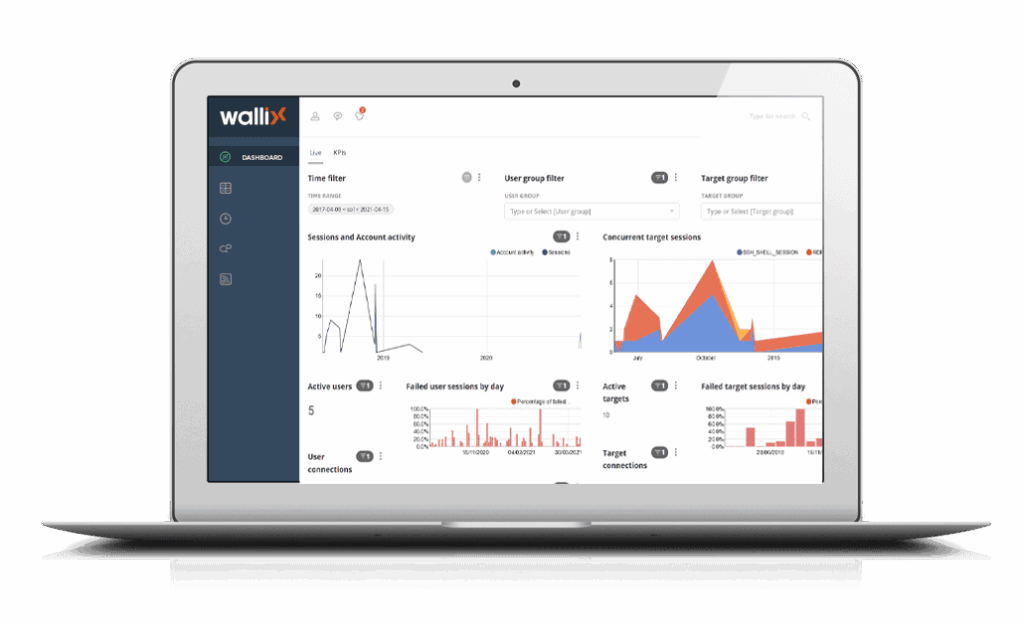
Wallix Bastion’s PAM platform focuses on delivering secure, auditable control over administrative accounts in hybrid and multi-cloud environments. Gartner recognizes it for helping enterprises enforce the least privilege and monitor privileged activity.
Main Features:
Available on-premises, in the cloud, or as a managed service.
Provides temporary, context-based access to privileged accounts.
Securely stores, rotates, and manages privileged account credentials with password vaulting.
Best for: Enterprises requiring centralized credential management.
Price: By inquiry.
Review: “WALLIX PAM provides strong security for privileged access management with an intuitive interface, real-time monitoring, and robust audit logs.”
StrongDM is a modern infrastructure access platform that approaches PAM differently. Instead of traditional password vaults, it focuses on secure, dynamic connectivity. It gives developers, DevOps, and security teams centralized control over access to databases, servers, Kubernetes clusters, and cloud environments.
Main Features:
Captures detailed logs of every session, command, and query for compliance and troubleshooting.
Integrates into existing workflows, with support for CLI and SDKs.
Eliminate the need for long-lived secrets by brokering connections directly.
Best for: DevOps teams wanting frictionless, VPN-free access to databases, servers, and Kubernetes.
Price: By inquiry.
Review: “The integration capabilities are top-notch, allowing us to embed StrongDM into complex environments with minimal friction.”
Teleport is an open-source platform that unifies secure access to servers, databases, Kubernetes clusters, and internal applications under a single, identity-based solution. Teleport uses certificates and short-lived credentials to provide strong, auditable privileged access.
Main Features:
Records all SSH, Kubernetes, and database sessions with full visibility for compliance.
Integrates with SSO/IdPs (Okta, Azure AD, etc.) to enforce fine-grained least privilege.
Built-in identity-aware proxy ensures every request is authenticated and authorized without relying on a VPN.
Best for: Engineering teams favoring open-source, zero trust access with short-lived certificates.
Price: Open-source version is free; enterprise pricing available by inquiry.
Review: “The session recording and audit logging features are incredibly useful for compliance and troubleshooting.”
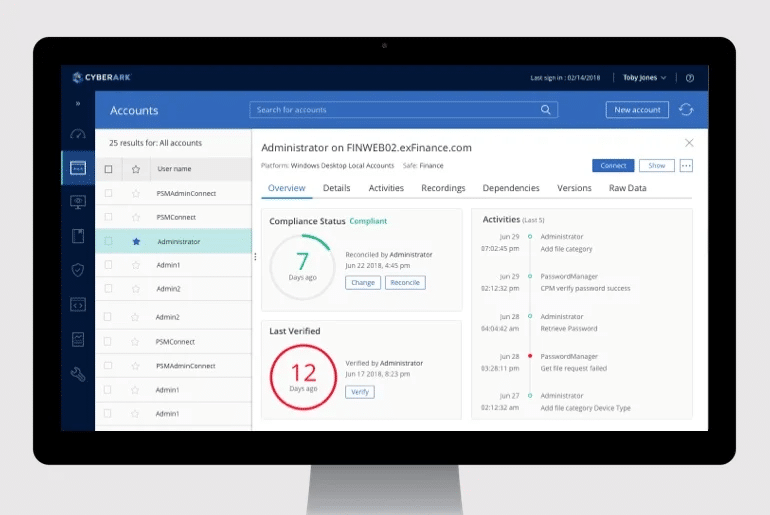
CyberArk’s PAM solution combines credential vaulting, session monitoring, and threat detection to deliver enterprise-grade control over privileged accounts in hybrid and cloud environments.
Main Features:
Leverages AI-driven monitoring to detect anomalies in privileged account usage.
Integrates with identity providers, cloud services (AWS, Azure, GCP), and DevOps pipelines.
Eliminates standing privileges by provisioning temporary, role-based access to critical assets.
Best for: Large enterprises and highly regulated sectors needing enterprise-grade PAM with vaulting and anomaly detection.
Price: By inquiry.
Review: “CyberArk Privileged Access Management (PAM) is an excellent tool for any organization looking to protect privileged access to critical systems and sensitive data.”
Netwrix Privilege Secure is part of Netwrix’s suite, which delivers end-to-end privileged access control with task automation and compliance built in. It’s designed to eliminate standing privileges and make administrative access safer and easier to manage across hybrid environments.
Main Features:
Automates high-risk tasks (patching, password resets, etc.) with workflows and ephemeral access.
Provides time-limited, MFA-protected access for remote or third-party users.
Full session recordings, keystroke/log capture, and approval and activity logs.
Best for: Organizations battling privilege sprawl who need continuous discovery.
Price: By inquiry.
Review: “[I like the] do-it-yourself proof of concept, open and straightforward commercial track, variety of architectural designs, and seamless rollout.”
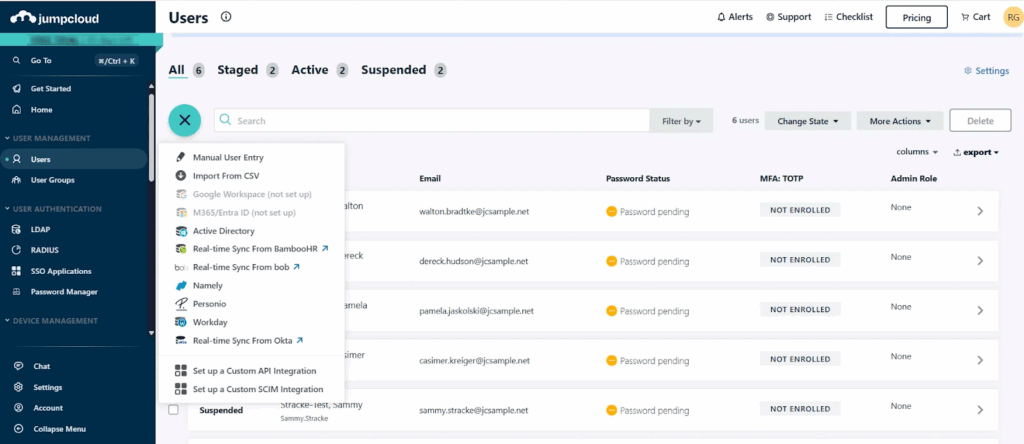
While it’s broader than traditional PAM, JumpCloud is an open directory platform with privileged access capabilities designed to help organizations manage admin rights, enforce least privilege, and secure hybrid IT environments.
Main Features:
Controls and secures privileged access on Windows, macOS, and Linux devices.
Extends secure, frictionless access to apps and infrastructure with built-in MFA and SSO across thousands of SaaS apps.
Assigns granular admin rights and enforces just-in-time elevation of privileges.
Best for: IT teams consolidating identity, device, and privileged access management into a single, all-in-one cloud directory platform (although PAM is not its core strength).
Price: Free plan available; paid plans start per user/month, with enterprise pricing by inquiry.
Review: “As a developer, I really appreciate the smooth integrations with different tools and the straightforward APIs—it saves a lot of time when setting up authentication and access controls.”
Table 2: Best Cloud PAM Solutions in a Snapshot
Solution
Main Features
Best For
Price
Systancia
Enhanced authentication, multiple deployment modes, adaptive control levels
Cross-platform device control, SSO & MFA, granular admin rights with JIT elevation
IT teams consolidating identity, device, and privileged access
Free plan; paid per user/month
Securing Privileged Access in the AI Era
In an AI-first enterprise, privileged access is both the biggest enabler and the greatest risk. Cloud PAM solutions help organizations scale securely, replacing static controls with just-in-time, least-privilege access.
Apono is built for this world: API-driven, cloud-native, and designed to protect non-human identities. With ephemeral, auditable permissions, your teams move fast and your auditors stay happy. See Apono in action to explore how it secures AI workloads without slowing developers.
Identity and Access Governance (IGA): Definition & Differentiation Explained
Identity is now the most common entry point for attackers. In cloud-native environments, thousands of microservices, containers, and agents request credentials every day, and each one represents a potential weakness. The imbalance between human and non-human identities (NHIs) is growing, but many organizations still devote the bulk of their identity and access governance (IGA) efforts to the former.
Over the past two years, 57% of organizations experienced at least one API-related breach; of those, 73% saw three or more incidents. At the same time, the global IAG market was valued at approximately $8 billion in 2024, driven by compliance frameworks such as SOC 2, GDPR, HIPAA, and CCPA that demand auditable proof of access controls.
The takeaway: static defenses built on logins and standing permissions can’t keep pace with identities that appear and disappear daily. For engineering teams, identity and access governance has shifted from a “nice-to-have” to a baseline requirement for both security and trust.
What is identity and access governance (IGA)?
Identity and access governance (IGA) is the framework your organization can use to decide who should have access to systems, applications, and data, and whether that access is still appropriate. IGA goes beyond the mechanics of logging and instead focuses on oversight, accountability, and policy enforcement.
Most IGA programs are built around a few core practices:
Identity lifecycle management: Provisioning, modifying, and deprovisioning accounts.
Role and entitlement management: Grouping permissions and enforcing least privilege.
Access reviews and certifications: Recurring checks to validate appropriateness of access.
Compliance reporting: Generating evidence required by auditors and regulators.
Unlike identity and access management (IAM), which enforces access at runtime, IGA asks the harder question: should this access exist at all? Answering this question is harder today because identities are multiplying. Machine identities outnumber humans by over 80 to 1, making them one of the fastest-growing risk classes in cloud-native environments. Unlike human accounts, NHIs rarely go through onboarding or offboarding, rely on static API keys or long-lived tokens, and are frequently overprivileged—the perfect storm for attackers.
Core capabilities of Identity and Access Governance
IGA is about ensuring access is both appropriate, accountable, and, most importantly, auditable. To achieve these three pillars, IGA platforms bring together several capabilities.
Access reviews and certification: Periodic checks give managers and system owners the chance to confirm that permissions are still valid. They’re meant to clean up access left behind after job changes, project work, or employee turnover.
Role and entitlement management: Permissions are grouped into roles to make administration manageable. This model keeps access consistent across teams and reduces the scatter of exceptions that creep in over time.
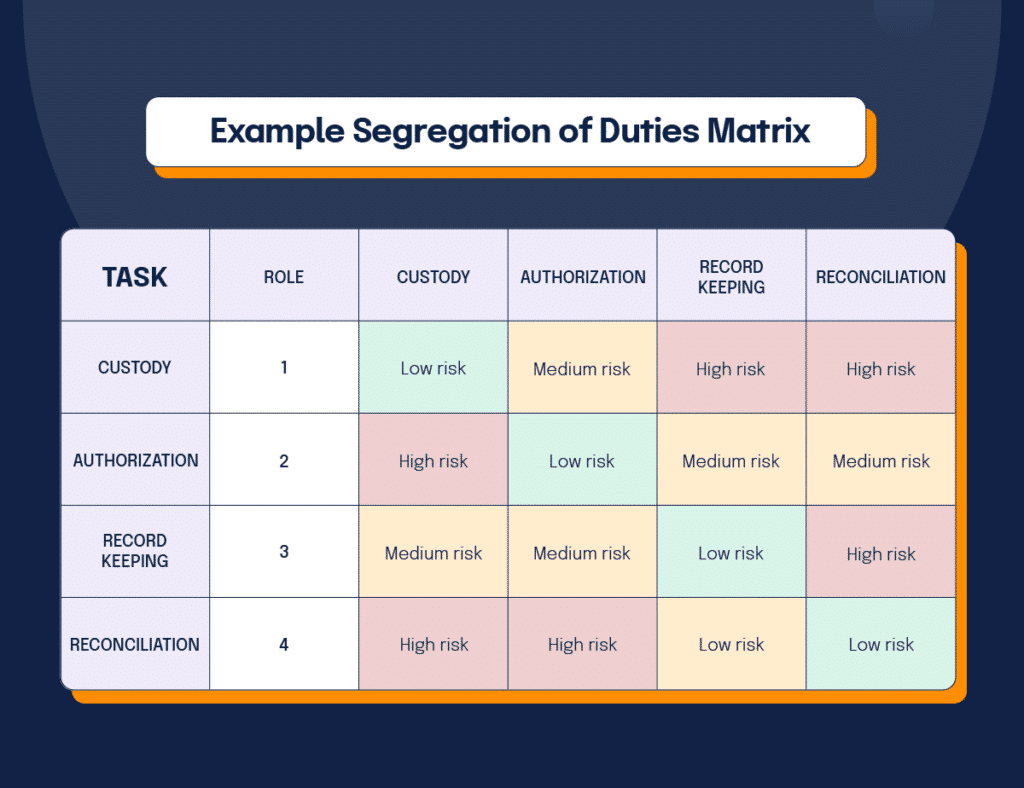
Separation of Duties (SoD): SoD prevents conflicting privileges so that no single identity has the ability to commit fraud or bypass checks.
Audit and compliance reporting: Most frameworks, from SOC 2 to GDPR, require proof that access is being governed. Automated reports provide that evidence and complement broader vulnerability management programs designed to reduce risk.
Delegated administration and approval workflows: Requests can be routed to business or technical owners who best understand whether access makes sense. This step spreads responsibility more evenly, while decisions remain logged centrally.
Crucially, modern IGA extends these capabilities beyond human users to include NHIs, ensuring service accounts and automation agents undergo the same scrutiny as employees.
Identity management has grown into a set of overlapping disciplines, each with its own focus. Many people still use the terms interchangeably, but this approach can blur the lines between strategic governance and privileged account protection.
It’s helpful to understand exactly where each begins and ends. IAM is concerned with authentication and access control at the point of login. IGA adds oversight, certification, and auditability across all identities. To monitor and control their activity, privileged access management (PAM) narrows in on the riskiest accounts, such as administrators and root users. For example, organizations rely on PAM software to enforce controls around these sensitive accounts, ensuring that high-risk permissions are granted only when necessary and closely monitored.
Table 1: IGA vs IAM vs PAM
Discipline
Focus
Typical Scope
Key Purpose
IAM
Enforcement
Authentication, MFA, SSO
Prove identity and control access at login
IGA
Governance
Human and non-human identities
Define, review, and certify who should have access and why
PAM
Privilege
High-risk administrator and root accounts
Control and monitor privileged sessions
5 Challenges of Implementing IGA in Cloud-Native Environments
1. Scaling Ephemeral Identities
In a cloud-native stack, thousands of containers, pods, and serverless functions may launch and terminate within minutes. Each instance often requires its own token or temporary credential to function. Legacy governance processes that rely on quarterly or monthly reviews cannot track this churn, so permissions are left unchecked. Security teams end up with audit trails that miss most of the short-lived identities, which makes proving compliance or investigating incidents almost impossible. A best practice to overcome this challenge is to use a cloud-native access management solution like Apono, which automates JIT access and generates granular audit logs, so even short-lived identities are governed in real time.
2. Complex Permissions
Cloud providers like AWS, Azure, and GCP offer permission systems with thousands of individual actions that can be combined into highly customized roles. Developers frequently over-provision roles because mapping business tasks to such granular entitlements is too time-consuming. Over time, these permission sprawl problems multiply, creating toxic combinations that static governance models don’t properly evaluate.
3. Friction with Development Teams
When engineers need access to a production database or a new cloud service, the request usually goes into a ticket queue. When reviews take too long, teams are forced to delay work or find workarounds such as borrowing credentials.
This bottleneck not only slows delivery but also weakens governance because security becomes seen as a blocker rather than a partner. In some organizations, administrators pre-approve broad entitlements “just in case.” This mistake undermines the entire principle of least privilege and increases the chance of compromised credentials being abused across environments.
Unmonitored NHIs are among the most consistent attack vectors in identity-driven breaches today. Service accounts and automation agents run critical workflows in CI/CD pipelines, monitoring systems, and infrastructure tools. These identities often carry long-lived credentials with powerful permissions. Unlike human users, they rarely leave the organization, so deprovisioning processes don’t catch them.
When one of these accounts is forgotten or left unmonitored, it becomes a permanent backdoor. Attackers frequently target exposed API keys or tokens for this reason, knowing they are less likely to be rotated or reviewed. As we’ve seen with emerging issues like the MCP protocol, unsecured machine-to-machine communications can further amplify the risks of unmanaged NHIs.
Recent examples include Microsoft’s 2023 SAS Token Leak, where researchers inadvertently published a token that exposed 38TB of internal data, and the BeyondTrust API Key Breach in 2024, where attackers exploited an overprivileged, static key to reset passwords and escalate privileges. Both incidents highlight how unmanaged non-human identities can open the door to large-scale compromise.
An essential NHI security best practice is to run a Cloud Access Assessment to uncover risks in your AWS environment, provided by Apono at no cost (for a limited time only). Apono’s platform is built to close this blind spot by enforcing JIT and JEP policies for NHIs just like human accounts, stopping long-lived keys from becoming backdoors.
5. Fragmented Visibility
Most enterprises work across multiple clouds, each with its own identity console and reporting format. Security teams trying to answer “who can access sensitive data” are forced to stitch together incomplete reports. The lack of a unified view leaves gaps for auditors and prevents real-time oversight—a challenge that becomes even more critical in industries like FinTech or government, which are subject to additional compliance requirements like CUI Basic.
How Modern IGA is Evolving
Identity governance is moving from periodic checks to continuous oversight. Instead of leaving broad permissions in place and revisiting them months later, newer approaches shift towards:
Just-in-Time access (JIT): Temporary access that expires automatically and reduces the window of risk while giving auditors a clearer picture of how access is actually being used. JIT access automation and contextual approval workflows are essential for scaling governance without undermining developer productivity.
Zero Trust: Assumes no identity should have standing access by default. Every request must be verified in context, regardless of whether it comes from a human developer or a bot in a CI/CD pipeline.
Just-Enough Privileges (JEP): JEP is particularly important for NHIs. JEP grants the minimum rights needed for a task for the shortest possible time. This shift addresses the chronic overprovisioning of machine identities, aligns with Zero Trust, and directly reduces the blast radius of a potential compromise.
Workflow integration: Approvals embedded into Slack, Teams, or CLI so governance fits into daily developer workflows.
By enforcing just-in-time access and contextual approvals, IGA reduces the standing permissions that often undermine API security in CI/CD pipelines and cloud workloads.
Bringing Automation to the Center of Governance with Apono
Cloud-native deployments and the explosion of non-human identities have pushed traditional identity governance past its limits. Static reviews and manual approvals leave too much standing access in environments where roles and permissions change constantly. To reduce risk, governance needs automation, time-bound access, and policies that apply equally to people and non-human accounts.
Apono redefines IGA for cloud-native teams. It eliminates risky standing permissions for both human and non-human identities, while ensuring compliance frameworks increasingly require full visibility into NHI governance. Apono’s platform automates JIT and JEP to eliminate standing permissions, generates granular audit logs for compliance, and applies governance equally to human and non-human identities. Approvals flow directly through Slack, Teams, or CLI—every action logged, every change auditable.
With built-in break-glass and on-call flows, and deployment in under 15 minutes, Apono delivers Zero Trust governance at the speed of modern infrastructure.
Inside the Crimson Collective Attack Chain—and How to Break It with Zero Standing Privileges
New details are emerging in recent weeks on how the Crimson Collective threat group has been conducting a large-scale campaign targeting Amazon Web Services cloud environments. Recent reports highlight how easily the attackers progressed once they obtained valid credentials.
The Crimson Collective claims to have exfiltrated ~570 GB across ~28,000 internal GitLab projects; Red Hat has confirmed access to a Consulting GitLab instance but hasn’t verified the full scope of those claims.
After the breach became public, Bleeping Computer reports that the threat actors partnered with headline-grabbing extortion group, Scattered Lapsus$ Hunters, to increase pressure on Red Hat.
In this post, we’ll break down how the hackers carried out their attack and how to keep your organization protected via a Zero Standing Privileges approach.
Breaking Down the Attackers’ Methodology
According to the report from Rapid 7 in Bleeping Computer, the attackers took a tried but true course of action to compromise their targets and make off with their illicitly obtained data.
Find exposed keys — They used TruffleHog to scan target environments and discover secrets in repos, configs, or other leaks to gain initial access.
Establish persistence — Then they used the leaked keys to call AWS APIs and create highly privileged IAM users/login profiles and new access keys.
Privilege escalation — With their foot firmly in the door, they attached AdministratorAccess to their new users. Boom: full control.
Recon — Privileges in hand, they then hit the cloud running, enumerating users, EC2, S3 buckets, RDS clusters, EBS volumes, regions, and apps to map the prize.
Data collection — Next they started hoovering up data, changing RDS master passwords, taking snapshots of their targets’ DBs and EBS volumes.
Exfiltration — With the targets’ data collected, they moved the snapshots/objects to S3 buckets that they controlled or accessible storage; using EC2s that they spun up and attaching volumes under permissive security groups for faster transfers.
Extortion — Finally, they sent ransom notes from inside the AWS account using SES and to external contacts.
The Cloud Identity Challenge
This latest attack highlights a tough if not cliche truth in the cloud: attackers don’t need to break in if they can just log in. Once credentials with standing privileges are compromised, it gives them everything they need to move freely across environments.
The reality is that credential compromise is now a matter of when, not if. And as the number of Non-Human Identities (NHIs)—like service accounts, IAM roles, and API keys—continues to explode, the challenge keeps growing. In many organizations, NHIs now outnumber human users by roughly 200 to 1.
Things are getting even more complicated with the rise of Agentic AI tools. These systems operate at massive scale with unpredictable access needs, often without the visibility security teams rely on to monitor what’s actually being accessed.
Protecting against these kinds of attacks means focusing not just on preventing credential theft, but on minimizing what attackers can do after credentials are compromised. That’s why AWS told BleepingComputer that customers should “use short-term, least-privileged credentials and implement restrictive IAM policies.”
That advice perfectly captures the idea behind Zero Standing Privileges (ZSP), reducing the amount of always-on access available in your environment, so even if credentials are stolen, attackers have nowhere to go.
Of course, actually putting that into practice is the hard part. Manual access management is slow and painful, and cutting privileges too aggressively risks hurting productivity. And as cloud environments and NHIs multiply, keeping up manually just isn’t realistic anymore.
How Apono Helps
Apono makes it simple to put Zero Standing Privileges into action—without slowing anyone down.
Here’s how:
Automatically discovers and remediates standing privileges across both human and non-human identities
Delivers Just-in-Time (JIT) access, granting permissions only when needed and revoking them immediately after use
Reduces Non-Human Identity (NHI) privileges safely, using automated rightsizing via quarantining and reversible remediation that preserves uptime and avoids breaking integrations
Centralizes and automates governance, unifying policies across cloud, on-prem, and AI-driven systems
Supports Zero Trust initiatives, enforcing short-lived, least-privileged access without adding friction for engineers
With Apono, security teams can close privilege gaps before attackers can exploit them, while developers and AI systems get access exactly when—and only when—they need it.
If you want a quick way to benchmark where standing privileges still exist in your environment, download our Zero Standing Privileges (ZSP) Checklist: a fast, practical self-assessment to help you identify hidden risks and early indicators of exposure.
Ready to take a smarter approach to cloud access?
See how Apono can help your organization prevent credential-based attacks while keeping teams fast and productive. Visit apono.io/jit-and-jep/ to learn more about our platform or request a demo.