New: Zero Standing Privileges Checklist – Find your standing privilege gaps in minutes

Download

How Attackers Maintained Persistence in AWS After Stealing Credentials

What the recent AWS campaign reveals about credential misuse, persistence techniques, and the need for Zero Standing Privilege

Last week’s disclosure from AWS is another reminder that in the cloud, attackers don’t need to break in. They just need a working set of keys. 

Several AWS customers learned this the hard way when threat actors used compromised IAM credentials to deploy a rapid cryptomining campaign across EC2 and ECS environments. The incident didn’t rely on vulnerabilities or sophisticated exploitation. It relied on valid credentials and overly permissive access.

Below is a clear breakdown of what happened, what matters, and how organizations can strengthen their defenses using a Zero Standing Privilege (ZSP) approach.

What Happened

According to reporting from Dark Reading and AWS’s own analysis, attackers used stolen IAM credentials to authenticate into customer environments and immediately begin provisioning cryptomining workloads. The campaign was active across multiple AWS customers, who were directly notified.

Importantly, AWS confirmed this was not the result of a flaw in AWS infrastructure. Every action the attackers took was permitted by the privileges attached to the compromised identity.

Once inside, the attackers:

  • Targeted EC2 and ECS resources to spin up mining infrastructure
  • Used automation to deploy workloads within about 10 minutes of initial access
  • Leveraged AWS APIs to create new roles, extending their control
  • Enabled persistence by modifying instance attributes to make resources harder to terminate

This combination of legitimate access and rapid provisioning made the campaign both effective and difficult to stop in its early stages.

For full details, you can read the AWS security blog here: https://aws.amazon.com/blogs/security/cryptomining-campaign-targeting-amazon-ec2-and-amazon-ecs/ 

A Closer Look at How They Stayed in Control

After gaining access, the attackers created two new IAM roles using the victim’s own permissions to achieve their goals and persistence:

  1. A service-linked role for Auto Scaling groups
  2. A Lambda execution role, with AWSLambdaBasicExecutionRole attached

These roles gave them flexibility to deploy and manage resources in ways that blended into normal cloud operations.

They also set DisableApiTermination=true on EC2 instances, which forces defenders to manually re-enable termination before cleanup. This slows incident responders and disrupts automated remediation workflows.

On top of that, the attackers attempted to launch as many EC2 instances and ECS tasks as each victim’s quota allowed. It’s a simple technique: push the environment to its compute limits, maximize mining output, and generate profit before alarms start ringing.

What Security Teams Should Check Right Now

AWS published several indicators of compromise tied to this campaign. Teams should search across logs, CloudTrail, GuardDuty findings, and container registries for the following:

Suspicious container image

  • yenik65958/secret (now removed, but variants may exist)

Mining pool domains

  • asia.rplant.xyz
  • eu.rplant.xyz
  • na.rplant.xyz

Unusual instance naming patterns

  • SPOT-us-east-1-G*-*
  • OD-us-east-1-G*-*

IAM activity

  • Unexpected CreateRole or CreateServiceLinkedRole events
  • ModifyInstanceAttribute calls setting DisableApiTermination to true

If any of these appear in your logs, treat it as a high-priority investigation.

Compromised Credentials Are Still the Easiest Way In

This attack chain is not surprising to anyone working in cloud security. In many environments:

  • IAM permissions are broad
  • Long-lived access keys still exist
  • Role creation is not guarded
  • There is no friction between authentication and high-impact actions

When a compromised identity can create new roles, deploy compute resources, and modify protection settings without additional checks, attackers don’t need zero-days. They just need opportunity.

This is exactly the kind of scenario where a Zero Standing Privileges strategy provides real value.

Why Zero Standing Privileges Matter

Zero Standing Privileges (ZSP) reduces the risk of credential misuse by ensuring that no identity keeps permanent access to sensitive or high-impact permissions. Instead:

  • Access is Just-in-Time
  • Privileges are scoped to the exact task
  • Access expires automatically
  • Sensitive roles require additional validation or approval

If the credentials in this incident had been tied to temporary, tightly scoped permissions — instead of broad, standing access to create roles and launch resources — the attackers’ options would have been dramatically limited.

How Apono Helps Implement ZSP in AWS

ZSP is a powerful strategy, but difficult to enforce manually. Apono automates the operational layer, making least privilege practical for real engineering teams.

Here’s how Apono would have helped in a situation like this:

Risk-tiered Access Flows

Apono allows organizations to define access policies that match the sensitivity of each system:

  • Low-risk resources — Baseline access or long-term auto-approved JIT access for authenticated users
  • Medium-risk resources — Short-term JIT access with clear time limits and MFA
  • High-risk environments (production, regulated data, IAM changes) Require manager or admin approval before ephemeral, time-bound access is granted

This means a compromised user cannot silently elevate themselves, create roles, or deploy infrastructure without triggering controls.

Breakglass with Context

For urgent incidents, engineers can request temporary elevation tied to an IRM like PagerDuty, Splunk OnCall, Opsgenie, Grafana IRM, or other service incident ticket, ensuring access is fast but still governed and auditable.

Dynamic, Ephemeral Role Creation

Instead of relying on static IAM roles, which age poorly and are always available for abuse. Apono creates scoped roles on the fly when access is approved.

This accomplishes two important outcomes:

  • Attackers cannot rely on pre-existing roles to escalate
  • Admin teams no longer need to pre-build and maintain dozens of role variations

Continuous Monitoring and Anomaly Detection

Apono would have flagged activity such as:

  • High-risk access requests, approvals of previously rejected requests, and sudden requests from inactive users
  • Repetitive or suspicious automated actions, ensuring that automation doesn’t become a security vulnerability

And before the attack even happened, Apono’s privilege discovery and remediation would have identified:

  • Overprivileged IAM accounts
  • Role-creation permissions assigned to users who shouldn’t have them or don’t need them based on business logic context

All of this reduces the blast radius of compromised credentials and limits how much damage attackers can do before they’re stopped.

Taking the Next Step Toward Smarter Access Controls

The AWS incident is a reminder of a simple truth: identity is the primary attack surface in cloud environments. Compromised credentials, combined with broad standing privileges, give attackers everything they need to operate inside your infrastructure.

A Zero Standing Privilege approach minimizes this risk by ensuring access is temporary, scoped, and closely governed. Apono provides the automation needed to make that practical in real-world environments.

Get the Checklist

you want to quickly assess where standing privileges may already exist in your environment, start with our Zero Standing Privilege Checklist — a simple way to benchmark your current exposure. 

And when you’re ready to compare Cloud PAM approaches that operationalize ZSP, our Privileged Access Buyer Guide + RFP Checklist breaks down the capabilities that matter most and the questions that separate cloud-native solutions from legacy ones.

Top 10 Automated Access Control Systems 

Manual access requests and long-lived credentials pose a significant scaling challenge for engineering teams, even as they automate pipelines, testing, delivery, and monitoring. As the volume of machine identities grows, the sheer volume of permissions makes manual review and revocation unmanageable, increasing risks of stale tokens and silent privilege exposure.

Nearly 47% of cloud intrusions stem from weak or mismanaged credentials, according to a Google Cloud report. Identity is still a major attack path rather than a solved discipline. Manual access management is unworkable at scale, but automated access control systems support fast workflows and safer access.

The automated access control platforms below help teams grant access automatically and maintain least privilege at scale. They support multi-cloud, SaaS, and modern CI/CD workflows, reflecting the future of identity security.

What are automated access control systems?

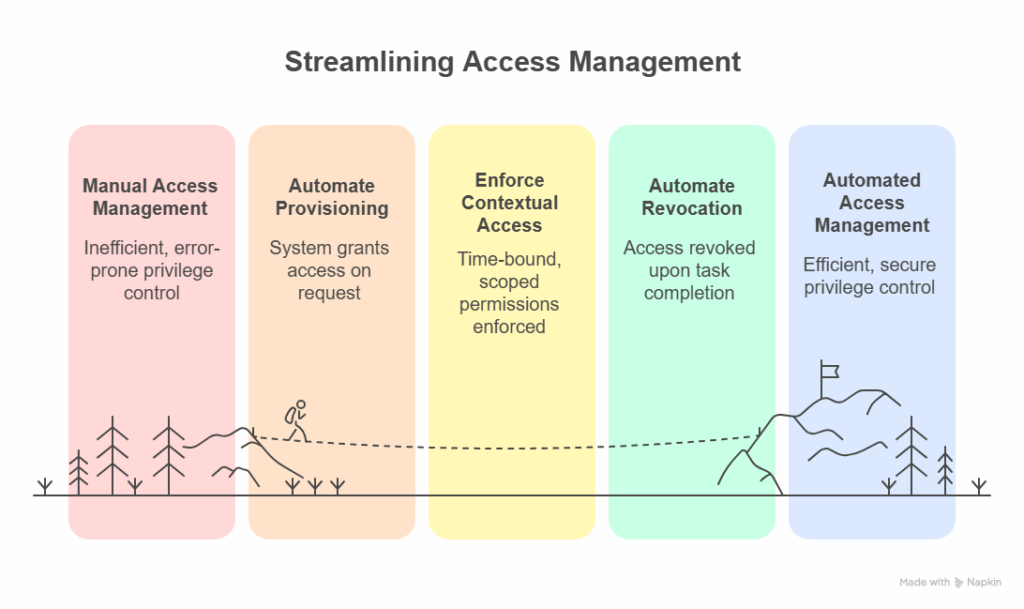
Automated access control systems use policy context and workflow automation to grant and revoke permissions without tickets, manual reviews, or long-lived credentials. Access opens only when it’s needed, remains active for the duration of a specific task, and then closes automatically, eliminating the risk of forgotten or persistent privileges. 

Automated access control systems reduce reliance on static, role-based access with short-lived, purpose-based permissions that align with least privilege and Zero Trust principles. Every access decision is logged and evaluated against contextual signals such as user role, device posture, location, risk score, and, in advanced systems, workload behavior. 

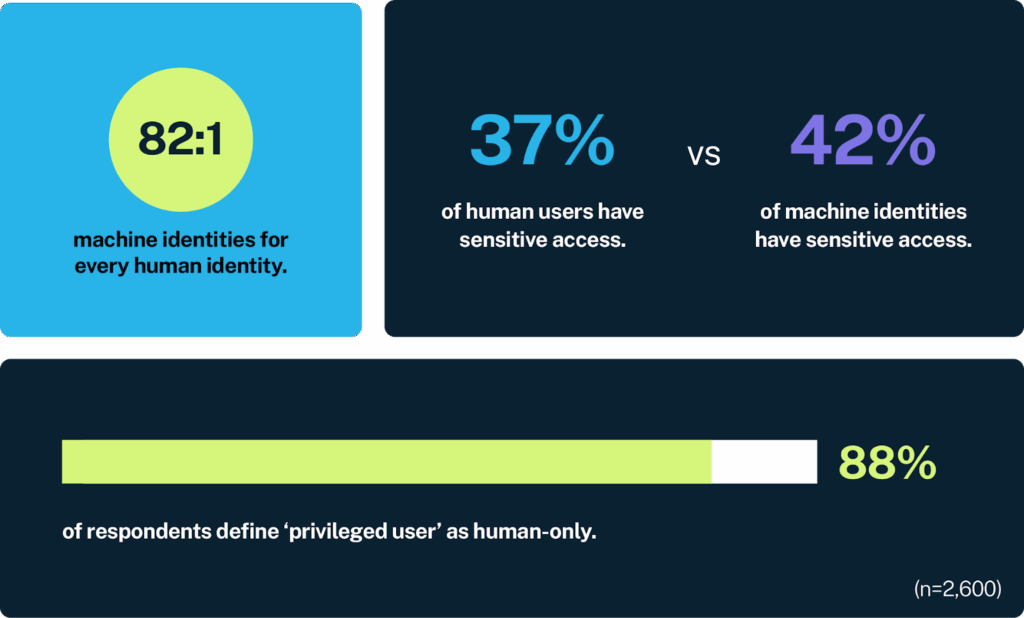
Non-human identities (NHIs), aka the service accounts, API keys, bots, CI/CD jobs, and cloud workloads running behind the scenes, now outnumber human users by an estimated 80:1. They move faster than any engineer and often carry the highest levels of privilege. The problem is that many NHIs still rely on long-lived IAM keys or broad, static roles. When that happens, they quietly turn into one of the largest and least-watched attack surfaces in the entire cloud environment.

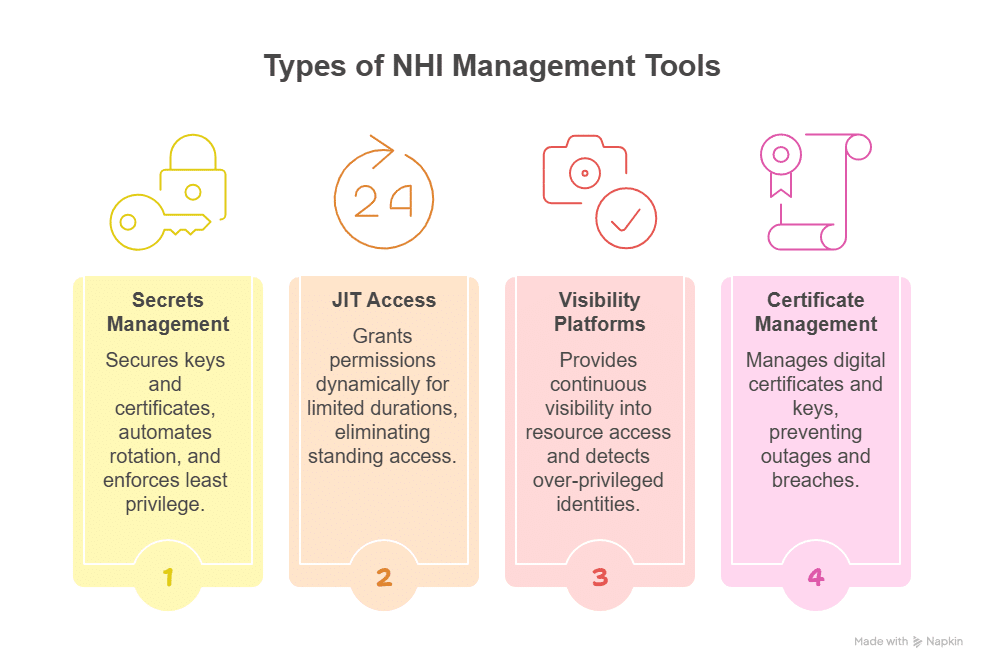
With automated access control systems, you can manage NHIs issuing short-lived, scoped permissions for each pipeline run or automation task, and revoke them cleanly as soon as work completes. This heightened risk is why teams increasingly rely on NHI management tools to right-size permissions and eliminate long-lived credentials.

Teams simply cannot track that level of entitlement sprawl or enforce credential rotation manually. Automated access control systems close that gap and consistently enforce least privilege. Modern platforms also integrate directly into CI/CD pipelines, issuing ephemeral credentials to remove long-lived secrets and reduce overall threat exposure.
Benefits of Automated Access Control Systems

  • Replaces long-lived and risky access with short-duration, Just-in-Time permissions, strengthening your overall privileged access management strategy.
  • Improves delivery speed by letting users request and receive access through familiar channels such as Slack, Teams, or CLI, without waiting in a queue.
  • Produces automatic and timestamped audit records suitable for SOC 2, HIPAA, GDPR, and CCPA evidence reviews, giving security teams built-in compliance support.
  • Reduces approval wait time and lowers the risk of misconfigured privileges by automating routing, access activation, expiration, and full teardown.
  • Maintains consistent least-privilege enforcement across multi-cloud and hybrid environments through API-driven integrations.
  • Controls non-human identities (NHIs) by issuing short-lived, scoped permissions, reducing one of the largest hidden attack surfaces in cloud environments. 

Key Features to Look For in an Automated Access Control System

  • Policy-driven access rules that adjust permissions based on identity, role, task, and context instead of fixed, long-term entitlements.
  • Granular visibility and control across human and machine identities, cloud platforms, and sensitive services, with clear mapping of what each identity can reach.
  • Native integration with cloud providers, identity platforms, collaboration tools, and CI/CD pipelines to align permissions with real activity and deployment flows.
  • Self-service request and approval flows that let users obtain access quickly through approved channels without bypassing governance.
  • Full audit and reporting coverage that records every access event, approval, and expiration with searchable logs for security and compliance teams.
  • Break-glass and on-call escalation flows providing temporary emergency access with full audit trails and automatic expiration.

Top 10 Automated Access Control Systems

CATEGORY 1: Cloud-Native Access Automation

These solutions are purpose-built for fast-moving DevOps and SaaS teams that need automated Just-in-Time access and least privilege enforcement across multi-cloud environments.

1. Teleport
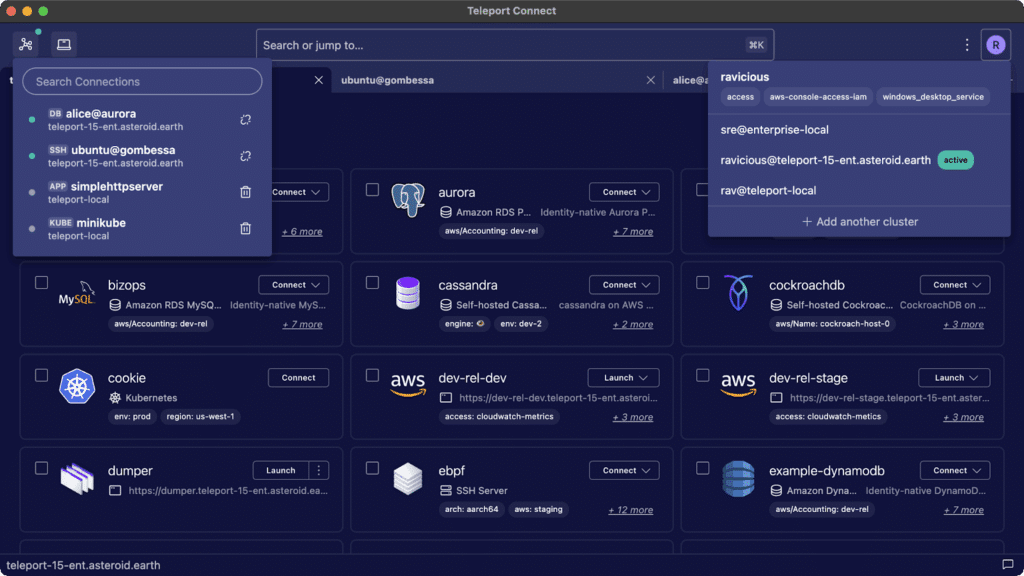
Teleport issues short-lived, identity-backed certificates for servers, Kubernetes clusters, databases, and internal applications. It removes static keys, records administrator sessions, and surfaces real-time activity to give teams a clear audit trail and tighter oversight of production access.

Best For: Teams that want certificate-based, Zero Trust access (with no standing credentials) across multiple clouds. 

Price: Offers usage-based pricing for enterprises, and a free Community Edition is available.

Review: “I like that Teleport provides secure, certificate-based access to servers, databases, and Kubernetes clusters without needing a VPN.”

2. Apono
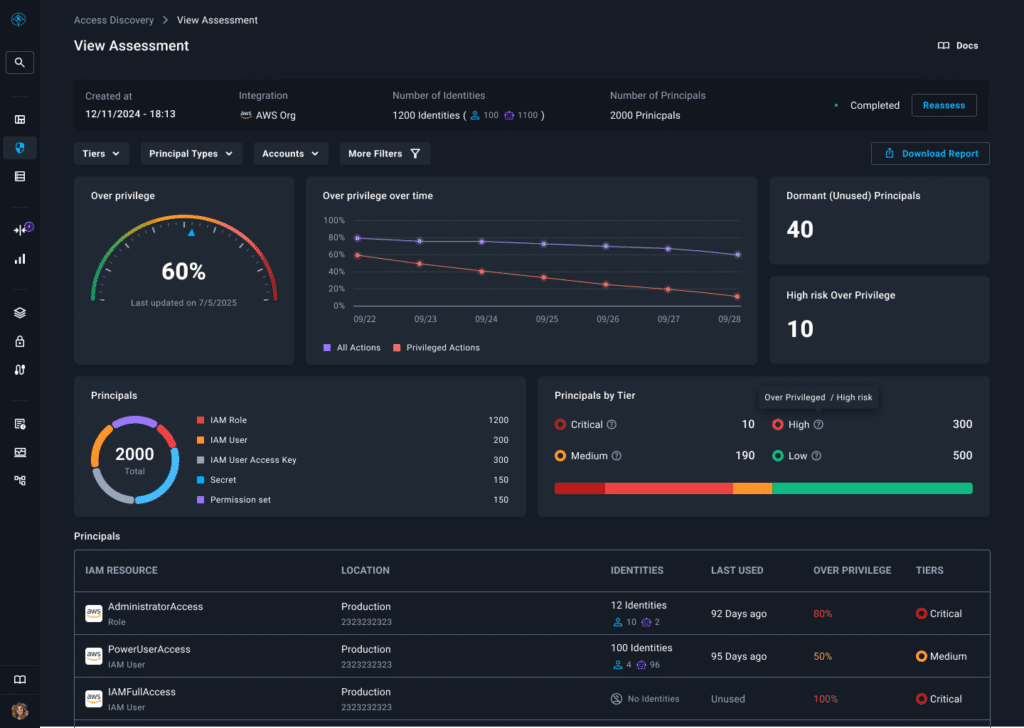
Apono automates Just-in-Time access across cloud infrastructure, SaaS tools, and data systems with policy-driven controls for both human and machine identities. Access is time-limited by default and revoked automatically. Engineers can request access from Slack, Teams, or CLI while Apono handles validation and approvals in the background. 

Apono also eliminates privilege sprawl by continuously discovering over-privileged identities and automating remediation. Real-world teams are already doing this at scale. Organizations like Caris Life Sciences use Apono to replace broad, persistent database access with time-bound, auditable permissions aligned with Just Enough Privileges.

After adopting Apono, Caris reduced standing access across sensitive systems and accelerated on-call response by giving engineers fast, temporary access exactly when needed, without compromising compliance or security.

Best For: Organizations looking to automate the entire Just-in-Time access workflow, from request through revocation, with no manual steps.

Price: A 30-day free trial is available for JIT database access.

Review: “Most integration configurations are straightforward and backed up by informative yet simple documentation. In more complicated cases, Apono’s team were happy to help and solved issues fast and with high professionalism.”

3. Zitadel
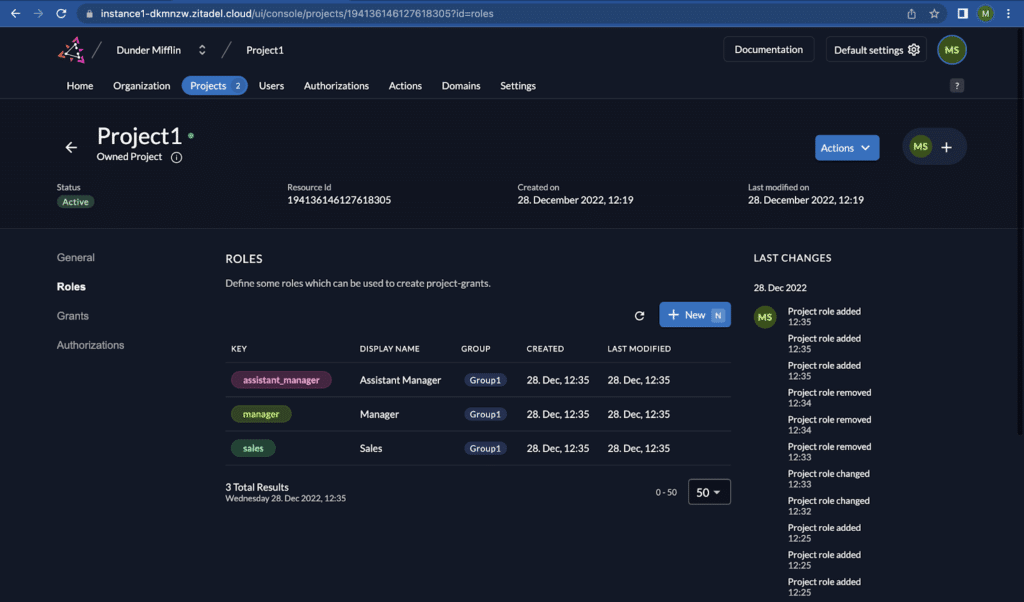
Zitadel offers a modern approach to authentication, supporting OIDC, passwordless login, and both RBAC and ABAC. Developers get clean APIs and SDKs they can plug straight into their applications, which means they don’t have to own identity storage or user lifecycle management themselves.

Best For: Teams that want solid authentication and fine-grained authorization built into their services. 

Price: A free tier is available, and paid plans are billed based on monthly active users.

Review: “I was relieved to discover ZITADEL, allowing us to leverage their expertise so we can focus on the rest of our platform development.”

CATEGORY 2: Developer-First Access & Authorization Tools

These tools support teams that want to control permissions at the application and service layers using code-driven policy logic, rather than relying on broad platform-level entitlements.

4. Cerbos 

Cerbos is a lightweight policy engine that lets teams pull authorization rules out of their application code. At runtime, Cerbos evaluates those policies through an API, giving every service consistent access decisions, even for automated workflows collecting data at scale or interacting with internal systems.

Best For: Teams that want to externalize authorization logic without adopting a full IAM suite.

Price: Free open-source core plus paid Hub tiers (starting at $25/month) for managed policy tooling and scalable production deployment.

Review: “The best thing about Cerbos is how easily I can tweak access control logic without having to even touch the codebase.”

5. ConductorOne
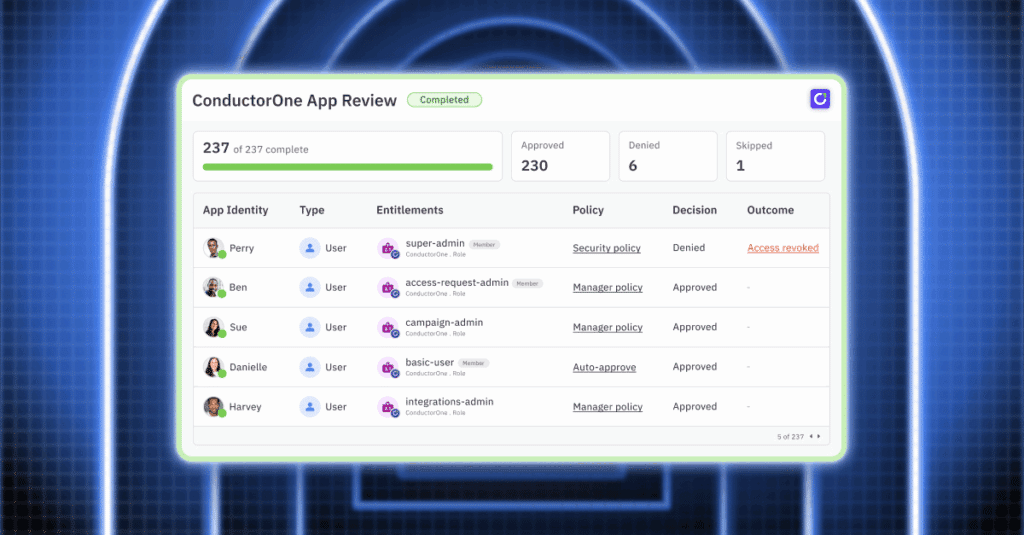
ConductorOne orchestrates SCIM-based provisioning, deprovisioning, and access reviews alongside existing IdPs. Its strong point is lifecycle management, with HR-triggered onboarding and offboarding plus one-click access to recertifications.

Best For: Organizations that want identity governance that keeps pace with cloud tooling, frequent onboarding changes, and rapid permission updates.

Price: Custom pricing.

Review: “The real strength behind ConductorOne is the ability to leverage its workflows against, at first glance, many disparate SaaS systems, which may not have cohesive workflows out of the box.”

CATEGORY 3: Enterprise IAM Platforms

This category serves organizations that manage large numbers of users and systems, requiring structured identity provisioning, governance workflows, and compliance-ready controls.

6. One Identity Manager 
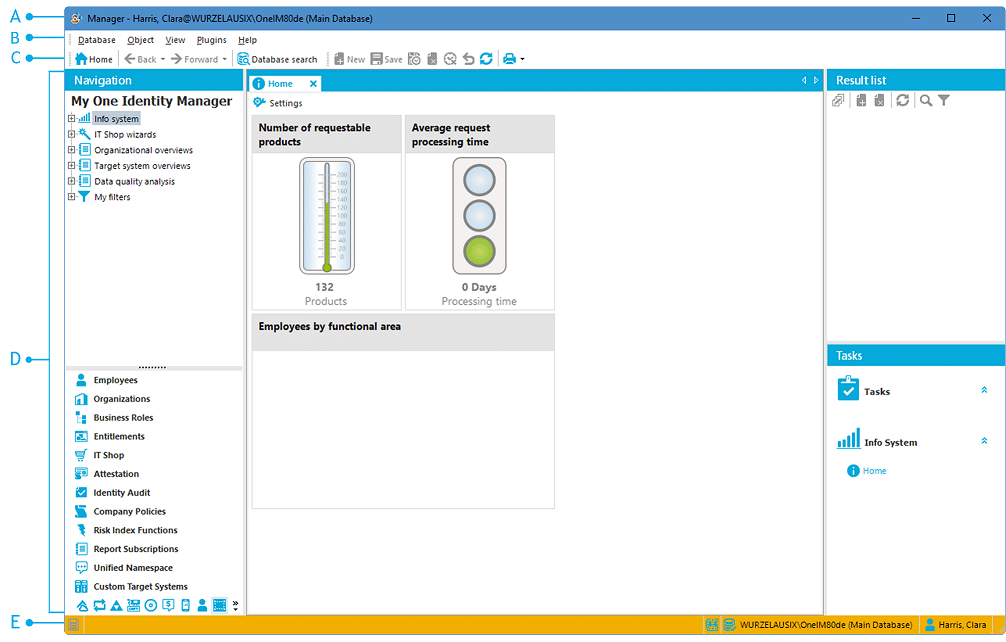
One Identity Manager links HR and directory data with enterprise apps to automate provisioning, enforce modeled roles, and run scheduled attestation cycles. It is well-suited for complex, regulated organizations that need full governance coverage across many identity sources.

Best For: Organizations operating under strict regulatory or audit requirements that need structured provisioning, role governance, and attestation cycles.

Price: Enterprise pricing is available upon request. 

Review: “We saw a significant boost in IT staff productivity after adopting the One Identity platform.”

7. Ping Identity 
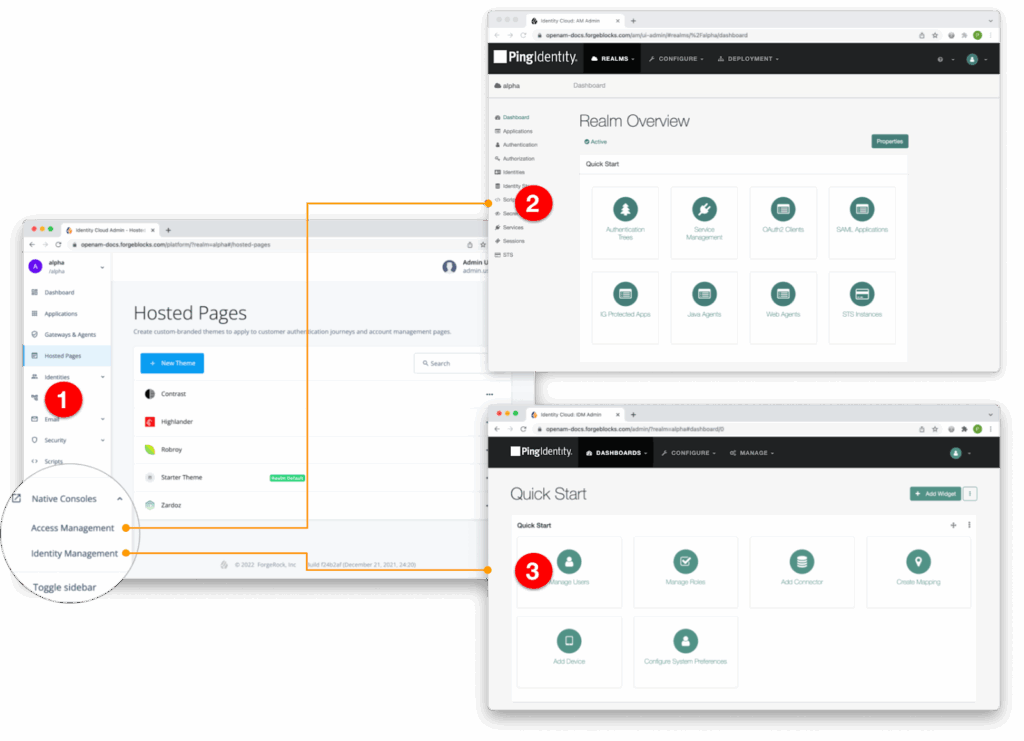
Ping Identity delivers a broad range of enterprise IAM services, including SSO and policy-based access control tailored to hybrid and multi-cloud deployments. It integrates seamlessly with legacy infrastructure while offering modern authentication flows, such as passwordless login and adaptive risk evaluation.

Best For: Organizations modernizing hybrid IAM without overhauling legacy systems.

Price: Starts at $35,000 annually for Essential and $50,000 for Plus, with pricing adjusted by scope and features.

Review: “This use of open standards and overall stability makes it an excellent platform to base user authentication upon.”

8. Okta Workforce Identity Cloud 
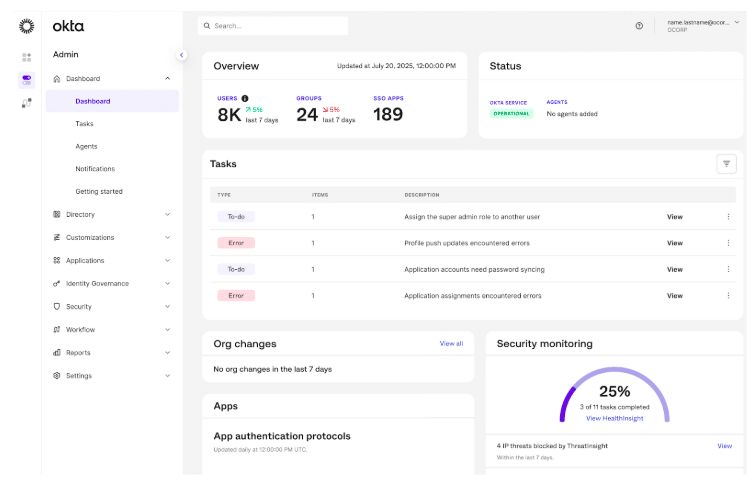
Okta Workforce Identity Cloud combines MFA and automated lifecycle workflows with a deep catalog of prebuilt connectors. This gives teams turnkey provisioning and offboarding coverage across thousands of SaaS and enterprise applications.

Best For: Companies standardizing workforce identity across SaaS and hybrid cloud.

Price: Tiered pricing, with core authentication in lower plans and lifecycle, device, and API security features in advanced plans.

Review: “It provides a secure, centralized way to manage user access across multiple applications, which saves time and reduces risk.“

CATEGORY 4: Data-Centric & Authorization Intelligence Platforms

These platforms focus on deep data-layer visibility and contextual authorization, making them ideal for organizations tackling entitlement sprawl and enforcing least-privilege access at scale.

9. Twilio Verify / Identity 
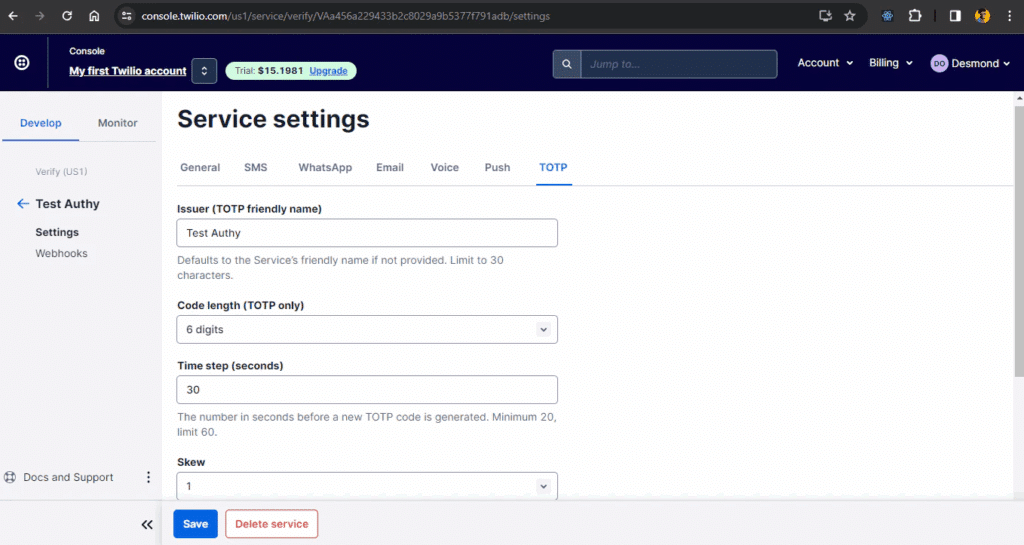
While not a full access control platform, Twilio Identity supports access workflows by validating user identity and risk signals before permissions are granted. It delivers API-based verification, including phone, document, and risk-based checks, so applications can validate users in real time.

Best For: Apps needing flexible, API-first user verification workflows.

Price: Pricing is usage-based per verification, with volume pricing available for higher throughput workloads.

Review: “I was looking for a communication API for my new product when I came across Twilio. It’s super easy and fast to implement, paired with a good customer support team.”

10. Veza
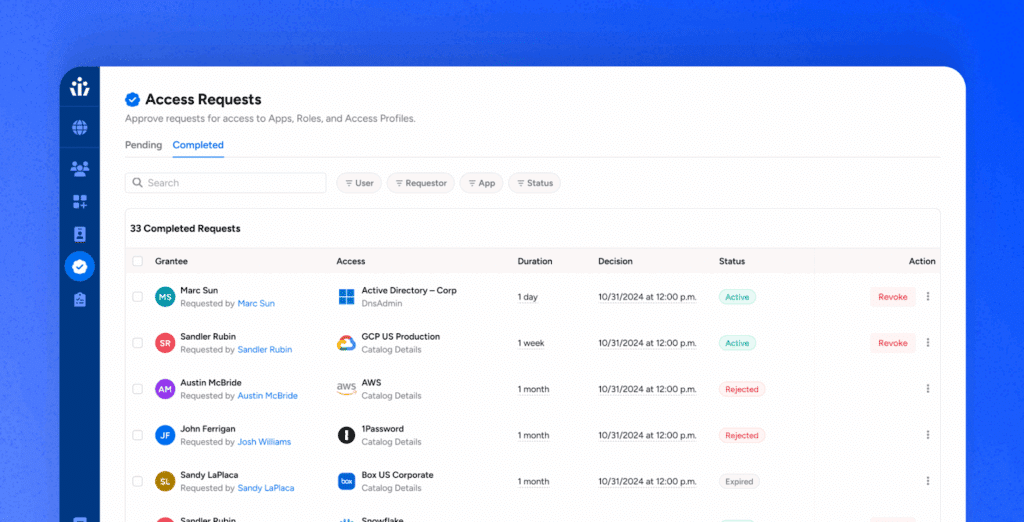
Veza builds an Access Graph across cloud, SaaS, and data systems to reveal effective permissions and hidden entitlements. It helps teams spot unused or over-privileged access and recommends least-privilege adjustments grounded in real data-layer visibility.

Best For: Organizations tackling complex entitlement sprawl across data and SaaS ecosystems.

Price: Custom pricing.

Review: “Veza gives us both broader and deeper visibility into who has access to our data, and how they have access to that data, so we can trust and verify that personnel only have the access they need.”

Why Temporary, Contextual Access is the New Standard

Identity security is moving fast, and the direction is clear: access needs to be temporary, contextual, and fully auditable. The shift toward automated, policy-driven controls IS how engineering teams keep pace with multi-cloud complexity and the explosion of human and non-human identities.

Apono’s approach aligns directly with the trends outlined above by automating Just-in-Time access and enforcing least privilege for both human and machine identities. Auto-expiring permissions, break-glass and on-call workflows, and full access discovery make Zero Trust practical, and it’s all deployable in under 15 minutes. 
If you’re ready to see how automated access actually works in a real environment, get a personalized walkthrough today.
Secret Management: A Step-by-step Guide to NHI Security

It’s not hard for secrets to sprawl, buried under layers of commits and forgotten branches. Most teams don’t notice it until one bad push exposes everything. Secret leaks don’t come from breaches, but from configuration drift and forgotten credentials; a gap that traditional vault tools struggle to close on their own.

Here’s the scale of that mess. Machine identities now outnumber human users by more than 80 to 1, and each one relies on credentials to function. Yet, only 15% of organizations feel highly confident in preventing NHI attacks, while 69% express concerns about them.

Keeping thousands of invisible credentials under control without slowing your team down begins with improved secrets management and a shift in how you secure non-human identities.

What is secrets management, and how does it relate to NHI security?

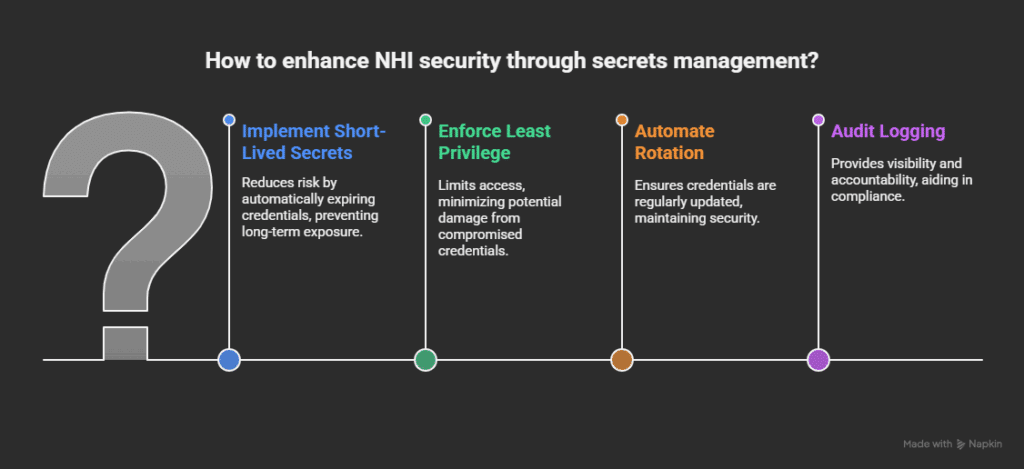
Secrets management involves storing, issuing, rotating, and controlling access to credentials such as API keys and tokens. It keeps machine-to-machine credentials out of code and ensures that every secret has a clear owner, scope, and expiration date.

Secrets management and NHI security are closely linked because every non-human identity (whether it’s a CI/CD pipeline or automated workflow) relies on credentials to function. Those credentials often end up hardcoded or overprivileged. NHIs often authenticate through short-lived credentials issued via OIDC or IAM role assumption rather than static API keys, minimizing the credential footprint. Secrets management solves that by turning static keys into short-lived, controlled secrets that expire automatically.

Without secrets management or effective NHI management tools, NHIs become a blind spot. All it takes is one leaked token to give an attacker broad access. With automated secrets management in place, you can enforce least privilege and rotate credentials automatically, removing long-lived tokens before they become a silent liability.

Zero Trust demands you verify every request and validate each secret, enforcing cloud security controls across all NHI workflows. Applying these controls to NHIs ensures machine-to-machine communication stays compliant with SOC 2, ISO 27001, NIST, and broader application security standards.

Why Secrets Management is the Weak Link in NHI Security 

Every bot, API, or AI-powered workflow needs credentials to connect systems, deploy builds, and pull data. Each non-human identity opens a new attack path. In most organizations, no one knows exactly how many exist or what they still access. API keys and tokens often carry more privilege than the humans managing them. Left unchecked, they multiply across scripts, containers, and pipelines, creating NHI sprawl.

As CI/CD pipelines spin up new workloads, they leave behind forgotten service accounts and unrotated secrets. These orphaned credentials expand your attack surface until a single unused token becomes an admin key to production. 

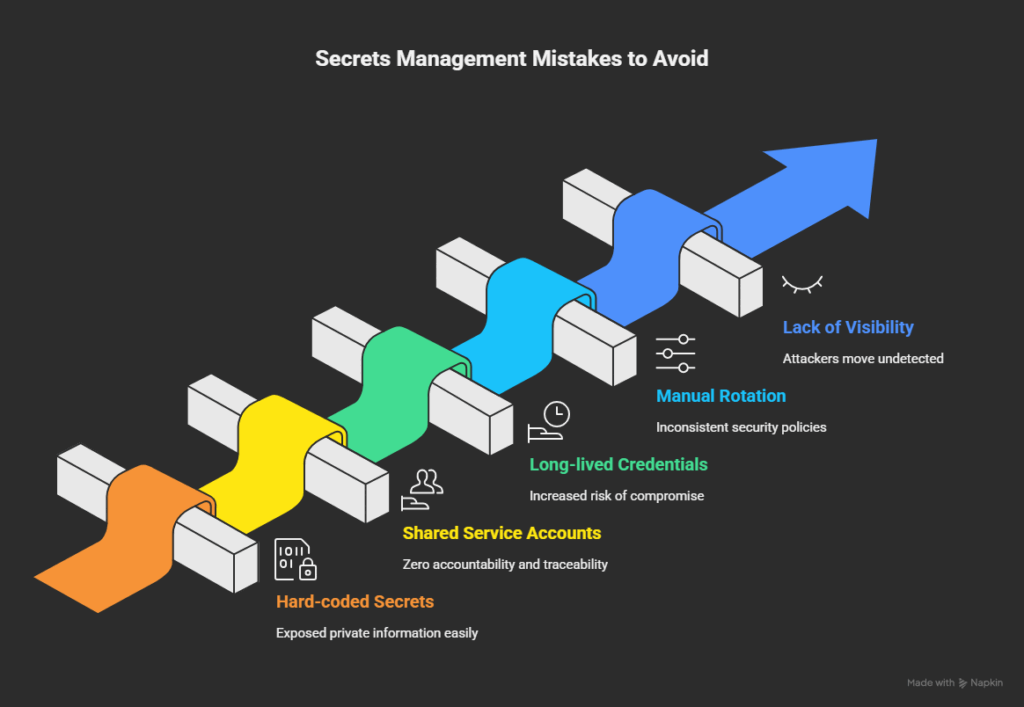
5 Secrets Management Mistakes to Avoid

1. Hard-Coded Secrets in Code Repositories

Leaving API keys or credentials inside your code is one of the simplest ways to reveal private information. Anybody with access, or even a public scan, can locate those lines once they are pushed to version control. A single exposed key can spread instantly across mirrors and forks before you even realize it. Attackers regularly scan public repos for exposed credentials, and even a brief exposure can result in a full system compromise.

2. Shared Service Accounts

To “keep things simple,” many teams use the same account for several services or pipelines. As a result, there is no accountability. It is impossible to determine which process or individual used a shared key. As a result, incident response is slow and unreliable, and audits (including any privileged access management audit) are unreliable. 

3. Long-Lived Tokens and Passwords

Static credentials that never expire are a major liability. The longer a secret stays valid, the more likely it is to leak, be reused, or be forgotten. Long-lived tokens often have broad permissions, which can turn into open doors for privilege escalation. Automated rotation and expiry policies close that window by ensuring credentials live only as long as needed.

4. Manual Rotation and Ticket-Based Workflows

Everything is slowed down, and human error is introduced when engineers are relied upon to manually rotate secrets or submit tickets for access. In reality, a lot of credentials are never rotated because the procedure is cumbersome or disruptive. Automating rotation and approvals enables teams to stay focused while maintaining consistent security controls.

5. Lack of Visibility and Auditing

Without centralized visibility, it’s impossible to know how many secrets exist, who has access, or when they were last used. That lack of visibility slows down audits and provides attackers with room to move undetected. With continuous monitoring and solid audit logs in place, you can identify suspicious use early and shut it down before it escalates into a larger problem.

A Step-by-Step Guide to Secure Secrets Management for NHIs

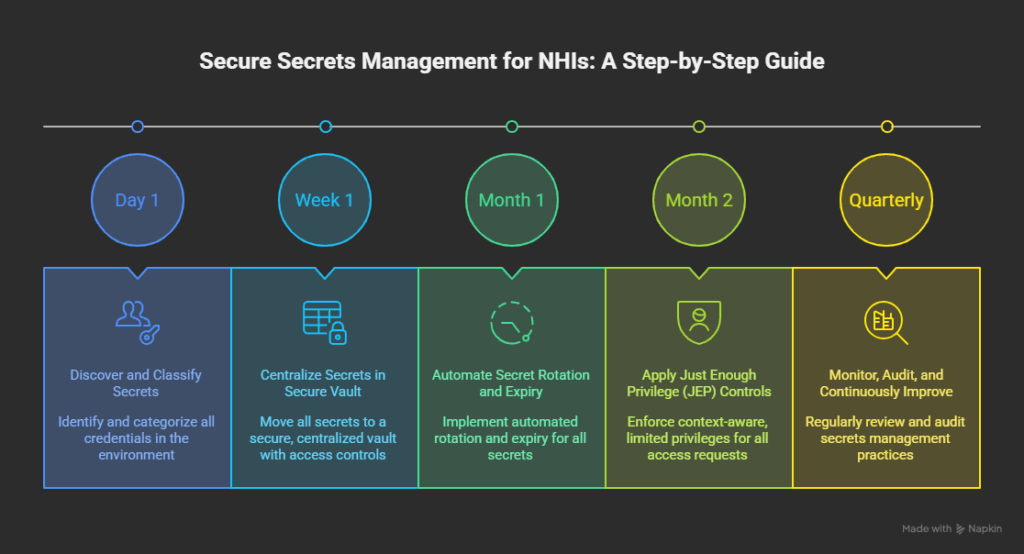
Step 1 – Discover and Classify All Secrets

Start by identifying every credential in your environment for human and non-human. Many teams find more machine credentials than expected once they run a proper discovery scan. Classify each secret by environment and purpose to keep control from day one.

Implementation Best Practices

  • Map service accounts, workloads, CI/CD tokens, and API keys.
  • Group them by sensitivity (production, staging, dev) and function.
  • Automate discovery to catch orphaned credentials left behind by old systems.
  • Revoke or rotate anything without a clear owner or current use.
  • Identify unused, stale, or orphaned secrets left behind by old systems.
  • Flag credentials that have no active owner or purpose.
  • Document every secret’s source, usage pattern, and access path.

Automated NHI security tools can identify hidden tokens and accounts with permissions that should have expired but remain active.

Step 2 – Centralize Secrets in a Secure Vault

Leaks are inevitable when credentials are stored across code repositories, scripts, and cloud variables. You can maintain uniform visibility and access controls with a central vault.

Implementation Best Practices

  • Enforce least privilege from the start.
  • Separate environments to contain damage if a secret is compromised.
  • Apply strong encryption and require MFA or identity-based access for retrieval.
  • Schedule regular audits to see who’s accessing what.
  • Remove hard-coded secrets from repositories, scripts, and config files.
  • Replace environment-file secrets with vault-issued credentials.
  • Require vault retrieval as part of your CI/CD and deployment workflows.

A vault is only effective if usage is mandatory, so make it part of your standard deployment process.

Step 3 – Automate Secret Rotation and Expiry

Manual rotation doesn’t scale. Credentials should never stay valid indefinitely, and teams shouldn’t depend on ticketing systems to manage them.

Implementation Best Practices

  • Rotate secrets automatically after a set interval or trigger (like a deployment).
  • Link rotation to events in your CI/CD pipeline.
  • Implement time-bound access so credentials expire after use.
  • Use just-in-time (JIT) provisioning to generate secrets only when needed.
  • Replace static credentials with time-bound or ephemeral tokens.
  • Set automatic expiry for all machine-issued secrets.
  • Remove ticket-based rotation workflows and make rotation part of CI/CD automation.

This best practice reduces dwell time for attackers and ensures compromised credentials have limited value.

Step 4 – Apply Just Enough Privilege (JEP) Controls

Granting broad access ‘just in case’ is the fastest way to lose control, which is why adopting just enough privilege controls is essential.

Implementation Best Practices

  • Define context-aware rules (who, what, when, for how long).
  • Limit privileges to a single pipeline, namespace, or function.
  • Set automatic expiry on all access requests.
  • Integrate with collaboration tools like Slack or Teams for quick approvals.
  • Replace shared service accounts with workload-specific identities.
  • Issue scoped keys tied to a single service, pipeline, or namespace.

Combining JEP with automation produces cleaner audit trails and aligns easily with compliance frameworks, such as SOC 2 or ISO 27001.

Step 5 – Monitor, Audit, and Continuously Improve

Secrets management isn’t “set and forget.” Continuous monitoring keeps privilege creep in check and exposes potential misuse early, which is a core component of any continuous threat exposure management approach.

Implementation Best Practices

  • Monitor for unused, expired, or overprivileged credentials.
  • Feed secret access logs into your SIEM for cross-system visibility.
  • Run quarterly reviews to spot drift between policy and practice.
  • Treat every access request as untrusted until verified.
  • Surface unused, dormant, or overprivileged credentials for review.
  • Track secret access patterns to detect drift or unexpected usage.
  • Alert on secrets that haven’t been rotated within policy thresholds.

When done well, this process becomes part of your Zero Trust framework by verifying every secret, every request, and keeping both human and machine identities accountable.

Bringing Automation and Trust Back to Access

Bots, pipelines, and workloads now outnumber human users many times over, and each depends on secrets to function. Without visibility and automation, those credentials quietly become the weakest link in your cloud security.

Instead of static credentials that linger for months, Apono delivers short-lived, scoped access that expires automatically when needed. Every request is verified, every permission is temporary, and every action, from approval to expiry, is logged for full visibility. It integrates natively into your workflow, whether you’re in Slack, Teams, or a CI/CD pipeline, and deploys in minutes, not days.

With Apono, least privilege is enforced automatically. Security and speed move together, so developers can ship fast while auditors sleep easy.See how your organization stacks up. Get an NHI Access Assessment and uncover where machine identities are over-privileged, and how automated, time-bound access reduces the risk.

Better Together: Apono and 1Password Join Forces to Deliver Secure, Just-in-Time Access to Secrets

We’re excited to announce Apono integration with 1Password to help organizations control, automate, and audit access to sensitive credentials and secrets bringing stronger security and smoother operations to teams everywhere.

This new integration enables customers to enforce Zero Standing Privileges (ZSP) and provision Just-in-Time (JIT) and just-enough access (JEA) to secrets stored in 1Password Enterprise Password Manager through Apono’s automated access flows. The result: security teams gain confidence, engineering teams move faster, and sensitive data stays protected.

A Shared Vision for Secure Access

In today’s complex environments, credentials and secrets are the keys to every system, cloud environment, and service. Yet managing who can access them  and when can be one of the biggest operational and security challenges for modern organizations.

Apono and 1Password share a common mission: to simplify secure access without slowing teams down. By combining 1Password’s trusted enterprise password management with Apono’s dynamic, policy-driven access control, organizations can now adopt a Zero Standing Privileges model while maintaining the speed their teams need to innovate.

Key Benefits

Together, Apono and 1Password give organizations greater control, visibility, and automation around access to credentials and secrets.

Provision Just-in-Time (JIT) Access

Automatically grant policy-driven, granular Just-in-Time access to 1Password credentials, secrets, and sensitive information ensuring that users get access only when they need it and for as long as they need it.

Enforce Least Privilege

Reduce standing privileges and enforce least-privilege access across all secrets managed in 1Password. Apono continuously right-sizes permissions, improving your overall security posture.

Eliminate Manual Friction

Streamline operations by automating access flows in line with your organization’s business policies and needs. Give R&D and engineering teams secure, compliant access faster without the manual approvals and delays.

Track, Audit, and Detect Anomalies

Gain complete visibility and auditability into every access request. With integrated tracking and anomaly detection, security teams can easily answer who accessed what, when, and why.

How It Works

The integration between Apono and 1Password enforces Zero Standing Privileges (ZSP) by granting access dynamically and revoking it automatically when it’s no longer needed.

Access requests are handled through policy-driven workflows in Apono, ensuring all approvals align with organizational policies and compliance requirements.

Using real-time, identity-aware provisioning, teams can adopt Just-in-Time (JIT) and Just-Enough Access (JEA) models for secrets management in 1Password – keeping credentials secure while maintaining business agility.

Why It Matters

This integration represents a major step forward for organizations adopting Zero Trust principles and modern access governance.
 By integrating Apono’s automated access controls with 1Password’s enterprise-grade secrets management, teams can:

  • Eliminate manual credential sharing.
  • Reduce security risk from secrets standing privileges.
  • Automate access provisioning and revocation.
  • Gain centralized visibility into every access decision.

Get Started

The integration between Apono and 1Password is available now.
Contact our team for a demo. and see how your team can start implementing Zero Standing Privileges (ZSP) to 1Password secrets  today.

Introducing Spaces Management: Safe, Scalable Access Governance for Large Engineering Organizations

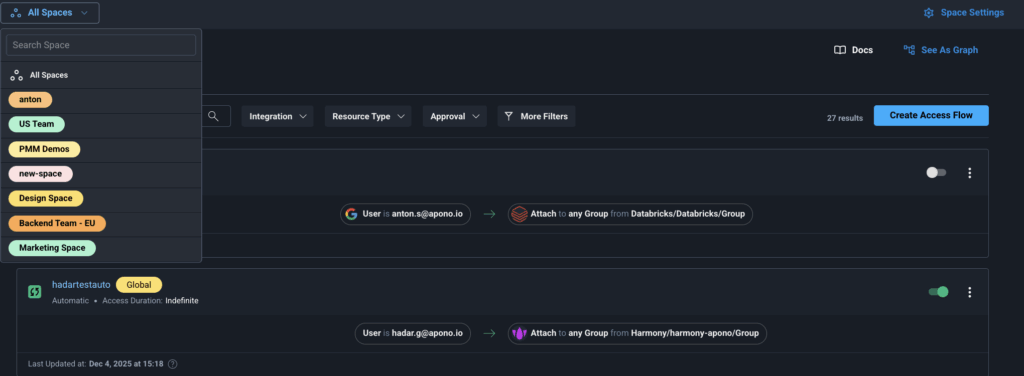
Large engineering organizations all run into the same challenge: as teams grow, clouds multiply, and environments diversify, access governance becomes noisy, risky, and difficult to delegate safely. Apono’s new Spaces Management feature gives enterprises a clean, scalable way to segment access governance across departments without spinning up multiple tenants or losing centralized control.

Spaces Management lets each team manage its own access flows, bundles, access scopes, and approvals inside a defined boundary, while security retains global oversight. It’s simple, safe, and built for organizations that can’t afford cross-team mistakes.

Why Large Organizations Need Spaces Management

As companies scale beyond a few teams, their access model starts to break down.

Different departments use different cloud providers, engineering stacks, and operational patterns. A DevOps engineer in backend infrastructure shouldn’t be configuring access for the data science team. And no security team wants dozens of global admins with the power to accidentally revoke production access with a single change or obtain access to all the organization’s resources.

Before Spaces Management, organizations had two bad choices:

  1. Centralize everything, creating bottlenecks around a tiny admin group
  2. Delegate broadly, accepting the risk that one mistake could impact the entire company

Spaces Management eliminates that tradeoff.

It introduces clean boundaries inside a single Apono tenant so teams can work independently without risking each other’s environments.

How Spaces Management Works

Spaces Management divides your Apono environment into isolated operational zones. Each zone (“space”) contains its own:

  • Access flows
  • Bundles
  • Access Scopes

Connectors and integrations are shared globally, so you don’t need to reconnect AWS or Kubernetes 12 different times. But the access logic built on top of those integrations is isolated per team.

Users inside a space only see the resources, flows, and objects that belong to their domain. No confusion, no cross-team entanglement, no risk of one department modifying another team’s workflows.

Security teams can still enforce global guardrails and retain visibility where needed without having to run every request or policy update through a central queue.

What Teams Can Do With Spaces Management

Secure Delegation, Zero Anxiety

Give each team control over its own access flows, scopes, and approvals without giving them the keys to the whole kingdom. Security keeps global oversight, teams get autonomy, and risk stays contained.

Stop Cross-Team Incidents Before They Start

One team’s mistake should never take down another’s environment. Spaces Management creates natural isolation so a misconfiguration in analytics can’t touch production, and production can’t impact finance. This enforces clean boundaries and shrinks your blast radius.

Governance Without the Noise

Teams only see the resources that belong to them. No clutter. No “why is this access flow even here?” confusion. Just clear, focused access governance that’s easy to understand and even easier to maintain.

Goodbye Admin Bottlenecks

Spaces Management removes the dependency on a tiny group of global admins. Teams can update workflows, manage access, and keep work moving. All within safe guardrails while creating faster cycles, fewer tickets, and happier engineers.

Stronger Guardrails for Sensitive Environments

Financial systems, compliance workloads, and production environments can live inside their own tightly enforced spaces, with stricter approval rules and limited visibility. This enables maximum protection without multiple tenants or duplicated connectors.

Why This Matters for Security, Compliance, and Scale

Spaces Management isn’t just about convenience. It solves several critical problems for large organizations:

1. Reducing Insider and Admin Risk

Global admin sprawl is a major source of breaches and audit findings. Spaces Management ensures:

  • Admins only control what they should
  • Privilege escalation paths are limited
  • Sensitive areas are protected from unintended access

2. Making Audits Faster and Cleaner

Auditors want clear evidence of:

  • Scoped administrative rights
  • Environment isolation
  • Controlled delegation

Spaces Management gives you a structure that maps directly to SOC 2, ISO 27001, SOX, and HIPAA expectations.

3. Accelerating Engineering Velocity

When teams can manage their own access workflows safely, they no longer wait on central teams to unblock them.

Spaces Management enables rapid, decentralized operations without sacrificing control.

Get Started With Spaces Management

Spaces is now available for enterprise teams looking to scale access governance safely and without bottlenecks.

If you’re managing multiple departments, diverse engineering stacks, or sensitive production environments, Spaces gives you the structure and guardrails to do it cleanly.

Want to see how Spaces can reduce cross-team risk and streamline delegation in your organization?

Request a demo and we’ll walk you through it.

How Contractor Privileged Access Failures Exposed Data Across 45 Federal Agencies

Earlier this year, twin brothers Muneeb and Sohaib Akhter, both government contractors, were fired from their employer. Minutes later, they began a weeklong insider attack that compromised or destroyed data belonging to more than 45 federal agencies.

According to CyberScoop’s report, the Justice Department, the brothers deleted 96 databases (including a Homeland Security production DB), stole IRS and EEOC records, copied thousands of files, and even used AI tools to learn how to wipe logs and avoid detection.

Their employer hosted sensitive data for DHS, IRS, EEOC, and other agencies. In minutes, critical investigative files, regulated data, and FOIA records were suddenly corrupted or missing.

This wasn’t a sophisticated nation-state operation. It was a pair of disgruntled insiders acting immediately after termination who used the privileged access they once legitimately held.

The Most Damaging Attacks Often Come From the Inside

Most security incidents still originate outside the organization, but insider risk remains a persistent problem. According to the 2025 Verizon DBIR:

  • 18% of incidents involve internal users
  • 65% of those stem from mistakes
  • 31% stem from privilege misuse

And the trend is worsening: nearly half of organizations reported an increase in insider attacks last year, and insider-driven data loss now costs companies an average of $15 million annually.

The Akhter brothers did not need to probe for vulnerabilities. They already understood:

  • Where sensitive data lived
  • How the contractor’s systems worked
  • Which paths lacked guardrails
  • What privileges gave them maximum destructive power

Insider threat is dangerous not because insiders are brilliant attackers, but because they already know how everything works. Standing access turns that knowledge into damage, making it all the more important to ensure that former employees are fully removed from systems before they can inflict damage.

When JML Fails, Contractors and Leavers Become High-Risk Actors

Joiner-Mover-Leaver processes often look clean on paper. In reality, contractors, temporary workers, and short-term staff often fall through the cracks.

They may receive broad access “to get the job done,” and their privileges often:

  • Don’t map neatly to HR lifecycle controls
  • Aren’t regularly reviewed
  • Remain active longer than intended
  • Aren’t removed quickly when they leave

In this case, the attack began minutes after termination. Far faster than traditional offboarding workflows could react.

Modern access governance must assume:

  • Any identity can become malicious instantly.
  • Access must be removed immediately and automatically.
  • No user should retain standing privileges capable of material damage.

If your privilege model depends on manual cleanup or pre-created roles that persist indefinitely, JML failures are inevitable. This creates risk for your organization and your customers.

Customer Trust Depends on Your Access Governance

The breached contractor handled data for more than 45 federal agencies. These customers assumed their provider had the controls needed to prevent exactly this type of insider misuse.

When that trust is broken, the consequences ripple outward:

  • Agencies lose access to mission-critical systems
  • Sensitive data becomes exposed, corrupted, or unrecoverable
  • Incident response sprawls across multiple organizations
  • Vendor trust is damaged

Access governance is not just internal hygiene. It is a customer assurance requirement, especially for companies handling regulated or sensitive workloads. You need to be able to meet security requirements, maintain them continuously, and be able to prove them to auditors and your customers.

Zero Standing Privilege: A Practical Defense Against Insider Threats

Zero Standing Privilege (ZSP) is based on a simple principle. No identity should retain permanent access to sensitive systems.

Instead:

  • Access is granted only at the moment of need
  • Permissions are tightly scoped
  • Elevation automatically expires

While ZSP is often introduced as a defense against stolen credentials, it is equally powerful for insider threats. Especially for contractors and leavers whose access may not be tightly governed.

ZSP reduces insider risk by:

  • Removing the always-available privileges insiders can weaponize
  • Shrinking the blast radius of any one identity
  • Preventing both malicious actions and accidental damage

The Akhter incident is a clear example of why permanent, unmonitored access is no longer acceptable. Apono offers a different approach that eliminates many of these risks.

How Apono Makes ZSP Operational: Risk Tiering + Policy Automation

Apono’s Privileged Cloud Platform turns ZSP principles into enforceable controls.

Apono’s access platform is built around dynamic risk tiering, which automatically aligns friction with sensitivity:

Tier 1: Low-Risk Resources

  • Automatic provisioning
  • No approvals
  • Short-lived, least-privilege access
  • Ideal for dev/test, internal tools, and everyday workflows

Tier 2: Medium-Risk Resources

  • Self-serve Just-in-Time access
  • Limited duration
  • Optional lightweight approvals
  • Helps eliminate standing access without slowing engineers down

Tier 3: High-Risk Resources

  • Explicit manual approval (manager, system owner, or security)
  • Strong justification
  • Very short access windows
  • Full auditing and session visibility

With this model:

  • Routine engineering stays fast
  • Sensitive actions carry friction
  • Standing privileges disappear
  • Insider blast radius shrinks dramatically

Apono enforces these tiers automatically by blending risk and usage data, generating temporary least-privilege roles on the fly. This removes the need for massive prebuilt role catalogs and ensures every identity receives only the exact permissions required in that moment.

Taking the Next Step Toward Smarter Access Controls

This incident demonstrates why sensitive resources cannot rely on standing access or delayed offboarding. Privileges must disappear the moment they are no longer required, high-risk actions must require explicit approval, and access pathways must reflect the sensitivity of what they protect. Zero Standing Privilege and Just-in-Time access provide the guardrails that ensure destructive actions are never a single click away.

If you want to quickly assess where standing privileges may already exist in your environment, start with our Zero Standing Privilege Checklist — a simple way to benchmark your current exposure. 

And when you’re ready to compare Cloud PAM approaches that operationalize ZSP, our Privileged Access Buyer Guide + RFP Checklist breaks down the capabilities that matter most and the questions that separate cloud-native solutions from legacy ones.

7 Tips for Just-in-Time Privileged Access Management You Need to Implement Today

Managing access can become tedious and clunky. Someone always ends up with too much power, someone else is locked out when something’s on fire, and no one remembers who approved what in the first place. It’s the slow creep of “we’ll fix it later.”

However, that “later” is catching up. A recent report found that 58% of security leaders expect the number of identities, human and non-human, to grow in the next year, adding even more strain to already fragile governance systems. In cloud-native environments, privileges tend to accumulate across AWS IAM roles and Kubernetes namespaces, creating persistent attack paths that are rarely audited.

Every new SaaS tool and automation job adds another credential that has to be tracked, rotated, and revoked. Most teams already struggle to stay ahead of what they have today, which is why it’s vital to implement Just-in-Time Privileged Access Management best practices.

What is Just-in-Time Privileged Access Management?

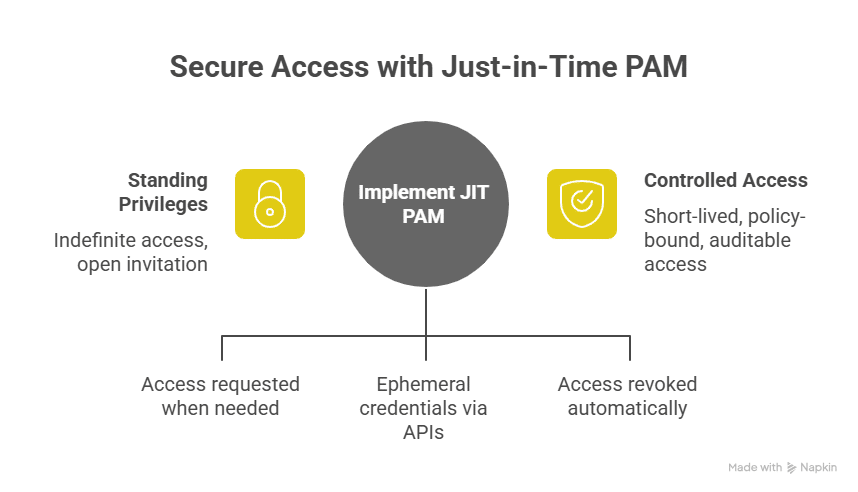
Just-in-Time Privileged Access Management (JIT PAM) exists to stop access drift. Instead of handing out standing privileges that last indefinitely, JIT PAM issues access only when it’s requested, for exactly as long as the policy allows, and then tears it back down automatically. JIT PAM uses ephemeral credentials issued via APIs or federated IAM roles. Access is time-scoped and automatically revoked through policy triggers once a task or session ends.

Essentially, it’s access that behaves more like an API call than a set of keys: granted for a purpose, then revoked once it’s served that purpose. Traditional PAM tools rely on vaults and rotation schedules, but the underlying permissions stay constant. JIT PAM treats privilege as something that should expire by default.

This approach matters because the environment has shifted. Non-human identities now outnumber human ones by more than 80 to 1. Every service account, container, pipeline, and bot carries its own credentials, each capable of the same lateral movement a compromised user could make. JIT PAM brings those identities under the same control model as humans (short-lived, policy-bound, and fully auditable), so that “access” stops being an open invitation and starts being a controlled event.

Key Components of Just-in-Time PAM

The point of JIT PAM is to enforce intent by making sure that every action in the system is traceable and linked to a deliberate choice. In modern environments, these policies are often defined as code (IaC) and triggered automatically when a developer or service account requests access, ensuring consistent enforcement across environments.

1. Automated Policy-Based Provisioning

Every credential has a lifespan. Nothing stays open longer than it should. When a session ends, the access that enabled it disappears, too. That single constraint changes how systems age, with fewer forgotten roles, fewer dormant tokens, and fewer cracks for attackers to find later.

2. Time-Bound, Auto-Expiring Permissions

Every privilege should have a defined lifespan. Access begins when the task starts and automatically expires once it’s complete; no manual cleanup or forgotten admin accounts lingering in the background. 

By ensuring that every permission has a clear endpoint, you maintain a smaller and more predictable attack surface. Each access event leaves behind a complete audit trail that shows precisely when it was granted and when it ended. In a Just-in-Time PAM model, nothing persists longer than it needs to, by design.

3. Context-Aware Approval Workflows

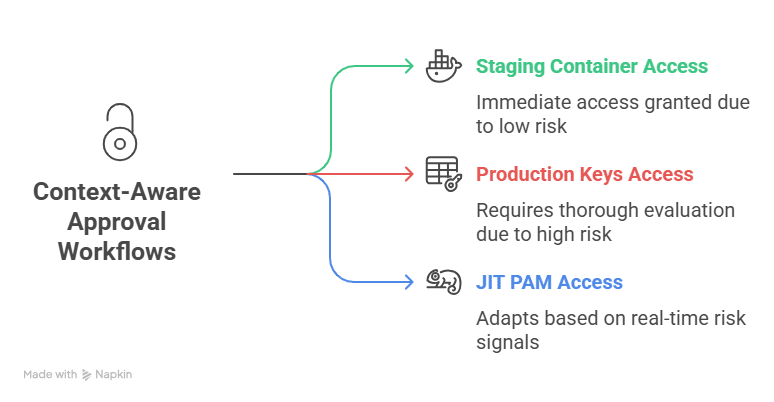
Access decisions are shaped by timing, intent, and the environment in which they happen. A developer spinning up a staging container might get in immediately. But someone requesting production keys is a different conversation. 

JIT PAM reads signals such as identity, device trust, and resource sensitivity and adapts on the fly. It behaves less like a static rule set and more like a security reflex, adjusting itself to match the risk in front of it. Signals such as user behavior, device trust, and location are evaluated in real time to ensure access decisions match contextual risk. These workflows often assess contextual risk signals such as user identity, device posture, IP reputation, and real-time session behavior before granting access.

4. Comprehensive Audit Trails

A robust audit trail is an account of what actually happened. Every request, approval, and expiry automatically builds that record. Over time, those logs provide valuable visibility. 

Security teams can trace actions back to intent, reconstruct incidents, and close loops without guesswork. When questions arise, the evidence isn’t buried in tickets because it’s already structured and searchable.

7 Tips for Just-in-Time Privileged Access Management You Need to Implement Today

JIT PAM is not something you install and walk away from. It is a continuous practice of auditing and adjusting access based on how people and machines actually work. The following best practices form the foundation of any strong JIT PAM implementation.

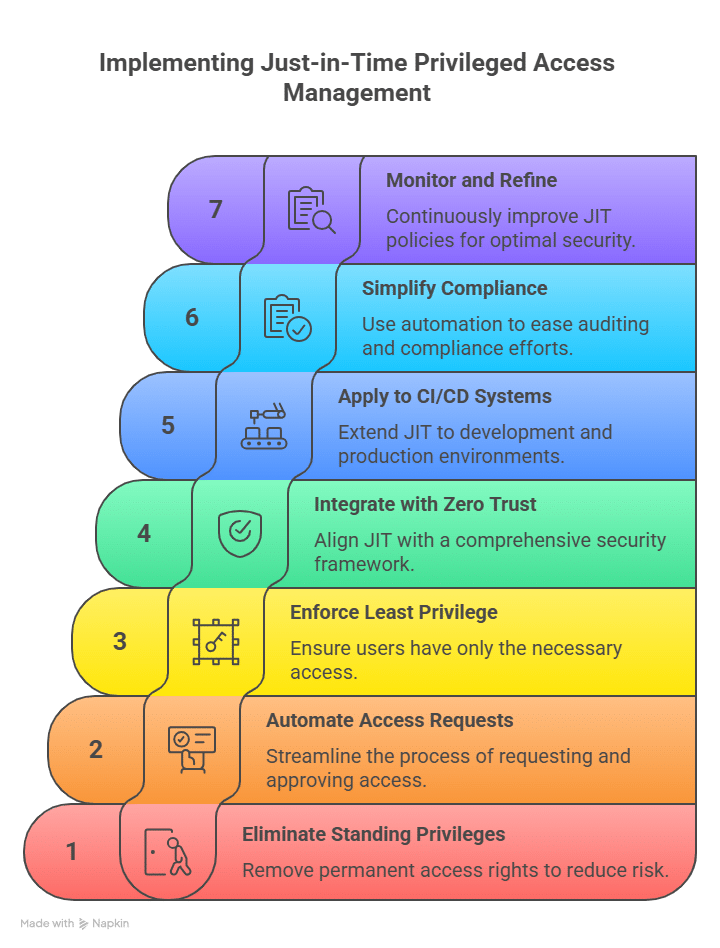
1. Identify and Eliminate Standing Privileges

Start with a full privilege audit. Automated discovery tools and policy-based permission expiry make this process repeatable and maintainable. Every environment accumulates what most teams call “zombie access,” such as credentials, tokens, and admin roles that were meant to be temporary. They stay in place long after they are needed, waiting to be exploited.

Conduct a full audit across human and non-human accounts to identify where standing privileges exist, then remove them in a structured way. Eliminating standing access reduces the number of open doors that attackers can use. Once identified, replace those static roles with time-bound, Just-in-Time (JIT) policies that automatically expire.

2. Automate Access Requests and Approvals

Manual access control slows down development and operations. Developers open tickets, wait for approvals, and eventually decide it is easier to keep elevated privileges “just in case.” That is how privilege creep begins.

Automating access requests fixes the root of the issue. Use cloud-native JIT PAM systems that integrate directly with your team’s existing tools, such as Slack, Microsoft Teams, or CLI. These integrations make it possible to grant temporary permissions dynamically based on context and policy. Access should feel simple to request and safe to revoke. 

In a JIT PAM model, requests trigger API-based policy provisioning: when a developer requests access, an ephemeral credential or federated role is issued automatically, scoped precisely to the resource and duration defined by policy.

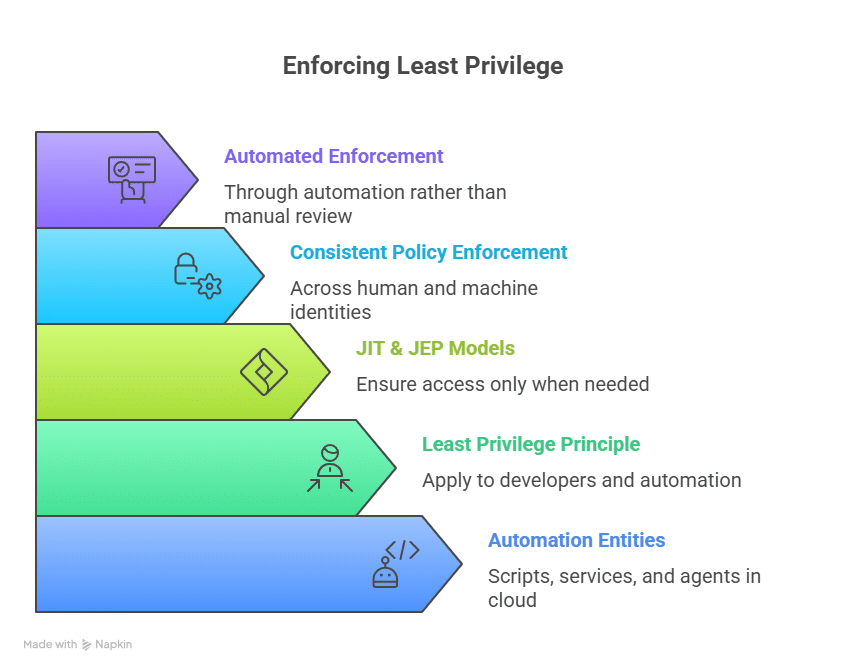
3. Enforce Least Privilege Across Human and Non-Human Identities

Cloud infrastructure is built around automation, meaning scripts, services, and agents, which now outnumber humans by a wide margin. Each entity holds potential access that can be compromised if left unmanaged.

The principle of least privilege should apply equally to developers and automation. JIT and Just Enough Privilege (JEP) models ensure that every identity, human or not, receives only the access needed for the specific task. This approach strengthens identity and access governance by ensuring consistent policy enforcement across human and machine identities. Apono extends this capability across workloads and service accounts, enforcing least privilege through automation rather than manual review.

4. Integrate JIT with Zero Trust Frameworks

JIT PAM and Zero Trust share the same goal: access is never assumed to be safe. Every request must be verified in context.

Access decisions become continuous and data-driven when JIT is applied within a Zero Trust architecture, much like how continuous penetration testing identifies and validates vulnerabilities in real time to ensure defenses adapt as environments evolve. Permissions are granted based on real-time conditions such as device posture, session history, and user activity. This approach ensures that even trusted users or systems are validated before every interaction. Cloud-native, policy-based controls make this achievable without creating extra work for the security team.

5. Apply JIT to CI/CD and Production Systems

Continuous integration and deployment pipelines often hide the most serious privilege issues. Tokens stay hardcoded in scripts, service accounts hold unnecessary admin roles, and access is shared to keep deployments moving quickly.

Applying JIT principles to your pipeline helps contain that risk. A cloud PAM approach extends these controls across CI/CD systems, ensuring credentials are issued only when needed and revoked automatically after use. You can choose a cloud-native access management platform that supports DevOps workflows by issuing temporary, scoped credentials for builds, deployments, and emergency access situations. Permissions exist only for the duration of the task and disappear when the work is done.

6. Simplify Compliance and Auditing with Automation

Every organization faces compliance checks, and most dread them. JIT PAM simplifies this by automatically logging every access event: who requested it, who approved it, and when it expired.

Automated logging makes compliance faster and more transparent, but visibility doesn’t end there. Many organizations also rely on external security oversight and continuous monitoring partners to strengthen their audit readiness and ensure alignment with frameworks like SOC 2, HIPAA, and GDPR.

7. Continuously Monitor and Refine JIT Policies

Access control changes as infrastructure and teams evolve. What is appropriate today can easily become excessive tomorrow.

Most teams don’t look at their own logs; they trust the policy and assume it’s working. However, it rarely is. Open the log data and you’ll see it immediately, such as access requests looping, temporary roles that never expire, and the same people asking for the same things. Regular reviews and automation are key DevSecOps best practices that ensure policies evolve as fast as your infrastructure does

Building Access Control That Works With You, Not Against You

Standing privileges are the silent failure point of modern security. They accumulate over time, stay invisible until something goes wrong, and create more risk than most teams realize. Just-in-Time Privileged Access Management changes that equation. It gives your organization a way to enforce least privilege, reduce exposure, and stay compliant without grinding daily operations to a halt.

Apono takes the heavy lifting out of that process. It deploys in under fifteen minutes and connects directly with the systems your teams already use, such as Slack, Microsoft Teams, and the command line. With Apono, permissions expire automatically once tasks are complete, ensuring least privilege by default. For urgent fixes, break-glass and on-call flows provide instant but controlled access that closes the loop once the incident is over.With Apono, you can see how automated, policy-driven access can replace manual approvals and standing admin roles. Request a demo today.

What is Just Enough Privilege? Definition, Examples, and Best Practices

Every automated workflow, microservice, and CI/CD integration needs credentials to run, but those credentials often live far longer and reach far wider than anyone intends. The result is a growing attack surface hidden in plain sight. 

Concerningly, 26% of organizations believe more than half of their service accounts are over-privileged. This is a staggering figure when you consider that machine identities now vastly outnumber human users by 80:1.

Engineers need fast access to deploy, debug, and deliver, yet static or “always-on” permissions keep the door open long after the job’s done. And it’s not just people—non-human identities (NHIs) quietly expand the attack surface when left unchecked.

That tension between agility and control is where the idea of Just Enough Privilege (JEP) comes in. JEP is the practical evolution of least privilege: giving users and NHIs only the exact permissions they need, for the time they need them. 

What is Just Enough Privilege?

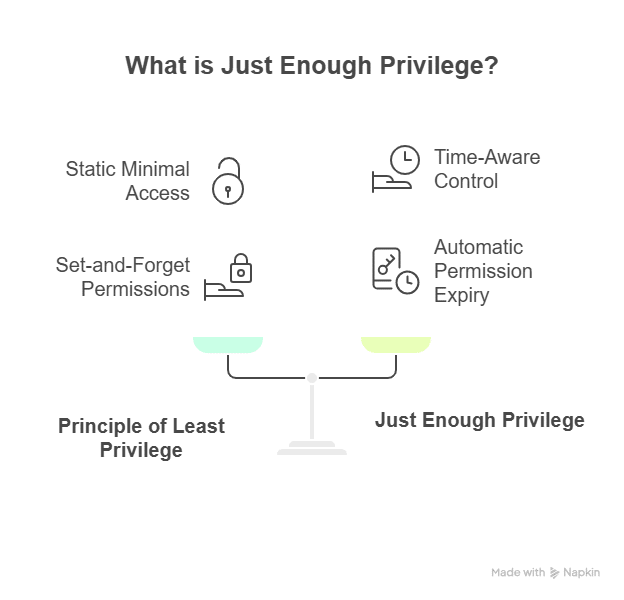
Just Enough Privilege (JEP) grants users or systems the exact access they need to perform a specific task, and only for the duration that access is required. Once the task is complete, permissions automatically expire, whether that task is triggered by a developer or an automation bot. This approach keeps exposure short-lived and contained, limiting how much damage a compromised human or machine identity can cause, while eliminating standing access.

Where the principle of least privilege (PoLP) focuses on static, minimal access, JEP adds time awareness to that control. It avoids the trap of “set-and-forget” permissions that accumulate over time. While JIT access ensures temporary access at the right time, it doesn’t always guarantee the minimum scope unless paired with least-privilege policies. JEP unites both, enforcing the right level of access for the right time and scope. 

Why Just Enough Privilege Matters

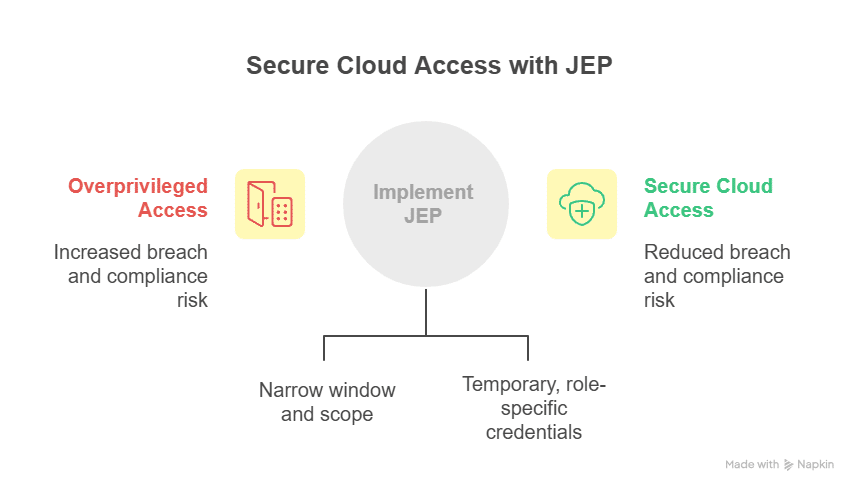
Overprivileged access is one of the easiest ways to increase breach likelihood and compliance exposure, a challenge that cloud PAM solutions are specifically designed to solve. In many security incidents, compromised credentials, not software flaws, were the primary entry point. Excess permissions give attackers room to escalate privileges and linger unnoticed.

The problem has grown with the rise of identity-based attacks. Phishing campaigns, token theft, and shadow admin roles exploit the growing complexity of access controls. In cloud environments, non-human identities (NHIs) such as service accounts, workloads, and automation tools now outnumber human users by almost 80 to 1, creating a new class of unmanaged risk. Each of these identities can authenticate or modify configurations, often with privileges far beyond what’s required. 

JEP addresses these challenges by narrowing the window and scope of access. When privileges are both minimal and time-bound, lateral movement within systems becomes harder, and insider misuse is limited. Temporary, role-specific credentials ensure engineers can deploy and troubleshoot without leaving long-lived permissions behind.

While frameworks such as NIST SP 800-53, ISO 27001, and SOC 2 don’t explicitly define ‘Just Enough Privilege,’ they require enforcement of least privilege and controlled access; principles that JEP operationalizes in practice.

Examples of Just Enough Privilege in Action

Just Enough Privilege works best when applied to everyday workflows, not just theoretical policies. The goal is to make access feel more natural for engineers, keeping risk exposure as minute and short-lived as possible. A few scenarios where JEP delivers that balance:

Temporary Read-Only Access for DevOps Engineering

Picture a DevOps engineer investigating a production issue in AWS; logs aren’t updating, and the team suspects a problem in an AWS S3 bucket. The team needs to trace what’s missing and confirm the source of a failed deployment to get the service back online. Instead of granting broad or standing access to the bucket, the engineer requests a temporary, read-only session through a cloud-native access management platform like Apono. Now, they can review objects, verify log flow, and confirm the fix without touching or modifying data.

Once the time window expires, that access quietly expires on its own. The engineer must re-request access if further review is needed, creating a natural audit trail and ensuring access doesn’t persist longer than required. It’s the same agility engineers expect, but with zero-trust discipline built in by design.

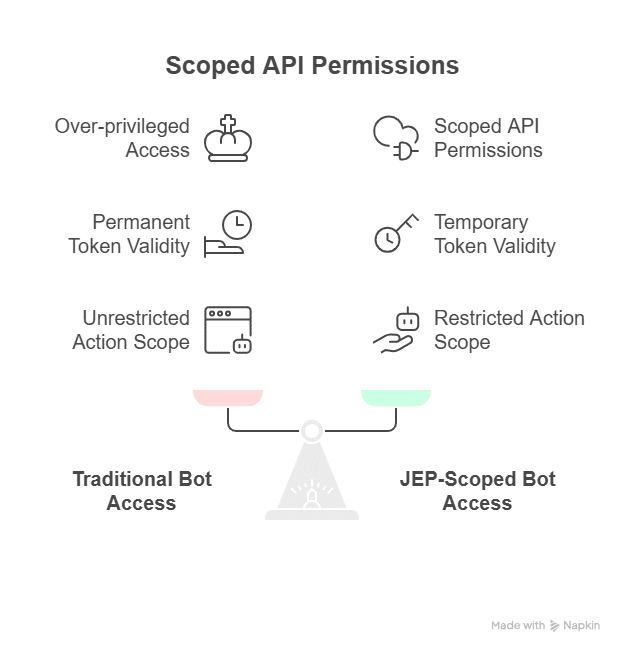
Scoped API Permissions for a Deployment Bot

The biggest NHI risks often come from automation itself. Bots and service accounts rarely request less access; rather, they just inherit whatever’s easiest to configure. JEP helps right-size that by enforcing temporary, scoped credentials for every task.

A CI/CD deployment bot is responsible for updating Kubernetes configurations during a release. Traditionally, such bots are over-privileged with full cluster or repository access to avoid friction in the build process. With JEP, you can define scoped API permissions that limit the bot’s actions and where they can be used.

In this setup, the bot gets a token tied to one pipeline instance, which is valid for the duration of that deployment run. It can update specific YAML configurations or apply manifests, but can’t read secrets or access unrelated namespaces. Once the job is completed, automation will immediately revoke the token. 

Limited Credentials for a CI/CD Pipeline Build Job

Pipelines are another common blind spot. These non-human actors perform critical steps in delivery but often use static secrets that live in plain text or config files.

Consider a build job that compiles code, runs tests, and pushes container images to a private registry, a core component of most CI/CD best practices. Normally, that step depends on long-lived credentials buried in an environment variable somewhere. 

With JEP, the pipeline gets a short-lived token created just for that job. It does exactly what’s needed (authenticating and pushing a single image) and disappears the moment the build wraps up. 

This approach removes the need for static credentials stored in environment variables or config files, common targets for supply chain attackers. It simplifies compliance reporting, since ephemeral credentials can be tied to defined owners, scopes, and expiry events within your audit logs. The result is a tighter control loop that protects the pipeline without slowing continuous delivery.

Scoped API Access for a Kubernetes Automation Bot

A Kubernetes automation bot might be used to apply configuration updates or manage secrets during runtime. Instead of giving it cluster-wide admin privileges, JEP enforces namespace-level access with an expiry that matches the deployment window.

During a deployment, the bot’s token allows write operations only within a specific namespace and only for the resources defined in the manifest. Once the update completes, automation systems revoke the token. Even if an attacker intercepts that token (a common vector in man-in-the-middle attacks), its scope and validity are too narrow to exploit.

Beyond reducing the attack surface, this approach brings operational transparency. Security teams can trace every privilege grant and expiry event, while DevOps teams maintain seamless automation.

5 Best Practices for Implementing Just Enough Privilege

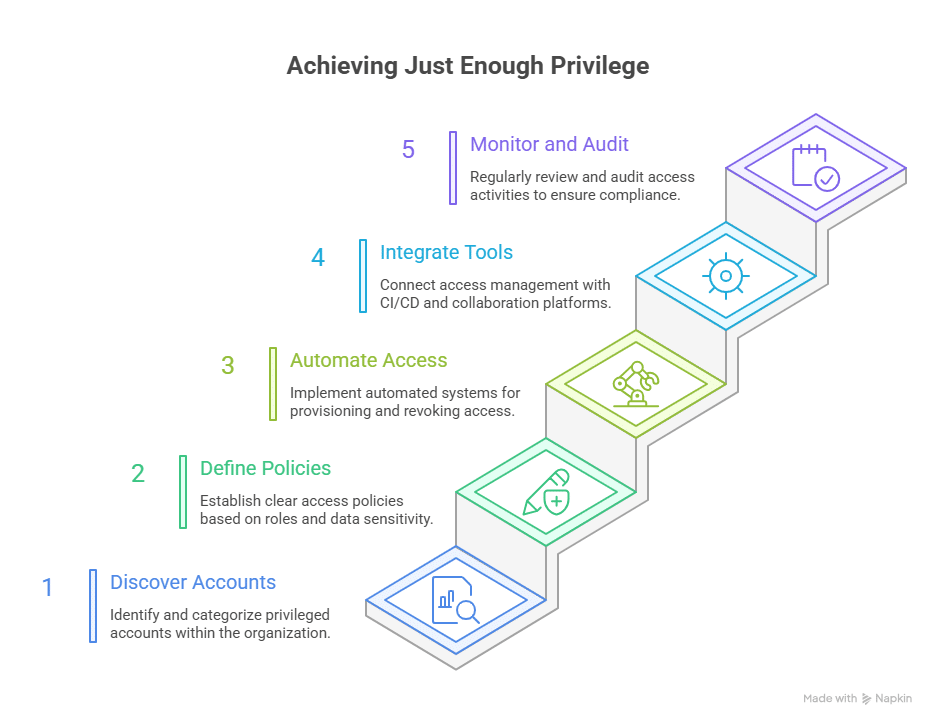
Applying Just Enough Privilege requires a structured and continuous approach. It’s not just about limiting access but doing it intelligently so that productivity isn’t lost in the process. Below are five practical ways to embed JEP into your environment.

1. Discover and Classify Privileged Accounts

Start by identifying all identities within your environment, both human and non-human, to control NHI privilege sprawl. You can’t secure what you don’t know. Map out service accounts, CI/CD tokens, API keys, and user credentials across systems and cloud providers. Classify each by its access level and business function, which helps expose hidden or orphaned accounts that often carry outdated permissions.

2. Define Access Policies by Role and Sensitivity

Once you know what exists, define who needs access to what, when, and why. Build access policies that align with least privilege principles but include time-based controls. For example, a database administrator might need elevated access only during maintenance windows, while an automation script may need it for a single job. Document these patterns clearly to maintain consistency and accountability across teams.

3. Automate Access Provisioning and Revocation

Manual access management rarely scales. Automating how privileges are granted and revoked ensures JEP works as intended. This kind of automation also reduces friction across engineering and project management workflows, freeing teams from manual approval loops while keeping permissions tightly controlled. Cloud-native access management platforms like Apono can enforce contextual, time-bound, and scoped access without constant admin involvement. When engineers request permissions, the system should automatically provision the right level of access and revoke it once the task is complete. This approach reduces friction and removes the human error often tied to privilege sprawl.

4. Integrate with CI/CD and Collaboration Tools

The best JEP systems blend into how your teams already work. Integrate privilege workflows into your CI/CD pipelines, Slack, or Teams channels. Now, engineers can request and approve access within familiar environments or directly through the CLI. Adopting becomes natural rather than forced when identity and access governance are built into daily workflows.

5. Monitor and Audit Regularly

Implement continuous monitoring to track how privileges are used, when they’re requested, and whether they’re still justified. Use logs and audit trails to detect factors like anomalies or privilege drift. Reviewing this data regularly helps refine access policies and align with compliance requirements such as SOC 2 and NIST SP 800-53.

Balancing Agility and Security with Apono

Every organization walks a fine line between agility and control. Engineers need fast access to deploy and deliver without waiting for approvals. Yet those same permissions, if left standing, quietly widen the attack surface. A single overprivileged account or forgotten service token can undo months of good security practice.

Apono helps teams enforce Just Enough Privilege (JEP) by automating how access is requested, approved, and revoked. With Apono, you can grant the right access to the right entity for as long as needed, without slowing down engineering workflows. Apono ensures security becomes invisible to the developer, but powerful enough to protect the entire organization. Deploy Apono in under 15 minutes and integrate it seamlessly with your cloud and CI/CD stack, then you’re ready to eliminate standing access and enforce least privilege at scale. 

Get a demo to see how Apono helps you prove compliance effortlessly while keeping least-privilege access fully automated.

A Critical HashiCorp Vault Flaw Shows Why Authentication Alone Isn’t Enough

If you work anywhere near identity or secrets management, you probably noticed the spike of chatter around HashiCorp Vault this week. A newly disclosed vulnerability in the Vault Terraform Provider revealed something no one wants to hear about a system built to protect your secrets:

Attackers could bypass authentication and walk into Vault without valid credentials.

For a tool meant to guard API keys, encryption keys, production database passwords, and the crown jewels of an organization, that’s about as serious as it gets. And while HashiCorp has issued fixes, the bigger story isn’t just about patching. It’s about what happens when your authentication layer fails entirely.

That’s the part security teams can’t afford to ignore.

What Happened With the Vault Terraform Provider

Here’s the quick version of the issue without getting stuck in the weeds.

A vulnerability (CVE-2025-13357) was found in the Vault Terraform Provider versions 4.2.0 through 5.4.0. The problem centered around Vault’s LDAP authentication integration.

The Terraform Provider incorrectly set a configuration parameter called deny_null_bind to false by default. That mistake meant Vault would accept LDAP authentication attempts even if the password field was empty.

Combine that with the fact that many LDAP servers still allow anonymous (null) binds, and you get a dangerous scenario where someone could authenticate into Vault without providing any legitimate credentials.

Once inside, an attacker could potentially access whatever secrets or policies their “authenticated” identity was allowed to reach.

HashiCorp’s patch fixes the defaults and tightens how Vault handles LDAP binds, but it’s a reminder that tiny auth configuration gaps can have huge consequences—especially in infrastructure built to hold sensitive secrets.

HashiCorp’s official advisory and updates are here:
https://github.com/hashicorp/terraform-provider-vault/security/advisories/GHSA-mf9x-c6g3-3pgj

What You Should Do Right Now

The remediation guidance isn’t complicated, but it is urgent.

• Update to Vault Terraform Provider v5.5.0
• Upgrade Vault to Community Edition 1.21.1 or Enterprise 1.21.1, 1.20.6, 1.19.12, or 1.16.28
• Explicitly set deny_null_bind = true in any LDAP auth configuration
• Review old Terraform modules and apply any necessary changes

This closes the specific vulnerability. But it doesn’t solve the underlying problem: authentication systems aren’t perfect. They fail, they get misconfigured, and attackers are very good at finding the cracks.

So the real question is what happens next time an authentication layer breaks.


Why A Single Control Can’t Protect Privileged Access

Identity is the front door to every environment today. But no matter how strong your SSO, MFA, PAM, or LDAP setup is, it’s still one layer. And every layer can fail for reasons you don’t expect.

Misconfiguration. Default parameters. Outdated modules. Human error. Vendor bugs. All of these routinely show up in post-incident writeups.

That’s why organizations need a defense-in-depth approach to privileged access. Patching is important, but once an attacker gets past authentication—whether through a flaw, a leaked credential, or a phishing attack—the only meaningful protection left is how much privilege is actually available.

If everything is open by default, a single auth failure turns into a breach.

If access is limited, temporary, and scoped, an auth failure is just another log entry.

This is where Zero Standing Privilege comes in.

How Zero Standing Privilege Reduces Access Risk

Zero Standing Privilege (ZSP) is simple in concept: no identity—human, machine or agent—should hold ongoing, always-on access to sensitive systems.

Instead, access is:

• Granted Just-in-Time
• Scoped to the specific task
• Automatically expired

You don’t leave powerful permissions sitting around “just in case.” You don’t assume someone should keep access forever. And you don’t assume authentication can’t be bypassed.

ZSP flips the model so that even if an attacker (or a misconfiguration) gets someone inside, there’s nothing meaningful waiting there.

For Vault specifically, ZSP dramatically shrinks the risk a flaw like this can create.

How Zero Standing Privileged Would Have Minimized This Vault Exposure

Let’s translate ZSP into the Vault scenario.

No permanent authentication paths
With JIT access, LDAP or Vault auth methods aren’t left open all day. They’re created only when needed. A misconfigured null-bind isn’t exploitable if the identity pathway is normally closed.

Least privilege becomes the default
JIT access requires explicit details: who needs access, to what, and for how long. Anonymous or null-bound access simply doesn’t fit into that model.

No standing tokens or long-lived roles
Even if someone got into Vault through the LDAP flaw, ZSP removes long-lived tokens or roles they could use. Getting inside doesn’t equal getting privileges.

This is why ZSP is increasingly becoming the backbone of modern access security strategies—because authentication can and will break, but privilege shouldn’t be sitting around waiting to be abused.

How Apono Helps Secure Access to Vault

Even when teams believe in ZSP, actually implementing it for Vault is another story. Vault is powerful but complex, and secrets sprawl across teams, environments, and automation.

Apono helps organizations put ZSP into practice for HashiCorp Vault and other vaulting systems.

Here’s what Apono enables:

• Discover Vault secrets and keys across environments
• Broker JIT access to those secrets through controlled access flows
• Ensure users only see sensitive information at the exact moment they need it
• Prevent exposure of static credentials
• Cut out manual secret sharing entirely
• Remove long-lived access paths that an attacker could exploit

Instead of trying to harden every pathway into Vault and hope nothing slips through, Apono eliminates standing access so that no secret store is ever wide open.

You get a defense-in-depth approach: authentication is a gatekeeper, ZSP is the safety net, and Apono operationalizes both.

The Bigger Lesson: Authentication Can Fail, Privilege Shouldn’t Be Permanent

The Vault Terraform Provider flaw isn’t the first authentication bypass we’ve seen, and it won’t be the last. Even well-run providers ship with risky defaults. Even well-managed infrastructure teams miss parameters. Even the most mature organizations have blind spots.

The real question is what damage can be done when authentication fails.

With ZSP in place, the answer is: not much.

By removing standing privileges, limiting scope, and using time-bound access, organizations can absorb authentication failures without turning them into full-blown breaches.

If this Vault incident has you rethinking your own privileged access guardrails, now is a good time to evaluate how your organization handles standing access, secret exposure, and high-risk roles. Our Privileged Access Buyer Guide and RFP Checklist can help you identify where to start and what modern ZSP-ready solutions should offer.

Authentication is one layer. ZSP is the safety system underneath it. And as incidents like this show, you need both.

Rethinking privileged access after this incident?
Grab the Buyer Guide + RFP Checklist to compare modern ZSP solutions and tighten your guardrails.

strengthen your access guardrails without slowing teams down

Top 10 NHI Management Tools in an AI World

In today’s AI-driven world, machine identities are multiplying faster than humans can manage them. Every API key and automation script is a digital identity, often with standing access privileges that attackers can exploit through leaked credentials or misconfigured policies.

Recent research shows that non-human identities (NHIs) now outnumber human users by more than 80:1 across enterprise cloud environments. Yet, traditional IAM platforms focus on humans, not the millions of agents and service accounts powering modern software delivery.

NHI management tools are changing the landscape, bringing lifecycle automation, Zero Trust, and least privilege enforcement to the table. 

What are NHI management tools?

Non-human identity (NHI) management tools discover and monitor machine identities: the bots, APIs, service accounts, microservices, and Agent2Agent processes interacting with your systems. Like human users, they often rely on service principles and certificates to authenticate workloads and CI/CD pipelines. But unlike humans, they often operate autonomously and at a massive scale, making governing them an equally huge challenge. 

NHI management tools integrate with cloud IAM systems and CI/CD platforms to dynamically adjust access scopes and programmatically rotate credentials. By managing permissions dynamically and in real time, NHI management tools eliminate standing access and ensure every agent and API operates under the principle of Zero Trust.

Types of NHI Management Tools

The NHI management landscape is broad, with different tools solving different layers of the identity problem. The best platforms combine features from multiple categories to unify discovery, access, automation, and auditability. Different types include:

Secrets and Credential Management Tools

These solutions secure the keys, tokens, and certificates that machine identities use to authenticate. They automate credential rotation and detect hardcoded secrets in source control (e.g., GitHub and GitLab).

Just-In-Time (JIT) and Access Governance Tools

JIT access management tools grant permissions dynamically: only when needed and for a limited duration. These solutions eliminate standing access and integrate with human-in-the-loop workflows or policy automation. Leaders in this category bring JIT and Just-Enough Privilege (JEP) to both human and non-human identities across cloud-native environments.

Visibility and Risk Analytics Platforms

These platforms provide continuous visibility into who (or what) can access which resources. They map permission sprawl and detect over-privileged machine identities, flagging anomalous access behavior. Some emerging solutions also leverage AI pen testing to simulate attacks by autonomous agents, uncovering hidden privilege escalation.

Machine Identity and Certificate Management Tools

Focused on the lifecycle of digital certificates and keys, these tools prevent outages and credential-related breaches by automating machine identity lifecycle management. The best solutions facilitate automated certificate enrollment via APIs or PKI integration. 

Benefits of NHI Management Tools

  • Enforced Least Privilege & JIT Access: Grant time-bound, context-aware permissions to eliminate standing access and minimize identity-based attack surfaces.
  • Continuous Compliance: Simplify SOC 2, HIPAA, GDPR, and CCPA audits with automated logs, approval trails, and revocation workflows.
  • Complete Visibility: Centralize identity data across clouds, pipelines, and AI environments to detect over-privileged or stale credentials.
  • Stronger Security Posture: Prevent credential misuse, man-in-the-middle attacks, privilege escalation, and lateral movement through automated rotation and least-privilege policies.
  • Faster Operations: Replace ticket-based access requests with self-service, policy-driven automation, reducing friction for DevOps and security teams.
  • Automated Key Rotation & Revocation: Ensure short-lived credentials to reduce the risk of token misuse and standing access. 

Key Features to Look For in an NHI Management Tool

Choosing the right NHI management platform means finding one that delivers 

  • Comprehensive Identity Discovery: Automatically detect and inventory all non-human identities, including bots, APIs, and service accounts created through AI code generation, across cloud and CI/CD environments.
  • Secrets & Credential Lifecycle Management: Securely store, rotate, and revoke keys, tokens, and certificates to eliminate hardcoded or expired credentials.
  • Just-In-Time (JIT) & Just-Enough Access (JEA): Grant permissions dynamically and revoke them automatically once tasks are complete, minimizing standing access.
  • Policy-Based Access Governance: Define and enforce access policies based on role, context, and environment for consistent compliance and zero-trust enforcement.
  • Continuous Monitoring & Auditing: Track access requests, approvals, and privilege escalations in real time with automated logs and audit-ready reporting.
  • Integrations with DevOps & Cloud Stacks: Connect seamlessly with AWS, Azure, GCP, Kubernetes, GitHub, and automation workflows via API or ChatOps.

10 Top NHI Management Tools 

1. AppViewX

AppViewX is an enterprise-grade machine identity and automation platform designed to secure and orchestrate digital certificates and IoT identities across multi-cloud infrastructures.

Main Features:

  • Crypto-agnostic security, supporting PKI, HSM, and key vault integrations
  • Integrates with CI/CD pipelines and ITSM tools for continuous compliance
  • Automates issuance, renewal, and revocation of SSL/TLS certificates and SSH keys

Price: By inquiry. 

Review: “The best things are [the ease] of onboarding servers [and] management of certificates.”

Best For: Enterprises managing large volumes of digital certificates and IoT identities.

2. Apono

Apono is a cloud-native access management solution built to secure both human and non-human identities (NHIs) through automated Just-In-Time (JIT) access and least-privilege enforcement. Designed for DevOps-driven organizations, Apono removes standing permissions across cloud, SaaS, and data resources without slowing developers.

Main Features:

  • Automated Just-In-Time (JIT) Access Flows: Dynamically grant and revoke permissions for both human and machine identities based on contextual policies.
  • Auto-Expiring Permissions: Eliminate risky standing access by ensuring every permission has a defined time-to-live.
  • Break-Glass and On-Call Flows: Empower teams to resolve production issues quickly and securely with pre-approved emergency access.
  • Granular Access for NHIs: Discover, classify, and govern non-human identities, such as service accounts and API tokens, across multi-cloud environments.

Price: Get in touch with the Apono team for tailored pricing.

Review: “As head of IT, it gives me peace of mind when I know that only the right users get proper access to the system’s DB at the right time; with Apono, I don’t need to worry about managing DB privileges since Apono makes sure that the key is automatically revoked upon duration completion.”

Best For: Cloud-native and DevOps-driven organizations that need to enforce JIT and least-privilege access across both human and non-human identities.

3. Entro Security 

Entro is a secrets and machine identity security platform that provides full visibility into where secrets live across code and cloud environments. It continuously monitors them for misuse and privilege escalation. 

Main Features:

  • Uses contextual intelligence to detect suspicious secret usage or credential abuse
  • Works with AWS Secrets Manager, Azure Key Vault, HashiCorp Vault, Kubernetes, and more
  • Consolidates insights from vaults and cloud providers for unified visibility 

Price: By inquiry. 

Review: “Entro has helped us increase the visibility of secrets and take the appropriate actions.”

Best For: Security and DevOps teams that want comprehensive visibility into secrets sprawl.

4. CyberArk Machine Identity Security 

CyberArk’s offering is an enterprise-grade platform providing centralized visibility and control over every machine identity, whether it’s a container, workload, service account, or CI/CD pipeline credential.

Main Features:

  • Integrates with CyberArk Conjur and Secrets Manager for unified control over machine-to-machine authentication
  • Enforces contextual, policy-based access for machine identities
  • Identifies all active and orphaned machine identities across multi-cloud environments

Price: By inquiry. 

Review: “We have automated the detection, sorting, and onboarding of new privileged accounts, freeing up man-hours.”

Best For: Large enterprises already using CyberArk’s PAM needing enterprise-grade control and auditing of machine identities.

5. Aembit

Next up is Aembit, a Workload Identity and Access Management (WIAM) platform that enables secure, policy-based authentication and authorization between applications and services. 

Main Features:

  • Replaces static secrets with cryptographic trust relationships
  • Works natively with Kubernetes, AWS, Azure, GCP, Okta, and major CI/CD platforms
  • Enforces least-privilege access policies for each workload, based on real-time context

Price: Free trial available. $20/client/month for teams and custom pricing for enterprises. 

Review: None available.

Best For: Teams implementing WIAM to secure authentication and authorization.

6. Transmit Security 

As an identity orchestration and authentication platform, Transmit extends beyond user access to include machine identity governance. While best known for passwordless and customer identity solutions, Transmit’s platform also helps enterprises secure and monitor NHIs. 

Main Features:

  • Eliminates password-based authentication for workloads and APIs using secure, identity-bound tokens
  • Generates detailed logs and access reports to align with regulations like SOC 2
  • Enforces least-privilege access based on risk level

Price: By inquiry. 

Review: “[I like the] agility provided for making the changes in the process of authentication and authorization.”

Best For: Organizations looking to unify human and machine authentication through passwordless access.

7. Jit 

Jit is a developer-first security orchestration platform that delivers Minimum Viable Security (MVS) directly within the CI/CD pipeline. It acts as an automation layer across GitHub and AWS, embedding essential security practices like code scanning

Main Features:

  • Monitors AWS roles and permissions to maintain minimal required access across cloud environments
  • Detects and remediates misconfigurations and exposed credentials
  • Prioritizes ease of adoption by embedding security directly into existing DevOps workflows 

Price: The Growth package is $50/developer/month, and custom pricing is available for enterprises.. 

Review: “Jit makes it very easy to integrate security into the development workflow without adding too much overhead.”

Best For: Developer-centric teams seeking to embed security automation directly into their CI/CD pipelines

8. Entrust

As an established player in the digital identity and credential management space, Entrust unifies PKI (Public Key Infrastructure) and certificate lifecycle management. It is well-suited for organizations managing large numbers of NHIs across distributed cloud ecosystems. 

Main Features:

  • Supports advanced cryptography for device, workload, and application identity verification
  • Works with AWS, Azure, GCP, and Kubernetes clusters to ensure consistent certificate policies
  • Automates the issuance, renewal, and revocation of digital certificates

Price: By inquiry. 

Review: “We use Entrust to serve our two-factor authentication needs, and it works perfectly.”

Best For: Enterprises requiring robust PKI and digital certificate lifecycle management.

9. HashiCorp Boundary

HashiCorp Boundary is an open-source secure access management tool designed to control privileged access to critical systems without exposing credentials or managing static network-based access lists. 

Main Features:

  • Authenticates users and applications through trusted identity providers (IdPs)
  • Works with HashiCorp Vault to generate short-lived, just-in-time credentials
  • Supports multi-cloud and hybrid setups with API-driven integration for DevOps workflows

Price: By inquiry. There are Pay-as-You-Go, Flex, and Enterprise Self-Managed options.

Review: None available. 

Best For: Infrastructure and platform teams that want to replace VPN- or SSH-based access with JIT.

10. Securiti 

Last but not least, Securiti is an AI-powered data and identity security platform that helps enterprises automate governance and access across hybrid and multi-cloud environments. While best known for its Data Command Center, Securiti also delivers strong capabilities in machine identity discovery. 

Main Features:

  • Uses artificial intelligence to detect anomalous access behavior
  • Continuously monitors and enforces least-privilege access policies for both users and service identities
  • Enables full visibility into identity-to-data relationships across clouds

Price: By inquiry. 

Review: “I really appreciate how Securiti Data Command provides a holistic view of data posture and security management across the organization.”

Best For: Enterprises seeking AI-driven visibility and governance over how human and non-human identities access sensitive data.

Securing the Next Generation of Identities With Apono

The ratio of machine identities to human users is rapidly growing, transforming identity security into a scalability problem. Every unmanaged credential or bot token increases the risk of breach and compliance failure. 

Legacy PAM and IAM tools weren’t designed for this level of automation. Apono’s cloud-native, API-first approach brings identity governance into the AI era. Apono automates JIT and JEP access flows to minimize privilege exposure without slowing down development pipelines.

Start with a free NHI Cloud Access Assessment to identify privilege risks across your cloud stack and learn how to automate them with Apono.