Apono is now part of 1Password, expanding secure access governance for the AI era

Read More

Use Case

Database Access ManagementWithout Standing Privileges

Give engineers temporary, scoped access to the production databases they need, right from Slack, Teams, or the CLI. Apono, now part of 1Password, grants access for a set window, revokes it on its own, and logs every step. No shared passwords. No permanent roles.

Standing database access puts your most sensitive data at risk

Database access management is how you control who can reach a database, what they can do inside it, and for how long. Your databases hold customer records, payment data, and the business logic your product runs on. That makes them the first place an attacker goes once they get a foothold.

Most teams still manage database access by hand. An engineer needs to debug a production issue, so someone shares an admin password or adds them to a read-write role. The task ends in an hour, but the access stays for months. Multiply that across PostgreSQL, MongoDB, Snowflake, and every cloud database you run, and no one can say who has access to what.

The result is a wide blast radius. One stolen laptop, leaked credential, or compromised identity can reach data that person stopped needing long ago.

How It Works

How Apono automates database access management

Apono replaces shared credentials and standing roles with Just-in-Time database access. Engineers get what the task needs, and nothing stays open after it’s done. Here’s how a database access request moves through Apono:

›
01
Request
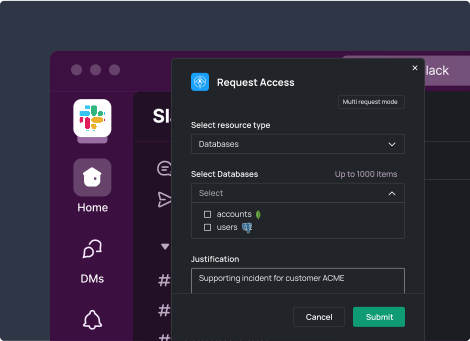
An engineer asks for access to a specific database through Slack, Teams, or the Apono CLI. They pick the resource, the permission level, and a reason.
›
02
Approve
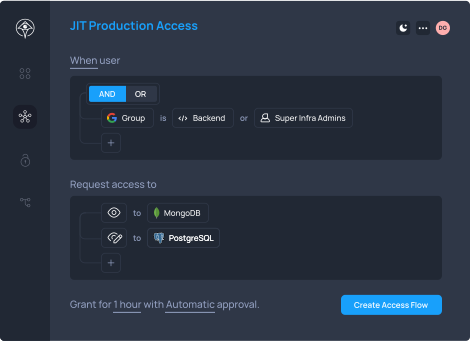
Apono checks the request against your Access Flow policy. Low-risk read access can auto-approve. Write or admin access on production can route to a team lead or the database owner.
›
03
Provision
Apono grants access at runtime, scoped to the database and permission level the task needs. It takes seconds, not a ticket queue.
›
04
Work
The engineer connects with their own identity and does the job. No one shares a password.
05
Revoke
When the access window ends, Apono removes the permission on its own. No standing role or credential is left behind.

Why teams pick Apono as their database access management solution

Automated database access pays off for both the engineer who needs in and the security owner who signs off:

No shared credentials. Engineers connect with their own identity. You stop passing admin passwords around in chat and stop rotating them every time someone leaves.
No standing database roles. Every grant is time-bound and ends on its own. You don’t have to build and maintain a pile of roles across each database engine.
A full audit trail. Apono logs every request, approval, grant, and revocation. You can show who touched which database, when, and why, which supports SOC 2, HIPAA, PCI DSS, SOX, and GDPR audits.
Faster access for engineers. Developers get production database access in seconds through tools they already use, so they’re not stuck waiting on the DevOps team.
Apono is SOC 2 Type II certified.

Customer Story

Database access at DevOps speed

OpenWeb used to route every production database request through its DevOps team. With Apono, developers now request and get scoped database access on their own, and security keeps a record of every grant.

“Apono brings security with DevOps speed.”

“Before we had Apono, developers who needed access to fix something in production or look into the database actually had to connect with the DevOps team to get permissions.”

Yaron Blachman

CTO and CISO, OpenWeb

What to look for in database access management tools

Request channels

Engineers ask for database access in Slack, Teams, or the Apono CLI. There’s no extra portal to learn, so people actually use the governed path instead of asking a teammate for a password.

Request channels

Engineers ask for database access in Slack, Teams, or the Apono CLI. There’s no extra portal to learn, so people actually use the governed path instead of asking a teammate for a password.

Context-aware Access Flows

Access Flows decide who can request which databases, at what permission level, and who approves. Policies can pull context from your identity provider, like Okta or Entra ID, and from on-call tools like PagerDuty.

Context-aware Access Flows

Access Flows decide who can request which databases, at what permission level, and who approves. Policies can pull context from your identity provider, like Okta or Entra ID, and from on-call tools like PagerDuty.

Connector architecture

The Apono Connector runs in your environment and doesn’t read, cache, or store secrets. It can work with the secrets manager you already use, such as HashiCorp Vault or 1Password, so database credentials stay where you trust them.

Connector architecture

The Apono Connector runs in your environment and doesn’t read, cache, or store secrets. It can work with the secrets manager you already use, such as HashiCorp Vault or 1Password, so database credentials stay where you trust them.

Audit, alerts, and fast setup

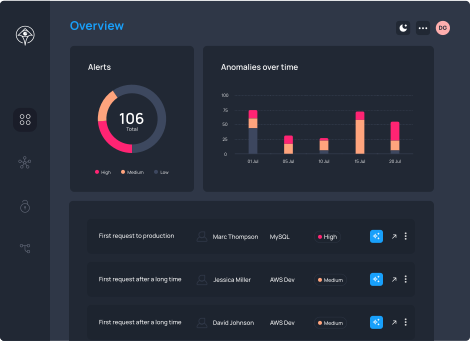
Apono reports on every access event and flags unusual activity for review. Most customers roll out access control across their organization in about two weeks, and database Access Flows come online as part of that rollout.

Audit, alerts, and fast setup

Apono reports on every access event and flags unusual activity for review. Most customers roll out access control across their organization in about two weeks, and database Access Flows come online as part of that rollout.

Database access management FAQs

Database access management is the practice of controlling who can connect to a database, what they can do there, and for how long. Modern database access management grants temporary, scoped permissions on request and removes them when the task ends, instead of leaving standing roles in place.

Look for self-serve requests in tools engineers already use, policy-based approvals, automatic revocation, and a full audit trail. The tool should also cover every database you run, from PostgreSQL and MongoDB to Snowflake and cloud-hosted databases, under one set of policies.

A shared admin account stays active whether anyone uses it or not, and you can’t tell who did what. Apono grants access to a named person for a set window, ties it to their identity, and revokes it on its own when the window ends.

Apono supports:

  • PostgreSQL
  • MySQL
  • MariaDB
  • Microsoft SQL Server
  • Oracle
  • MongoDB
  • Snowflake
  • Databricks
  • Elasticsearch
  • Redis Cloud

It also covers cloud databases on AWS, Azure, and Google Cloud, including RDS, Redshift, Azure SQL, Cosmos DB, Cloud SQL, AlloyDB, and BigQuery.

Access expires when the approved duration ends, unless extended under your configured policy.

No. The Apono Connector runs in your environment and doesn’t read, cache, or store secrets. It can work with your existing secrets manager instead.

Yes. Every request, approval, grant, and revocation is logged. That record supports SOC 2, HIPAA, PCI DSS, SOX, and GDPR programs and makes access reviews faster.

Take standing access out of your databases

Give engineers fast, scoped access to production databases without shared passwords or permanent roles. See how Apono automates database access management on a Zero Standing Privilege model, so you shrink your attack surface without slowing your team down.