10 MCP Security Best Practices

The Apono Team
September 15, 2026
Abstract
- MCP security is the set of controls that govern how MCP-connected agents, clients, servers, tools, credentials, and downstream resources interact.
- Effective protection requires server-side authorization, task-scoped access, and human approval for sensitive actions rather than relying on authentication or model behavior alone.
- Teams should treat tool content and third-party servers as untrusted, restrict network reach, and protect tokens throughout their lifecycle.
- Production readiness depends on continuous inventory, audit trails, revocation controls, and incident response processes that can contain unsafe agent behavior without creating unnecessary access friction.
A natural-language decision can now trigger a real API call, query sensitive data, deploy code, or modify infrastructure. MCP expands the security boundary beyond the connection to the identities, privileges, tools, credentials, and downstream systems behind each action.
That challenge is growing with adoption. Anthropic reported more than 10,000 active public MCP servers by December 2025, alongside 97M+ monthly downloads of its Python and TypeScript MCP SDKs.
As MCP moves from experimental to production, security teams need a model that covers the entire trust chain without making every agent action a manual approval step. The following 10 MCP security best practices focus on the controls that matter most, from identity and authorization to server hardening, credential protection, runtime governance, and auditability.
What is MCP security?
MCP security is about protecting the full trust chain that connects a user’s intent to an action on a real system. That chain can include the user or agent, the MCP host or client, the MCP server, the exposed tool, and the backend resource the tool can access. A weakness at any point can expand what an agent is able to see or do.
MCP standardizes how capabilities are discovered and invoked, but it doesn’t provide an organization’s complete security model. Teams still need to determine which identities may act, what permissions they receive, how long those privileges exist, and when sensitive actions require additional approval.
MCP security extends beyond protocol controls. Security at the authentication, transport and protocol level is important, but so are tool permissions, credentials, execution environments and downstream access.
The trust boundary also varies by deployment. A local stdio server is running inside the host’s local environment and inherits many of the host’s risks, while a remote HTTP server creates network, authentication and authorization boundaries between the client and server.
10 MCP Security Best Practices
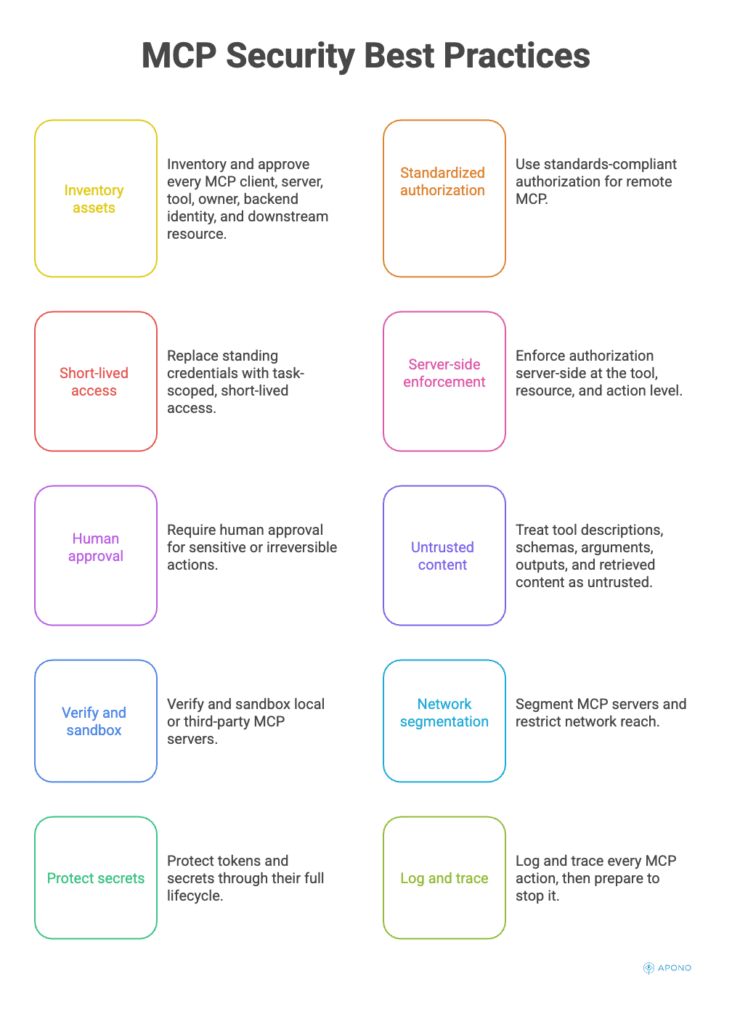
1. Inventory and approve every MCP client, server, tool, owner, backend identity, and downstream resource
Start by making the MCP environment visible. Maintain an inventory of approved clients, servers, exposed tools, their owners, the identities they use, and the systems those tools can ultimately reach. Include both centrally deployed services and MCP servers developers install locally.
Assign each discovered component an owner and risk classification. A tool to fetch documentation should not be analysed in the same way as a tool that can change production infrastructure.
Security teams can use this inventory for access reviews, incident response, and policy enforcement. Without it, you may know that an MCP server exists without understanding the permissions or downstream blast radius attached to it.
2. Use standards-compliant authorization for remote MCP
For remote HTTP deployments that require authorization, implement the authorization model defined by the current MCP specification rather than creating a proprietary token-sharing mechanism. MCP’s authorization architecture follows OAuth conventions and separates the MCP server, acting as the protected resource, from the authorization infrastructure responsible for issuing credentials.
Current MCP requirements include audience-bound access tokens and PKCE protections for authorization-code flows. Servers need to verify that tokens they receive were issued for them. Clients need to know what resource they are being authorised for. Token passthrough, where a server accepts a token and passes it downstream unchanged, is prohibited because it bypasses important audience and privilege boundaries.
This advice is applicable to remote authorisation boundaries. Local stdio servers have a different trust model and should not be simply treated as remote web services.
3. Replace standing credentials with task-scoped, short-lived access
The agent should not be automatically given some highly privileged credential just because the agent may need that permission at some point in the future. Increasing standing access increases the risk of damage from compromised tools, indirect prompt injection, wrong reasoning or agent identity misuse.
Instead, use just-in-time and just-enough access: grant privileges only when a specific task requires them, limit them to the resources and actions needed, and withdraw them when the work is complete.
A Zero Standing Privilege model addresses this risk by moving privilege decisions to runtime. Apono Agent Privilege Guard, for example, is designed to evaluate declared intent and provide task-scoped, ephemeral privileges rather than requiring agents to operate with broad standing permissions.
4. Enforce authorization server-side at the tool, resource, and action level
Never assume that exposing a tool to an MCP client means every authenticated identity should be able to perform every operation behind it. Authorization needs to survive beyond authentication and capability discovery.
Enforce policy where the action is actually executed. Check the requesting identity, requested tool, target resource, requested operation, and relevant context before proceeding. A user permitted to list cloud resources, for example, shouldn’t automatically be permitted to delete them.
Server-side enforcement also prevents security decisions from depending on model behavior or client-side instructions. Tool descriptions and prompts can help an agent choose an appropriate action, but they are not security boundaries. MCP itself notes that implementations still need to have appropriate control of access and authorisation flows around tool invocation.
The same rule applies to application state that spans multiple requests. The 2026-07-28 protocol is stateless, so servers may pass explicit state handles, such as workflow or resource IDs, as ordinary tool arguments. Don’t treat possession of a handle as authorization. Bind it server-side to the verified identity and reject it when another principal presents it.
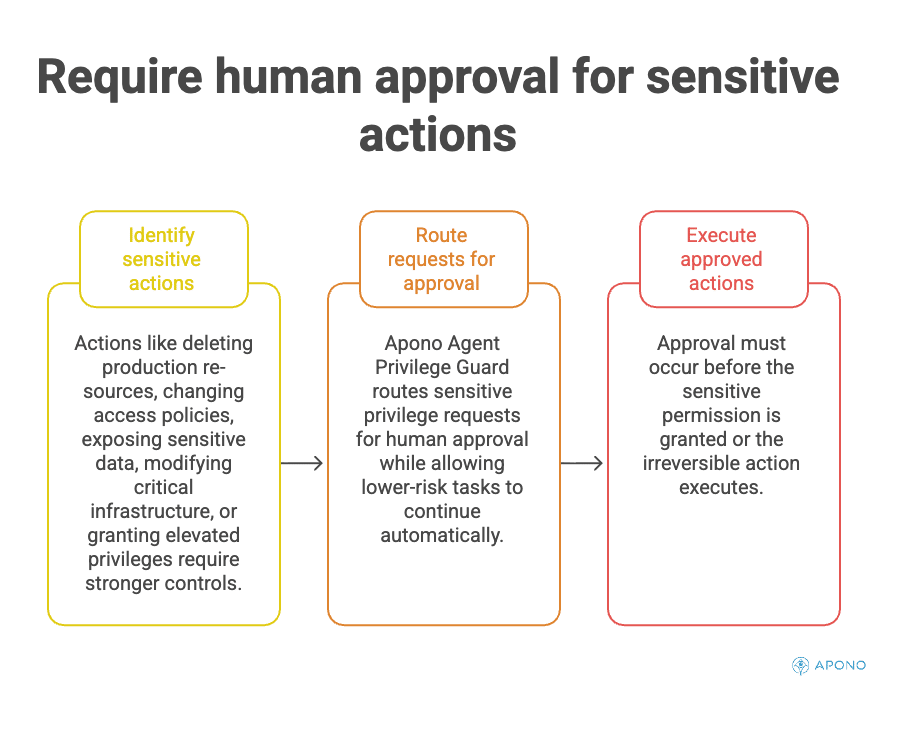
5. Require human approval for sensitive or irreversible actions
Requiring approval for routine, low-risk operations recreates the ticket queues teams are trying to avoid.
Actions such as deleting production resources, changing access policies, exposing sensitive data, modifying critical infrastructure, or granting elevated privileges should trigger stronger controls. Approval should occur before the sensitive permission is granted or the irreversible action executes and not after the system has already changed.
MCP’s current specification emphasizes explicit user consent around tool invocation, but enterprises often need additional business-specific approval logic beyond protocol-level consent and a runtime privilege layer can add that control selectively. Apono Agent Privilege Guard, for instance, can route sensitive privilege requests for human approval while allowing lower-risk tasks to continue automatically.
6. Treat tool descriptions, schemas, arguments, outputs, and retrieved content as untrusted
An agent consumes information from multiple places, and any of it can influence what happens next. Treat tool metadata, parameter values, retrieved documents, external API responses, and tool outputs as potentially hostile input rather than trusted instructions.
Validate arguments against expected types, ranges, destinations, and formats before execution. Validate outputs before passing them into another privileged operation. Most importantly, separate information the model can interpret from policy the model is allowed to change.
Independent authorization and validation limit the impact of tool poisoning and indirect prompt injection. The malicious document or compromised tool may attempt to trick an agent into doing something else, but the request that results should still be subject to independent authorisation and validation controls before it reaches a sensitive resource.
7. Verify and sandbox local or third-party MCP servers
A locally installed MCP server can execute inside a developer’s environment, often with access to local files, environment variables, credentials, or other resources available to its process. Teams therefore need to secure server installation and execution, not only protocol interactions.
Treat third-party servers like other software dependencies. Verify publisher and source, pin or control approved versions, review requested permissions, and establish a process for replacing or removing compromised packages. Where possible give servers limited filesystem, process and credential access rather than the full privileges of the host.
Sandboxing won’t solve every MCP risk, but it reduces the blast radius if server code itself is malicious or compromised. Remote authorization controls cannot compensate for an untrusted local process already executing with excessive host permissions.
8. Segment MCP servers and restrict network reach
An MCP server should only be able to communicate with systems necessary for its intended purpose. Avoid placing every server on a network path that can freely reach internal databases, administrative APIs, metadata endpoints, and production services.
Separate environments and apply outbound network restrictions based on function. A server designed to query a knowledge base, for example, generally has no reason to reach infrastructure-management endpoints. Limit inbound exposure as well, especially for remote servers.
MCP security guidance specifically addresses SSRF during OAuth metadata discovery, where a malicious server can cause an MCP client to fetch URLs that resolve to internal services, localhost, or cloud metadata endpoints. Apply URL and redirect validation and restrict outbound network access from components that perform these requests.
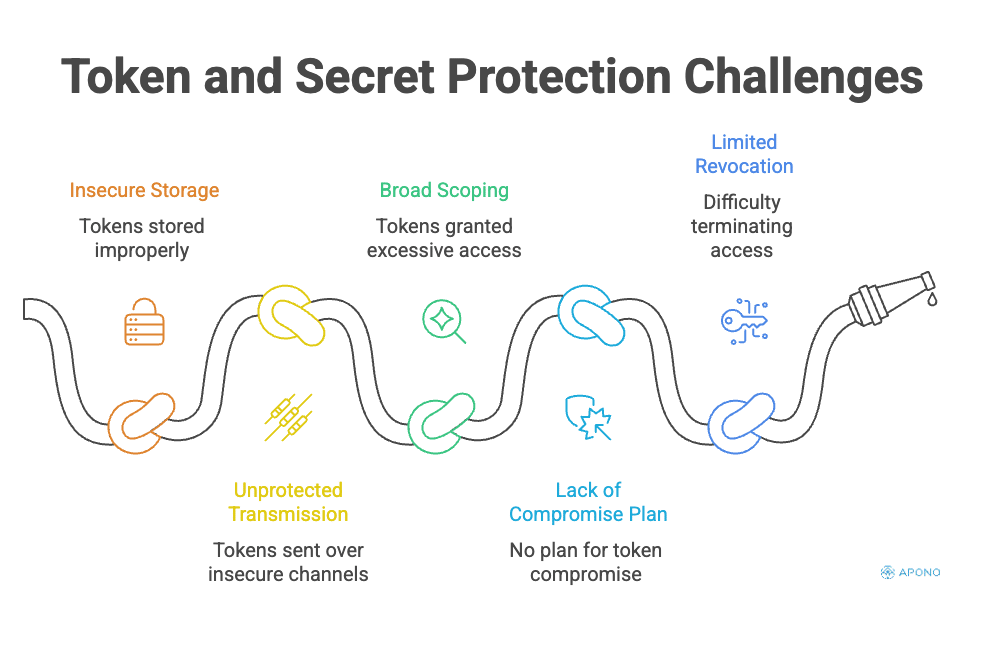
9. Protect tokens and secrets through their full lifecycle
A stolen token gives an attacker whatever access the downstream system associates with it. If a downstream system takes this as proof that a caller is allowed to be there, then whoever has this token now has the same access rights.
Store tokens using appropriate secret-management mechanisms, transmit them only across protected channels, and scope them to their intended audience and purpose. MCP’s current authorization guidance requires secure token storage and recommends short-lived access tokens; for public clients, its security requirements also require refresh-token rotation.
Plan for compromise as well. Define how to revoke affected access, rotate exposed secrets, invalidate credentials, and remove sensitive tokens from logs or caches. A short-lived credential limits the exposure window, but teams still need a tested way to terminate access when a token or MCP-connected component is compromised.
10. Log and trace every MCP action, then prepare to stop it
Security teams need to reconstruct the entire path from intent to outcome. Capture who or what initiated the request, which MCP client and server were involved, the tool and action selected, the target resource, authorization decisions, approvals, privilege changes, and the resulting outcome.
Correlating those events makes it possible to distinguish an ordinary agent workflow from an unexpected privilege escalation or destructive sequence. Logs must be auditable without collecting superfluous sensitive tokens or secrets.
Observability is only useful if teams can act on it. You’ll need to define how to disable compromised servers, revoke temporary and persistent privileges, invalidate credentials, block high-risk tools, stop ongoing workflows. The objective is not merely to understand what an MCP-connected agent did after the fact, but to retain the ability to contain its access when behavior moves outside approved boundaries.
30/60/90-Day MCP Security Rollout
Enterprises can strengthen MCP security without slowing adoption by introducing controls in stages rather than trying to solve every risk at once.
| Timeline | Focus | Key actions |
| First 30 days | Find and contain | Inventory MCP clients, servers, tools, owners, credentials, backend identities, and production connections. Block unknown servers, rotate exposed tokens, classify high-risk tools, and establish baseline logging to understand what is operating and where the greatest exposure sits. |
| Days 31–60 | Enforce identity and isolation | Implement standards-compliant remote MCP authorization, progressive scopes, server-side policies, sandboxing, and environment separation. Require human approval for sensitive actions. Replace broad standing permissions with short-lived and task-scoped access. |
| Days 61–90 | Implement runtime governance | Automate discovery and policy checks, correlate end-to-end traces, red-team tools and indirect injection paths, and test revocation and kill switches. Run an incident exercise to confirm teams can disable a compromised server or tool and terminate its access. Track authorization and policy coverage, standing-privilege reduction, time-to-revoke, denied or escalated actions, unowned servers, and high-risk tools operating without approval. |
Secure MCP Access Without Standing Privileges
MCP can connect an agent to just about anything. Once that connection exists, security depends on what the agent can do through it. If an agent can reach production infrastructure, sensitive data, or privileged APIs, teams need to control who or what is acting, what it can do, how long that access lasts, and whether human approval is required.
Apono is a cloud-native privilege access management platform built on Zero Standing Privilege principles. Its Agent Privilege Guard enforces access at runtime, giving MCP-compatible agents task-scoped, ephemeral privileges instead of broad standing permissions. It evaluates agent intent, routes sensitive actions for human approval, and automatically revokes access when the task ends.
Moving MCP-connected agents into production? Explore Apono Agent Privilege Guard or book a live demo to walk through how intent-based access, approvals, and automatic revocation work in practice.