7 Principles of Zero Trust Identity and Access Management

The Apono Team
April 22, 2026
Many engineering teams treat zero trust as a simple MFA checkbox. They invest in advanced identity providers but still leave environments exposed, with permanent admin roles and manual ticket queues that frustrate developers.
Most teams have adopted the language of zero trust without changing how access actually works. They verify identity at login, then leave broad permissions in place long after the task is done.
Yet 59% of organizations now rank insecure identities and risky permissions as their number one cloud security risk. When you rely on standing permissions, you’re just waiting for a single compromised credential to turn into a full-scale breach.
To survive modern infrastructure, it’s vital to stop treating identity as a static perimeter and start treating every access request as a high-risk, time-bound event.
What is zero trust identity and access management?
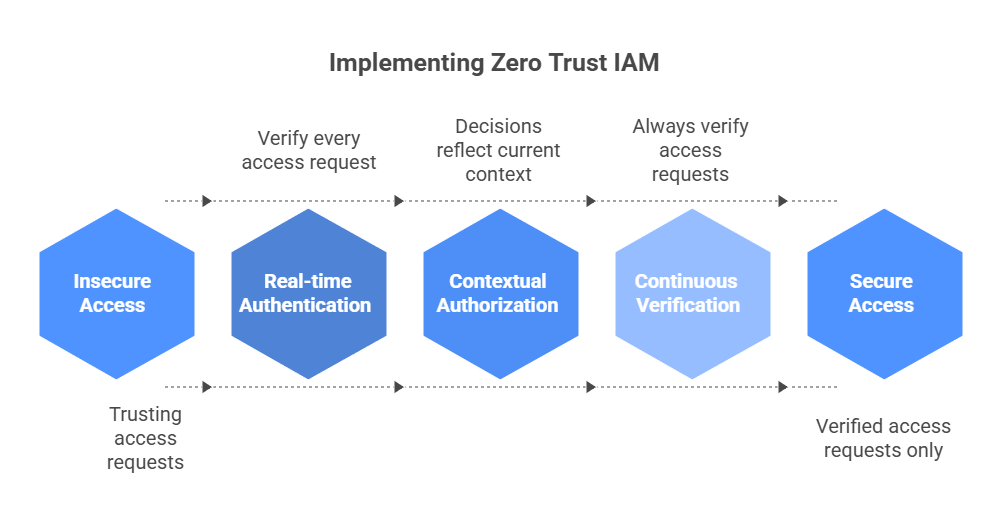
Zero trust Identity and Access Management (IAM) is a security framework based on the principle of “never trust, always verify.” The goal is simple: never trust by default. In this framework, being on the network doesn’t grant you a free pass.
Every access request should be authenticated and authorized in real time, whether it’s a developer requesting temporary access to a production Kubernetes cluster or a CI/CD runner assuming a cloud role. Decisions should reflect the current context, including device posture, workload identity, approval status, and resource sensitivity.
At the center of zero trust IAM is least privilege, a core principle of identity governance. Users and services should have only the permissions they need to complete a specific task, and nothing more.
Rather than leaving elevated permissions in place indefinitely, teams use Just-In-Time (JIT) access to grant them only when needed and revoke them automatically when the task is done. This turns access into a time-bound, context-aware control instead of a persistent entitlement.
In practice, zero trust IAM has to work across the full engineering stack: cloud consoles, Kubernetes clusters, databases, internal apps, SSH workflows, and CI/CD pipelines. It also has to apply the same policy logic to human users, service accounts, runners, and third-party access paths, rather than treating each environment as a separate exception.
Why Zero Trust Identity and Access Management Matters for Cloud-Native Teams
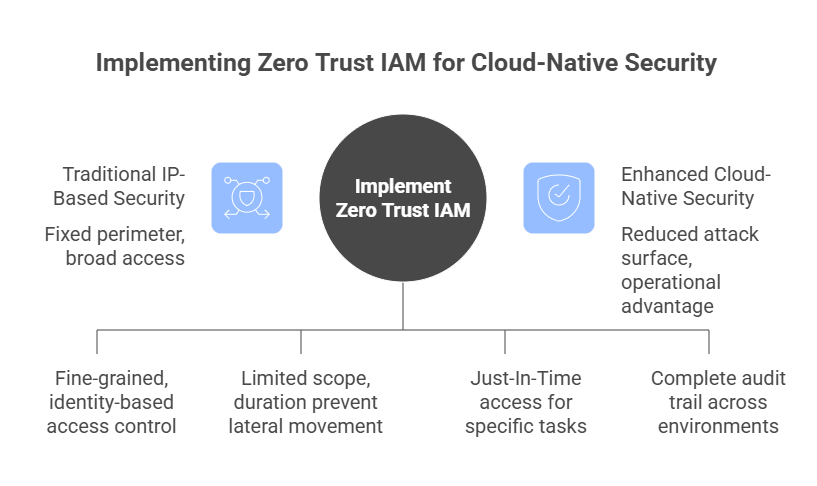
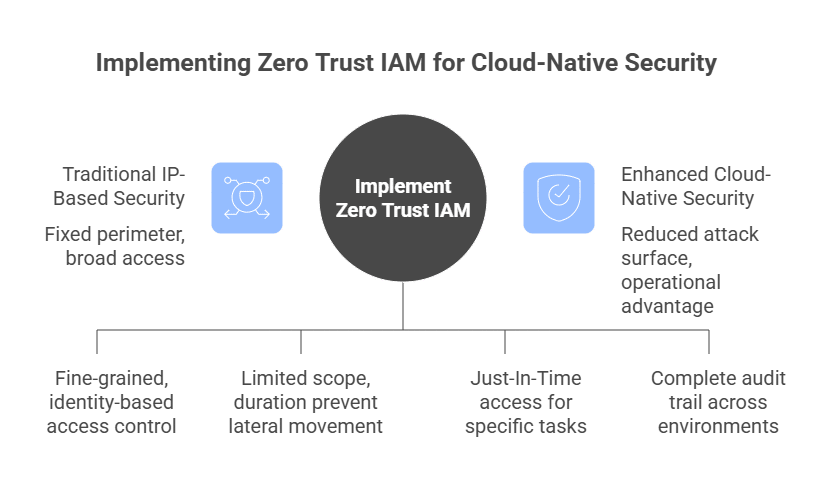
Cloud-native teams need a security model that verifies every connection in real time based on current context. Traditional IP-based security is outdated because a fixed perimeter cannot be relied on, given the constantly changing infrastructure across clouds, Kubernetes, and CI/CD pipelines.
From a security standpoint, zero trust IAM helps contain permission sprawl by replacing broad, static access with fine-grained, identity-based policies. The attack surface is significantly reduced when short-lived tokens are used in place of standing privileges. Even if a credential is leaked, its limited scope and duration prevent attackers from moving laterally across your infrastructure.
Beyond security, there is a massive operational advantage for developers. Cloud-native teams do not just manage employee logins. They manage ephemeral workloads, short-lived build jobs, service accounts, database roles, cross-cloud identities, and emergency production access under pressure. All these factors affect IT service continuity during outages and high-impact incidents.
Traditional IAM often relies on ticket-based security, where a developer might wait days for a manual approval to access a production database. Zero trust IAM supports automated self-service through JIT access, so engineers can request the exact permissions they need for a specific task and receive them quickly if policy conditions are met.
Zero trust IAM solves the headache of compliance and auditing. When access requests, approvals, grants, and revocations are routed through centralized workflows and policy enforcement, teams can build a more complete audit trail across environments. That makes it easier to show who accessed what, when, why, and under what approval path.
7 Principles of Zero Trust Identity and Access Management
Principle 1: Verify Every Identity, Request, and Session
Trust is never granted by default to any user, device, or service. Whether an access attempt comes from inside or outside the network, it must be authenticated and authorized every time.
Relying on “network trust” from a VPN or office Wi-Fi is a dangerous fallacy that doesn’t hold up in a cloud-native world. Once an attacker has gained access to one entry point, they can move laterally across a network by using the “hidden” trust that is eliminated by verifying each session.
That verification mindset is especially important in cloud-native environments, where a single compromised identity can quickly lead to lateral movement and weaken brand protection strategies.
Actionable Implementation Tips
Move away from long-lived session cookies and static passwords. Instead, implement phishing-resistant Multi-Factor Authentication (MFA) and use short-lived, scoped credentials over long-lived secrets or static sessions. These should require re-authentication based on the specific risk or duration of the session.
Principle 2: Enforce Least Privilege by Default
Least privilege ensures that every identity, whether a human developer or a background service, is granted only the absolute minimum permissions necessary to complete a specific task. Least privilege is how you limit the “blast radius” of a breach. If a developer’s credentials are stolen, but their access is restricted to a single non-production database, the impact is minimal. Without these limits, one compromised account can give an attacker keys to everything.
Actionable Implementation Tips
Conduct a comprehensive permissions audit to identify “shadow admins” and overprovisioned roles. You need to move away from generic “Cloud-Admin” roles in favor of granular permissions. By mapping these to documented job functions, you ensure that access is limited to the specific resources a role actually requires.
Principle 3: Replace Standing Permissions With Just-In-Time (JIT) Access
JIT access replaces persistent privilege with temporary elevation. Instead of assigning admin access around the clock, teams grant it only for a defined task, with approvals, scope limits, and automatic expiration built in.
Actionable Implementation Tips
Deploy a JIT access broker that integrates with your SSO. For example, you could use 60-minute temporary tokens for production Kubernetes access. Setting a hard expiration means that stale access doesn’t stay active after the task is finished.
This is where a cloud native access management platform helps operationalize this model by replacing standing permissions with automated, time-bound access workflows across cloud, Kubernetes, databases, and internal systems.
Principle 4: Use Context-Aware Access Policies
Access decisions should reflect real-time signals such as device posture, location, time of day, resource sensitivity, and insights from threat intelligence tools. Identity alone is no longer enough. A valid username and password coming from an unmanaged, malware-infected laptop in a different country should be flagged as high-risk. Context-aware policies allow the IAM system to adapt its strictness based on the current threat level.
Actionable Implementation Tips
Integrate your IAM provider with your Endpoint Management (MDM) software. Create a policy that automatically denies access to production environments if the requesting device is not encrypted or is running an outdated operating system.
Principle 5: Secure Human and Non-Human Identities
Zero trust IAM should apply to non-human identities just as strictly as it applies to human users. Automated infrastructure means non-human identities now have more permissions and higher numbers than the people using them. Because these identities often use static, plaintext secrets, they pose a significant risk. Zero trust must extend to every machine-to-machine interaction.
Actionable Implementation Tips
Eliminate static secrets by using Workload Identity Federation. This allows your CI/CD pipeline or cloud services to exchange a short-lived identity token for temporary cloud permissions, removing the need to store sensitive “secret keys” in your code or configuration files.
Principle 6: Apply Zero Trust Across Cloud, Kubernetes, Databases, and CI/CD
To apply zero trust across the board, a unified identity layer must govern the entire technical stack rather than relying on siloed security for each platform, while complementary practices like continuous threat exposure management help teams validate that cloud-native systems remain secure as environments change. Security is only as strong as its weakest link. If you secure the cloud console but leave backend databases accessible via a shared password, your framework has already failed. Consistency across environments prevents “backdoor” access and ensures that security policies are applied universally.
Actionable Implementation Tips
For internal apps and legacy systems, route access through centralized identity-aware controls where possible. For databases and infrastructure, use short-lived credentials, approval-based elevation, and workload-native identity mechanisms instead of shared secrets.
Using a cloud native zero trust solution gives teams a single way to govern access across infrastructure and applications without forcing engineers through slow, manual ticket queues.
Principle 7: Automate Access Requests, Approvals, and Revocation
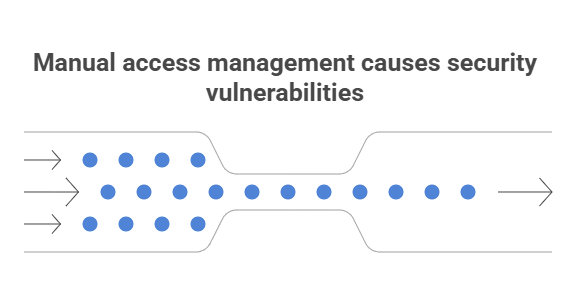
Manual identity management rarely scales well in fast-moving cloud-native environments, which inevitably leads to privilege creep and leaving unnecessary access active indefinitely. Moving to software-automated access solves this by ensuring permissions are revoked the instant they are no longer required. Automation ensures that permissions are granted for legitimate needs and removed the instant they aren’t required, closing security gaps.
Actionable Implementation Tips
Set up ChatOps-based workflows (e.g., via Slack or Teams). A developer can type a command to request access; their manager receives a notification and clicks “Approve,” which triggers an automated script to provision temporary access that self-destructs after the task is complete.
With a cloud native access management platform like Apono, those requests can happen directly in Slack, Teams, or CLI, with approvals, provisioning, and revocation handled automatically.
Make Zero Trust Access Practical for Cloud-Native Teams
Zero trust identity and access management only works when access is continuously evaluated, least privilege is enforced by default, and standing permissions are removed wherever possible. For cloud-native teams, that means controlling access not just at login, but across Kubernetes, cloud infrastructure, databases, CI/CD pipelines, internal apps, and machine identities.
That is the gap many teams still need to close. Zero trust only works when access controls are practical enough for engineers to use and strong enough for security teams to trust.
See how Apono helps teams replace standing permissions with just-in-time, self-serve access across cloud, Kubernetes, databases, and CI/CD.