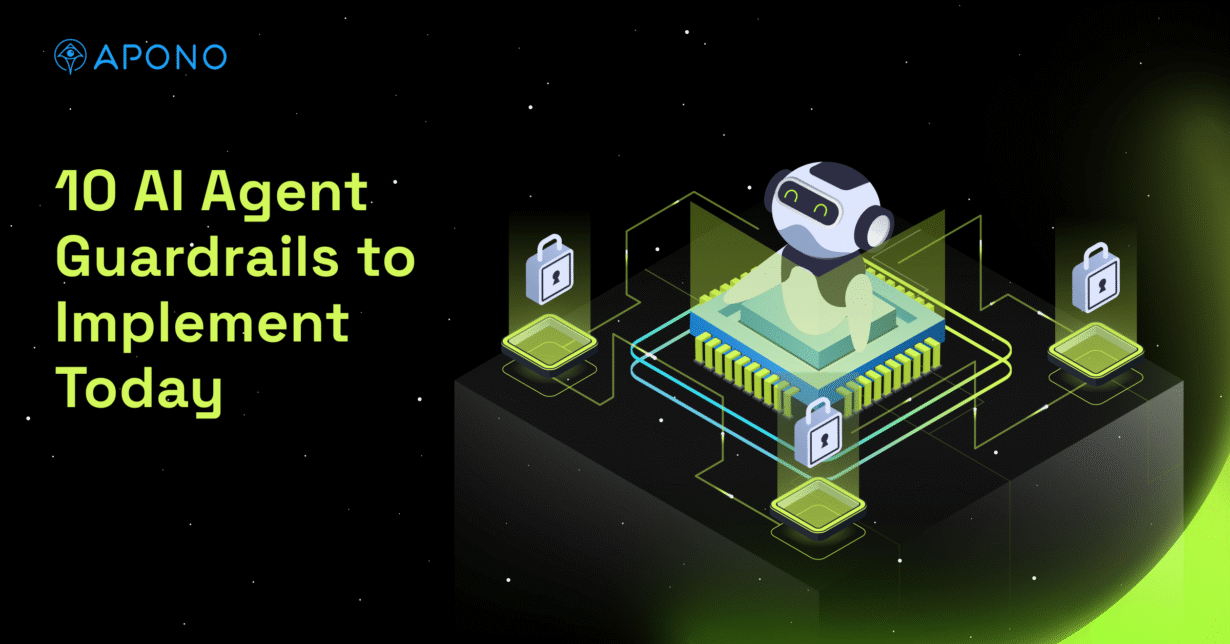
10 AI Agent Guardrails to Implement Today

The Apono Team
July 8, 2026
Abstract
AI agent guardrails are the controls that define what an AI agent can access, which tools it can use, what actions it can take, and when human approval is required. In cloud, SaaS, CI/CD, and production environments, these guardrails are especially important because agents can inherit permissions and affect sensitive resources faster than a human operator could manually review.
This blog covers 10 AI agent guardrails that help teams reduce risk without slowing adoption:
- Build an inventory of every AI agent and what it can access
- Assign every agent a unique identity and owner
- Replace standing privileges with just-in-time access
- Enforce short-lived, dynamically injected credentials
- Apply just-enough permissions to limit blast radius
- Require human approval for sensitive or destructive actions
- Validate agent intent before granting access
- Control which tools, APIs, and MCP servers each agent can use
- Monitor agent activity across tools and infrastructure
- Keep audit logs for every agent request and action
AI agents aren’t just suggesting work anymore. They’re starting to do it. An agent that can act inside cloud or production workflows needs more than prompt-level safety controls. Without AI agent guardrails, agent access can become broader and more permanent than the task requires.
By 2028, agentic AI is expected to be built into 33% of enterprise software applications, up from less than 1% in 2024. That shift puts pressure on the access model. As agents take on more real work, teams need a way to decide whether a request is appropriate before the agent gets access.
In most enterprise workflows, that means moving away from static permissions and toward access granted for the task at hand, then removed when the work is done.
This guide covers the AI agent guardrails teams need to give agents just-in-time, just-enough access before they act, then enforce that scope while they work.
What are AI agent guardrails?
AI agent guardrails are the controls that define how an agent can behave inside a system. They should set boundaries across the full agent workflow, including data access, tool use, permissions, approvals, execution paths, and auditability.
Traditional software usually follows predefined code paths, even when the workflow is complex. AI agents differ because they can select tools, interpret context, and dynamically chain actions based on prompts, retrieved data, and prior outputs. Because agents can act across systems, they should be governed as non-human identities with their own access boundaries, owners, permissions, and audit trails.
If an agent can only retrieve public documentation, the risk is limited. But when an agent is given access and permissions to act within deployment pipelines or change cloud IAM policies, the guardrails need to become much stricter. Agents working near production should not retain standing access. Instead, they should receive narrow, time-bound permissions tied to the task they are performing.
AI agent guardrails should work across several layers: model behavior, data access, tool use, identity, authorization, monitoring, and audit. Prompt filters and output validation can reduce unsafe responses, but they don’t control what an agent can do inside AWS, Kubernetes, GitHub, Snowflake, or a CI/CD platform.
In production environments, the most critical guardrails are identity-aware access controls that determine what the agent can access, what actions it can take, and how long those permissions last.
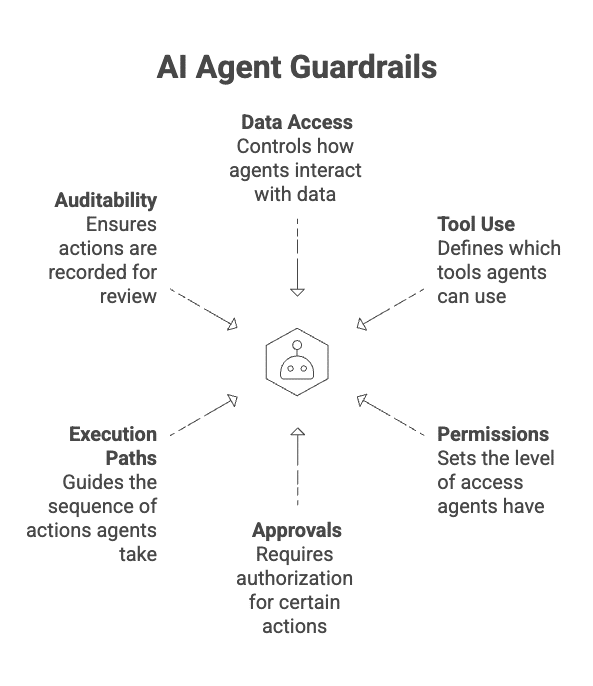
Why AI Agent Guardrails Matter in Cloud and Production Environments
Cloud and production environments carry the highest-impact access for your organization. As teams build out AI agent infrastructure, agents may interact with databases, CI/CD platforms, Kubernetes clusters, logging systems, secrets managers, ticketing systems, SaaS tools, or customer-facing applications.
Plus, the agentic AI crisis is not just about model behavior. It’s about what happens when autonomous systems gain persistent access to systems such as cloud IAM and databases.
That’s why CI/CD access deserves special attention. A small mistake in a deployment workflow can become a production incident if the agent has write access, broad cloud permissions, or the ability to trigger downstream actions. Ultimately, AI agent guardrails reduce that risk without shutting agents out of useful work.
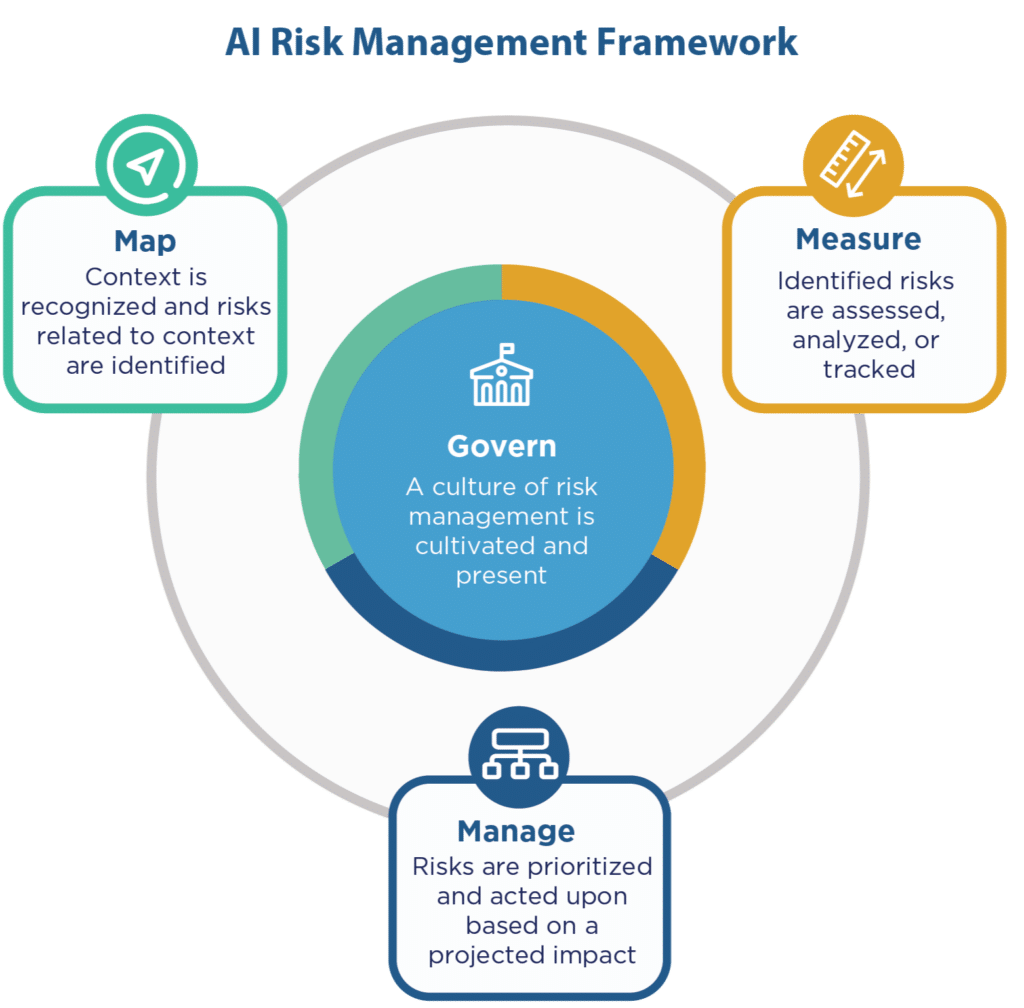
10 AI Agent Guardrails to Implement Today
1. Build an Inventory and Access Policy for Every AI Agent
Start by creating an inventory of every AI agent. The inventory shows the agent’s current state: which systems, tools, data sources, credentials, and permissions are connected to its workflow. The policy defines the desired state:
- What the agent is approved to access
- Which actions it can take and under what conditions
- How long access should last
Without both views, teams can’t reliably detect drift. An agent may start with a narrow purpose, then accumulate access to additional tools, APIs, MCP servers, or environments over time. A written access policy gives security and platform teams a baseline to compare against actual permissions and live behavior.
This policy serves as the control point for the rest of the guardrails, which you can evaluate against it.
2. Assign Every Agent a Unique Identity and Owner
Treat every agent like an accountable identity, not an invisible extension of a developer account. It should not borrow a human user’s credentials, reuse a shared service account, or operate under a generic automation credential.
When multiple agents act through the same identity, teams lose the ability to reliably prove which agent took which action. This weakens incident response, compliance evidence, and access reviews.
Ownership should be just as clear. Each agent needs a technical owner who understands how the agent works and is responsible for keeping its access aligned with its approved purpose.
3. Replace Standing Privileges With Just-in-Time Access
Agents should not keep privileged access open in case they need it later. Standing privileges create unnecessary exposure because the access exists even when no approved task is running. For an AI agent, that can mean production access remains available.
Use just-in-time access instead. The agent should request access when a specific task requires it and lose that access when the task is complete. Instead of pre-provisioning broad roles for agents just in case, teams should create privileges dynamically at request time. That keeps access tied to the task, the resource, and the approved workflow.
For lower-risk tasks, access can be issued automatically under policy, while requests involving sensitive systems should require approval before the agent receives access.
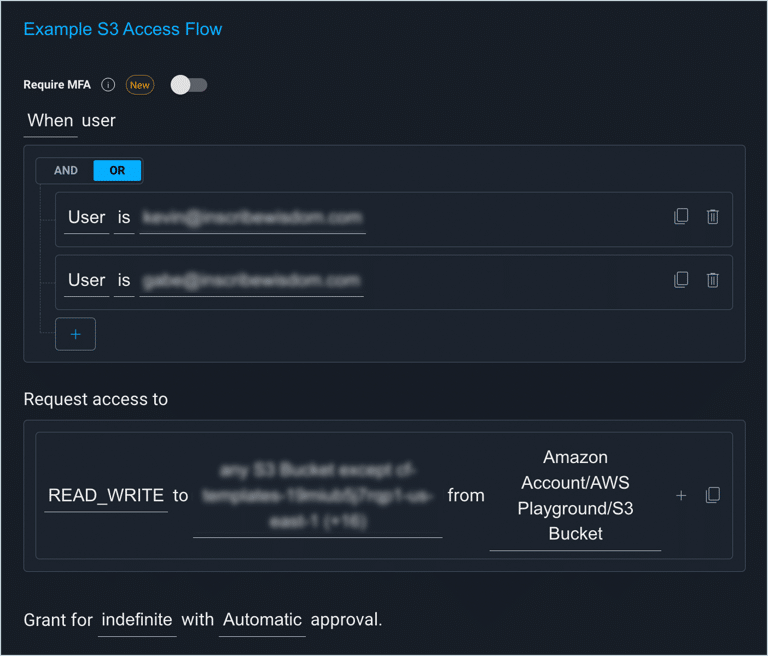
4. Enforce Short-Lived, Dynamically Injected Credentials
Long-lived credentials such as API keys, database passwords, and cloud credentials create durable risk: if they’re exposed, reused, or stored in the wrong place, an attacker may retain access until the credentials are discovered and rotated.
For agents, the safer pattern is to issue short-lived, dynamically injected credentials only when a task requires them. These credentials should match the approved task, flow through an approved access workflow, and expire or be revoked automatically.
5. Apply Just-Enough Permissions to Limit Blast Radius
Temporary access can still be too much access. Just-in-time controls decide when an agent gets access; just-enough permissions decide how much access it gets.
Permissions should be set to match that specific task, not the general system the agent is working in. For example, an agent investigating a failed deployment may need read access to pipeline logs, but not write or admin permissions to take action.
Implement this by defining narrow permission sets for common agent tasks. Separate read, write, admin, export, and delete actions instead of bundling them into broad roles.
6. Require Human Approval for Sensitive or Destructive Actions
Some sensitive or destructive actions should not be approved automatically, even when just-in-time and just-enough access controls are in place. Human approval should be required when an agent requests access that could affect production systems, identity policies, credentials, sensitive data, network controls, or security tooling.
The approval request should provide sufficient context by including details such as the requested resource and the requested permission scope. This helps reviewers make a well-informed decision.
7. Validate Agent Intent Before Granting Access
Intent validation compares the agent’s declared task, requested permissions, and observed actions against policy. The question is “Does this request match what this agent is approved to do?”
For example, if a deployment troubleshooting agent requests read access to CI/CD logs, that may match policy. If the same agent requests permission to modify IAM roles or access production secrets, the request should be denied or escalated.
The goal is not to read the model’s mind, but to confirm that the request and behavior match the approved workflow.
This is especially important because the task can change once the agent starts working. A vague prompt or compromised ticket can push the agent away from the original request.
The task declaration required by an agent should be structured enough for policy evaluation. Compare:
- Too vague – Debug production
- Policy-ready – Read CI/CD logs for failed deployment #4821
The second version gives the access workflow something concrete to evaluate. This guardrail should also apply during the workflow. If an agent moves beyond the approved task, the action should be blocked, escalated, or quickly tied back to the original access request.
8. Control Which Tools, APIs, and MCP Servers Each Agent Can Use
Tool access is part of the agent’s permission model. Broad tool and data access can turn what looks like a narrow workflow into an indirect path to sensitive systems. This is also where third-party risk monitoring matters: agents often connect to external SaaS tools, APIs, plugins, and MCP servers that can expand the organization’s exposure if they’re not governed.
An agent connected to GitHub, Slack, Jira, AWS, Snowflake, Kubernetes, internal databases, and MCP servers has a much wider tool and privilege surface than an agent limited to one approved workflow.
Define an allowlist for each agent. Then, define the scope of what the agent can do within those approved systems. For instance, access to an MCP server should not automatically give the agent access to every tool exposed through that server.
This same rule applies to data. An agent that needs deployment metadata should not receive access to more sensitive data unless the task specifically requires it.
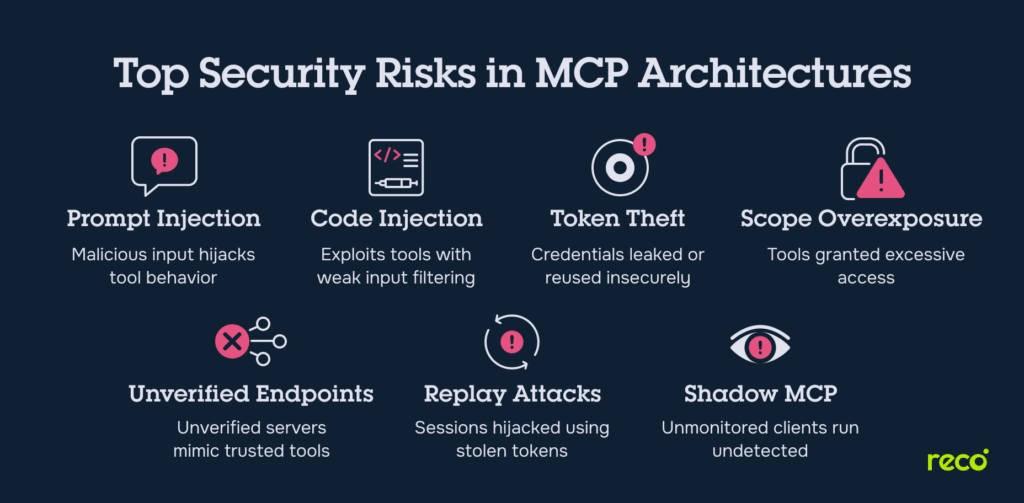
9. Monitor Agent Activity Across Tools and Infrastructure
Agent monitoring should follow the full chain of action. A single task may start in a ticketing system, move through a code repository, trigger a CI/CD workflow, query production logs, and call a cloud API. If those actions are reviewed separately, teams may miss the actual sequence of events.
Implement this by routing agent activity into the same monitoring and SIEM workflows used for privileged access, cloud events, CI/CD changes, and infrastructure activity. Use those logs to watch for signs of compromise or rogue behavior, so teams can respond quickly when an agent starts operating outside its approved scope.
10. Keep Audit Logs for Every Agent Request and Action
Audit logs should show whether each action matched the agent’s approved access policy, and every agent session should leave a clear trail from access request to final outcome. This serves as a durable record that teams can use during incident response and compliance audits.
The record should connect the reason access was granted to what the agent actually did with it. If an agent touched a sensitive system, teams need to see whether the activity matched the approved task and whether anything changed after access was granted.
What to Look for in an AI Agent Guardrails Solution
When evaluating AI agent guardrails, focus on how the solution controls access at the moment an agent acts. Strong AI agent security requires more than prompt filters and model-level controls; it also needs identity-aware authorization for production systems.
Look for a solution that supports:
- Identity-aware controls that govern both human and agentic identities.
- Zero Standing Privilege to prevent agents from keeping persistent access.
- Just-in-time access to grant access only when a specific task requires it.
- Just-enough permissions to limit access to the minimum permissions needed for the action.
- Runtime authorization that evaluates access at the moment an agent acts, instead of relying only on static policies defined in advance.
- Context-aware decision-making that evaluates the human requester, agent identity, task, resource, environment, risk level, business context, and approval status before allowing or denying access.
Apono Brings Zero Standing Privilege to Agentic Workflows
AI agent guardrails are what keep autonomous work from becoming unmanaged production risk. The goal is not to slow agents down, but to make sure every privileged action is temporary, narrow, contextual, approved when necessary, and fully auditable.
Every enterprise using agents in production workflows should be building toward Zero Standing Privilege. Apono is a cloud-native privileged access management platform built on Zero Standing Privilege principles. It helps teams govern human users, service accounts, and agentic workflows with just-in-time, just-enough access that’s created dynamically, scoped to the task, and automatically removed when the work is complete.
With Apono, teams can tailor access to the resource, environment, and risk level involved, then set the access window based on the task. That gives DevOps and platform teams a way to reduce standing privilege while letting users request access through the workflows they already use, including Slack, Teams, or CLI, instead of slow manual tickets.
Ready to secure AI agents without giving them standing access? Explore Apono Agent Privilege Guard to see how runtime privilege controls help teams deploy agents safely, enforce just-in-time access, and keep sensitive actions under control.