How to Detect Shadow AI: 8 Key Steps

The Apono Team
September 2, 2026
Abstract
- Shadow AI is the ungoverned use or deployment of AI tools, integrations, models, and agents across enterprise environments.
- Effective detection requires correlating browser, SaaS, endpoint, cloud, code, identity, API, and audit signals, then mapping each system to its owner, credentials, permissions, data flows, and downstream actions.
- Risk should be prioritized by privilege level, data sensitivity, production reach, autonomy, and potential blast radius, not by tool count alone.
- Useful deployments should move into monitored, least-privilege workflows with task-scoped access, contextual guardrails, human approval for high-risk actions, and automatic revocation.
Security teams have spent years building visibility into unsanctioned SaaS apps, cloud services, and other forms of shadow IT. But shadow AI raises the bar. Discovering an unsanctioned AI app or autonomous agent is only the beginning. Teams also need to determine which identities it authenticates with, what credentials and permissions it relies on, what data it can access, which systems it integrates with, and what downstream actions it performs.
The scale of the challenge is already becoming apparent. IBM’s 2025 Cost of a Data Breach Report found that one in five surveyed organizations experienced a breach due to shadow AI, while only 37% had policies for managing AI or detecting shadow AI.
As AI becomes embedded across SaaS platforms, developer tools, cloud environments, browsers, and enterprise workflows, detection needs to follow a structured process that supports risk-based decisions. Here are eight key steps to detect shadow AI.
What is Shadow AI?
Shadow AI is the use or deployment of AI tools, models, applications, integrations, or agents without the knowledge, approval, or governance of security, IT, privacy, or AI oversight teams.
It doesn’t always involve deliberate policy violations. Often, AI features are embedded in existing tools or connected to enterprise systems within minutes using existing credentials and APIs.
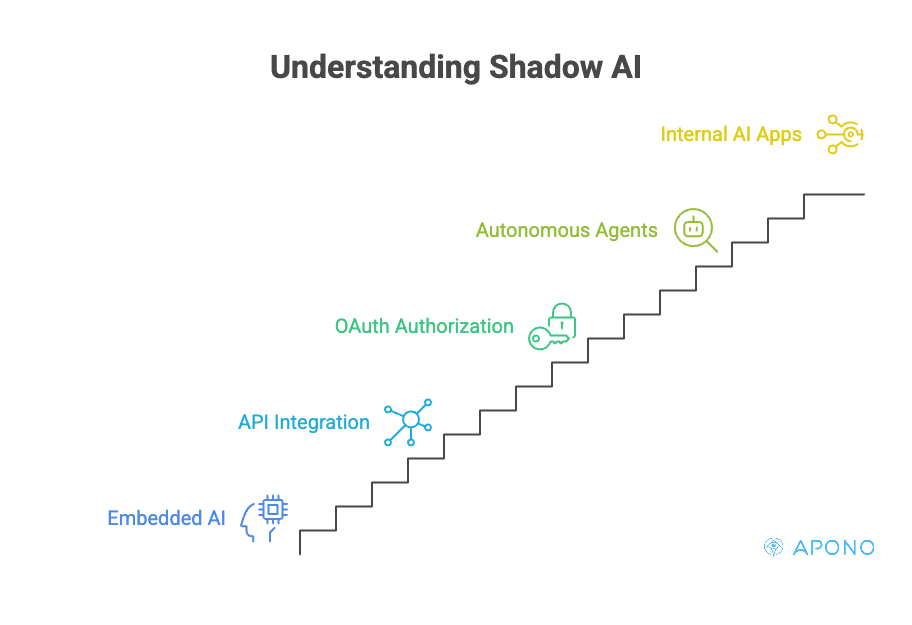
Shadow AI extends beyond an unfamiliar app in the environment. Examples include a developer connecting an AI coding assistant to a private GitHub repository, a marketing team enabling an AI feature in a SaaS platform, an employee authorizing an AI productivity tool through OAuth, or an autonomous agent querying internal knowledge bases and triggering business workflows. It can also include internally developed AI applications connected to cloud resources, production environments, or sensitive data without formal review.
This makes shadow AI a visibility and governance challenge, not simply an inventory problem. Finding an AI app is only the first step. Security teams must determine which identities it authenticates as, what credentials or API keys it uses, which permissions it holds, what enterprise data it can access, and which downstream systems it can modify, invoke, or automate. Without that context, teams may know AI is present but not understand the risks it introduces.
Benefits of Detecting Shadow AI Early
Reduce Sensitive Data Exposure
Many AI tools request access to source code repositories, document stores, messaging platforms, CRM systems, and cloud storage as part of their normal operation. Detecting shadow AI early allows you to identify where sensitive data is flowing before confidential information, intellectual property, customer records, or regulated data is unnecessarily exposed to third-party models or unauthorized AI services.
Identify Excessive and Standing Privileges
AI applications and agents may act with a user’s delegated permissions, an OAuth application’s scopes, or privileges assigned to a service account, workload identity, cloud role, or API credential. Those permissions may be broader than the agent’s current task requires.
Improve Accountability for Agent Actions
As AI agents become capable of executing workflows instead of simply generating content, you need a clear understanding of who (or what) performs sensitive actions. Detecting shadow AI helps you establish which identities are associated with each agent, what actions they can perform, and how those actions can be traced back through logs, approvals, and audit records.
Reduce the Blast Radius of Compromised or Manipulated Agents
An AI agent with broad access can become a powerful attack path if its credentials are stolen, its prompts are manipulated, or the underlying application is compromised. Detecting shadow AI early allows security teams to identify these high-risk deployments and evaluate whether the permissions they hold are appropriate.
Strengthen Compliance and Audit Readiness
By the time an auditor asks for an inventory of your AI systems, the identities they use, the data they process, and the controls surrounding them, it’s too late to start discovering what’s running. Detecting shadow AI early gives security teams time to bring undocumented AI deployments under governance, validate their access, close visibility gaps, and maintain an accurate inventory before compliance reviews expose those weaknesses.
How to Detect Shadow AI in 8 Steps
1. Define What Counts as Shadow AI in Your Environment
Strong shadow AI detection starts with a shared definition. If security, engineering, IT, and governance teams aren’t working from the same criteria, they’ll inevitably produce incomplete inventories and inconsistent decisions.
Rather than limiting shadow AI to public AI chatbots, consider every AI capability operating outside established governance processes. That may include:
- AI-enabled SaaS features enabled without security review
- Browser extensions connected to enterprise accounts
- AI coding assistants accessing private repositories
- Autonomous AI agents executing workflows
- Internally developed AI applications deployed outside governance
- AI-powered automation platforms connected to business systems
- Third-party AI services authenticated through enterprise identities
The goal is to establish a clear baseline for which AI deployments require visibility and governance.
2. Build an Inventory From Multiple Discovery Sources
No single tool will reveal every instance of shadow AI. An AI assistant may appear in browser telemetry, authenticate through your identity provider, access cloud resources using a workload identity, and retrieve data through APIs, all without showing up in one dashboard.
Build your inventory by correlating signals from multiple sources, including:
- Browser telemetry
- SaaS application logs
- Endpoint detection and response (EDR) platforms
- Cloud providers and Kubernetes environments
- Identity providers (such as Microsoft Entra ID or Okta)
- API gateways
- Network and proxy logs
- Source code repositories
- Access management and audit logs
Looking across multiple sources helps distinguish isolated experimentation from AI systems that have quietly become embedded in your production workflows.
3. Search Cloud Environments and Code for Model and Agent Activity
Many AI deployments never appear as standalone applications. Instead, they’re introduced through infrastructure changes, application code, automation scripts, or cloud-native services.
When reviewing cloud environments, look for resources such as:
- Managed AI services
- Foundation model endpoints
- Agent frameworks
- Vector indexes, embedding pipelines, or vector databases associated with model endpoints, AI SDKs, or agent workflows
- Serverless AI workloads
- AI inference APIs
- AI-specific Kubernetes workloads
Then examine source code repositories and CI/CD pipelines for evidence of AI adoption, including:
- LLM SDKs and client libraries
- Calls to external AI APIs
- Prompt templates and orchestration logic
- MCP servers and clients
- Hardcoded API keys or model credentials
- AI-enabled GitHub Actions or automation scripts
Treat these as discovery signals rather than proof of shadow AI. Validate each finding against ownership records, approved use cases, and governance requirements before classifying it as unauthorized. This broader search can uncover internally developed AI capabilities that never passed through formal procurement or governance processes.
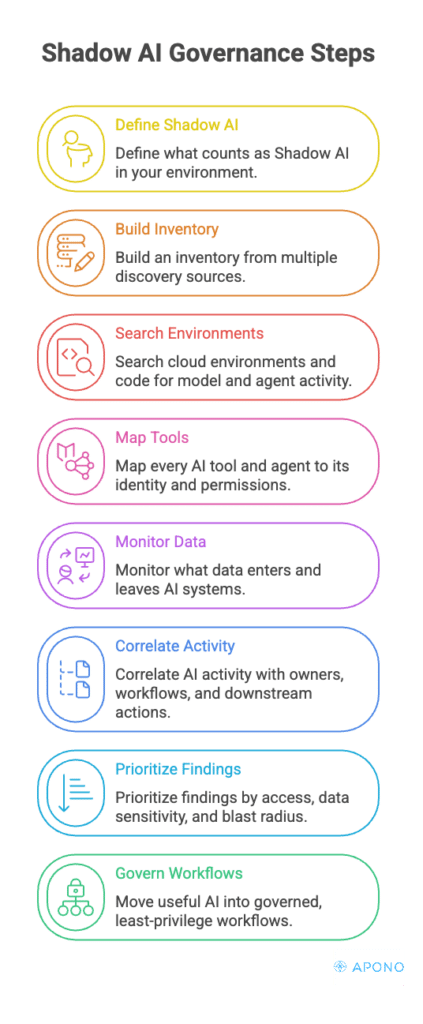
4. Map Every AI Tool and Agent to Its Identity and Permissions
Finding an AI application answers only one question: Does it exist? The more important questions are about what it’s allowed to do.
For every discovered AI system, determine:
- Which identity is it authenticating as?
- Does it use a user account, service account, workload identity, OAuth application, or cloud role?
- Which credentials or API keys does it rely on?
- What permissions have those identities inherited?
- Which cloud resources, APIs, repositories, or databases can those permissions reach?
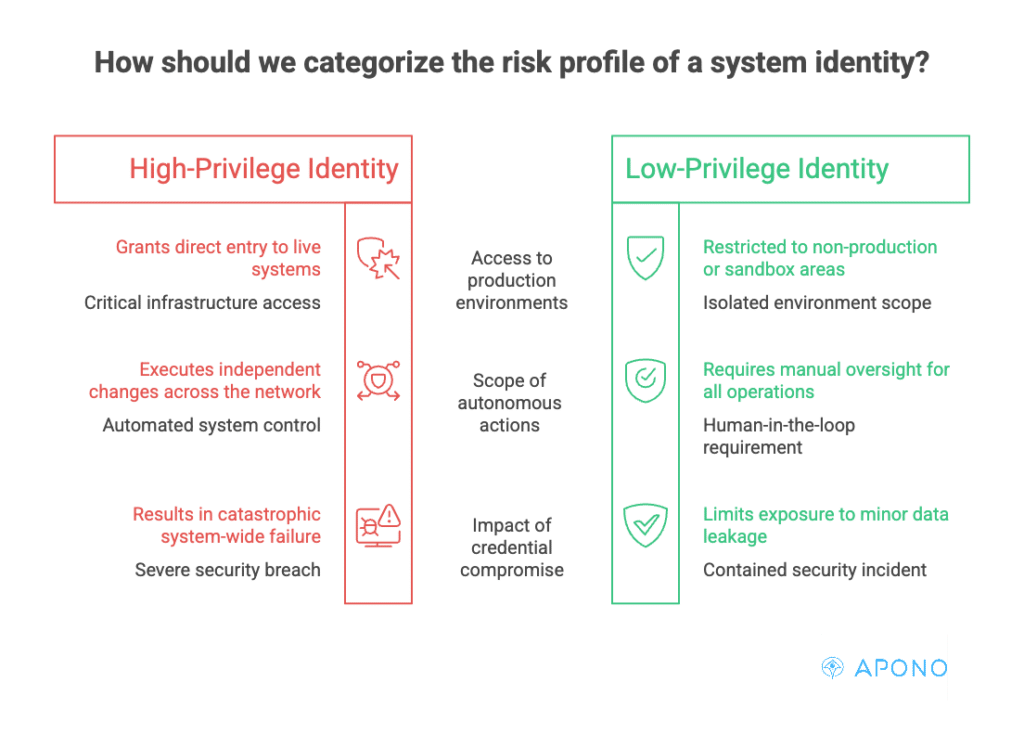
Two AI assistants may appear almost identical on paper, yet one may have read-only access to documentation while another can modify production infrastructure or retrieve sensitive customer data. Understanding those differences is essential for accurate risk assessment.
5. Monitor What Data Enters and Leaves AI Systems
Equally important is understanding the information flowing through it. You can monitor:
- Which data sources AI systems access
- What users submit as prompts
- Which repositories or databases are queried
- What information leaves the environment
- Whether prompts, files, retrieved context, tool results, or generated outputs are transmitted to external AI providers or downstream systems
Pay particular attention to AI systems interacting with sensitive data such as source code repositories and internal documentation. Even relatively low-privilege AI tools can create significant exposure if they’re routinely processing sensitive enterprise data.
6. Correlate AI Activity With Owners, Workflows, and Downstream Actions
An inventory becomes much more valuable once it’s connected to business context. For every AI deployment, answer questions such as:
- Who owns this application or agent?
- Which team is responsible for it?
- What business process does it support?
- Which enterprise systems does it interact with?
- Can it trigger downstream actions automatically?
For example, an AI assistant summarizing meeting notes presents a very different governance challenge from an autonomous agent capable of approving pull requests, provisioning cloud resources, updating CRM records, or restarting production services.
Without this context, security teams know an AI system exists but not whether it’s performing low-risk productivity tasks or executing privileged business operations.
7. Prioritize Findings by Access, Data Sensitivity, and Blast Radius
Not every shadow AI deployment deserves the same response. Prioritization should focus on potential impact rather than simply counting the number of unauthorized tools.
When assessing risk, consider factors such as:
- The privileges associated with its identities
- The sensitivity of the data it processes
- Whether it can access production environments
- The number of downstream systems it can influence
- Whether it performs autonomous actions
- The consequences if its credentials were compromised
This approach allows security teams to concentrate on AI deployments capable of creating meaningful business risk instead of treating every discovery as equally urgent.
8. Move Useful AI into Governed, Least-Privilege Workflows
Discovery shouldn’t automatically lead to removal. Many shadow AI deployments exist because they solve legitimate business problems that official tooling hasn’t addressed.
Once an AI deployment has been identified and assessed, determine whether it should be:
- Retired because the risk outweighs the value
- Replaced with an approved alternative
- Brought under formal governance and retained
For AI systems that continue operating, review the identities and privileges they rely on. By replacing persistent privileged grants and long-lived privileged credentials with just-in-time, just-enough access (and by right-sizing service-account and workload-identity permissions) organizations can limit AI systems to the access required for each task.
Shadow AI Detection Checklist
Use this checklist to help guide your efforts to detect shadow AI.
☐ We have a clear policy defining which AI tools, models, agents, and AI-enabled features require governance.
☐ We continuously discover AI activity across browsers, SaaS applications, endpoints, cloud platforms, and source code repositories.
☐ We identify unmanaged AI integrations, model APIs, agent frameworks, and embedded AI capabilities rather than just standalone AI applications.
☐ Every AI application or agent has a documented owner and a legitimate business purpose.
☐ We know which human identities, service accounts, workload identities, OAuth applications, and API credentials each AI system uses.
☐ We regularly review the permissions granted to AI identities and remove unnecessary standing or excessive privileges.
☐ We understand what sensitive data each AI system can access, process, store, or transmit.
☐ We can trace AI-initiated actions back to the originating user, workflow, or autonomous agent.
☐ We prioritize remediation based on privileged access, data sensitivity, and potential blast radius—not simply the number of AI tools discovered.
☐ Approved AI deployments are brought under governance with monitoring, logging, and documented ownership.
☐ High-risk AI operations require additional controls, such as human approval, contextual guardrails, or temporary privilege elevation.
☐ AI applications or agents that cannot be adequately governed are restricted, isolated, or removed from the environment.
From Shadow AI Discovery to Control
Detecting shadow AI requires more than knowing which tools exist. Security teams must also understand which identities those tools use, what privileges they hold, which data and systems they can reach, and what actions agents can perform.
Apono is a cloud-native privilege access management platform built on Zero Standing Privilege principles. It complements shadow AI discovery and observability tools by controlling what discovered AI identities can do. Apono creates task-scoped privileges dynamically at runtime, evaluates requests based on identity, intent, environment, resource sensitivity, and risk, and automatically revokes access when the task ends.
The same access framework can govern engineers, service accounts, copilots, and autonomous agents. Sensitive or destructive actions can require human approval, while intent validation compares an agent’s declared task with its runtime behavior. Each request, approval, and access window is recorded with business context, giving security teams a clear audit trail without blocking useful AI adoption.
See how Apono Agent Privilege Guard helps teams govern AI agent access with task-scoped privileges, runtime authorization, and Zero Standing Privilege. Book a live demo.