
Secret Management: A Step-by-step Guide to NHI Security

The Apono Team
December 11, 2025
It’s not hard for secrets to sprawl, buried under layers of commits and forgotten branches. Most teams don’t notice it until one bad push exposes everything. Secret leaks don’t come from breaches, but from configuration drift and forgotten credentials; a gap that traditional vault tools struggle to close on their own.
Here’s the scale of that mess. Machine identities now outnumber human users by more than 80 to 1, and each one relies on credentials to function. Yet, only 15% of organizations feel highly confident in preventing NHI attacks, while 69% express concerns about them.
Keeping thousands of invisible credentials under control without slowing your team down begins with improved secrets management and a shift in how you secure non-human identities.
What is secrets management, and how does it relate to NHI security?
Secrets management involves storing, issuing, rotating, and controlling access to credentials such as API keys and tokens. It keeps machine-to-machine credentials out of code and ensures that every secret has a clear owner, scope, and expiration date.
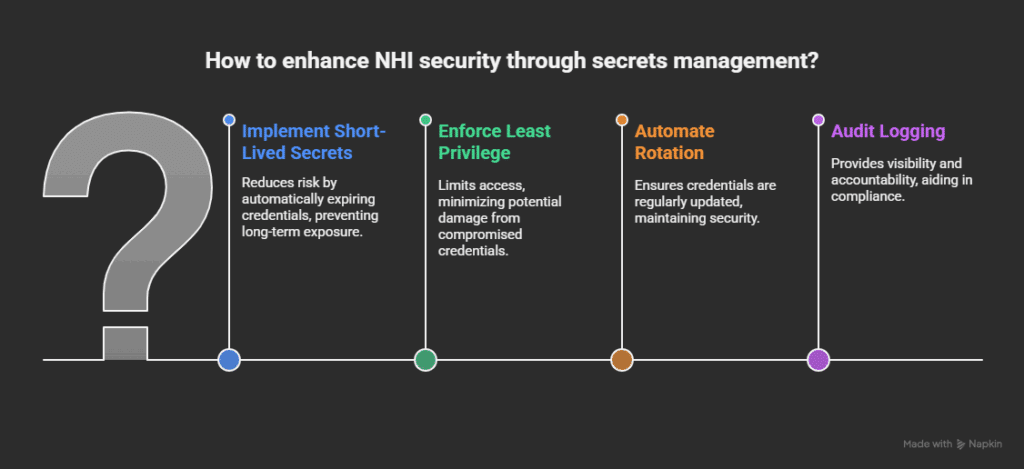
Secrets management and NHI security are closely linked because every non-human identity (whether it’s a CI/CD pipeline or automated workflow) relies on credentials to function. Those credentials often end up hardcoded or overprivileged. NHIs often authenticate through short-lived credentials issued via OIDC or IAM role assumption rather than static API keys, minimizing the credential footprint. Secrets management solves that by turning static keys into short-lived, controlled secrets that expire automatically.
Without secrets management or effective NHI management tools, NHIs become a blind spot. All it takes is one leaked token to give an attacker broad access. With automated secrets management in place, you can enforce least privilege and rotate credentials automatically, removing long-lived tokens before they become a silent liability.
Zero Trust demands you verify every request and validate each secret, enforcing cloud security controls across all NHI workflows. Applying these controls to NHIs ensures machine-to-machine communication stays compliant with SOC 2, ISO 27001, NIST, and broader application security standards.
Why Secrets Management is the Weak Link in NHI Security
Every bot, API, or AI-powered workflow needs credentials to connect systems, deploy builds, and pull data. Each non-human identity opens a new attack path. In most organizations, no one knows exactly how many exist or what they still access. API keys and tokens often carry more privilege than the humans managing them. Left unchecked, they multiply across scripts, containers, and pipelines, creating NHI sprawl.
As CI/CD pipelines spin up new workloads, they leave behind forgotten service accounts and unrotated secrets. These orphaned credentials expand your attack surface until a single unused token becomes an admin key to production.
5 Secrets Management Mistakes to Avoid
1. Hard-Coded Secrets in Code Repositories
Leaving API keys or credentials inside your code is one of the simplest ways to reveal private information. Anybody with access, or even a public scan, can locate those lines once they are pushed to version control. A single exposed key can spread instantly across mirrors and forks before you even realize it. Attackers regularly scan public repos for exposed credentials, and even a brief exposure can result in a full system compromise.
2. Shared Service Accounts
To “keep things simple,” many teams use the same account for several services or pipelines. As a result, there is no accountability. It is impossible to determine which process or individual used a shared key. As a result, incident response is slow and unreliable, and audits (including any privileged access management audit) are unreliable.
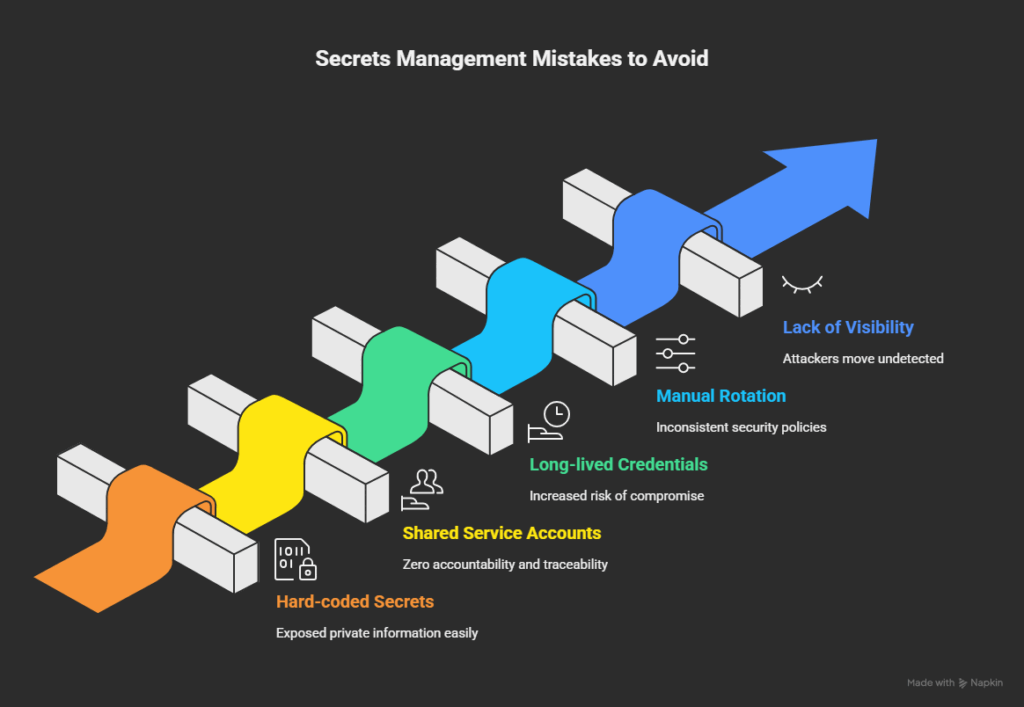
3. Long-Lived Tokens and Passwords
Static credentials that never expire are a major liability. The longer a secret stays valid, the more likely it is to leak, be reused, or be forgotten. Long-lived tokens often have broad permissions, which can turn into open doors for privilege escalation. Automated rotation and expiry policies close that window by ensuring credentials live only as long as needed.
4. Manual Rotation and Ticket-Based Workflows
Everything is slowed down, and human error is introduced when engineers are relied upon to manually rotate secrets or submit tickets for access. In reality, a lot of credentials are never rotated because the procedure is cumbersome or disruptive. Automating rotation and approvals enables teams to stay focused while maintaining consistent security controls.
5. Lack of Visibility and Auditing
Without centralized visibility, it’s impossible to know how many secrets exist, who has access, or when they were last used. That lack of visibility slows down audits and provides attackers with room to move undetected. With continuous monitoring and solid audit logs in place, you can identify suspicious use early and shut it down before it escalates into a larger problem.
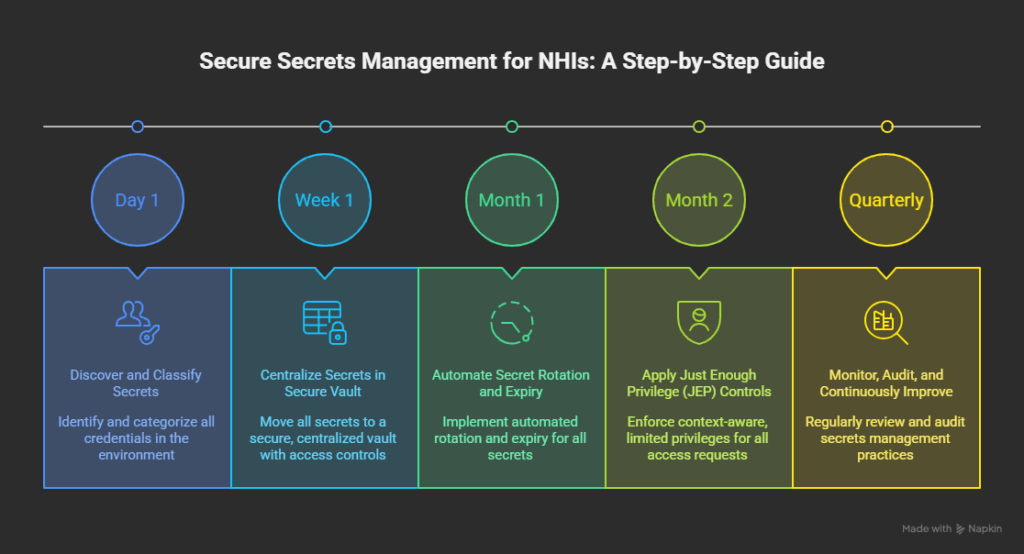
A Step-by-Step Guide to Secure Secrets Management for NHIs
Step 1 – Discover and Classify All Secrets
Start by identifying every credential in your environment for human and non-human. Many teams find more machine credentials than expected once they run a proper discovery scan. Classify each secret by environment and purpose to keep control from day one.
Implementation Best Practices
- Map service accounts, workloads, CI/CD tokens, and API keys.
- Group them by sensitivity (production, staging, dev) and function.
- Automate discovery to catch orphaned credentials left behind by old systems.
- Revoke or rotate anything without a clear owner or current use.
- Identify unused, stale, or orphaned secrets left behind by old systems.
- Flag credentials that have no active owner or purpose.
- Document every secret’s source, usage pattern, and access path.
Automated NHI security tools can identify hidden tokens and accounts with permissions that should have expired but remain active.
Step 2 – Centralize Secrets in a Secure Vault
Leaks are inevitable when credentials are stored across code repositories, scripts, and cloud variables. You can maintain uniform visibility and access controls with a central vault.
Implementation Best Practices
- Enforce least privilege from the start.
- Separate environments to contain damage if a secret is compromised.
- Apply strong encryption and require MFA or identity-based access for retrieval.
- Schedule regular audits to see who’s accessing what.
- Remove hard-coded secrets from repositories, scripts, and config files.
- Replace environment-file secrets with vault-issued credentials.
- Require vault retrieval as part of your CI/CD and deployment workflows.
A vault is only effective if usage is mandatory, so make it part of your standard deployment process.
Step 3 – Automate Secret Rotation and Expiry
Manual rotation doesn’t scale. Credentials should never stay valid indefinitely, and teams shouldn’t depend on ticketing systems to manage them.
Implementation Best Practices
- Rotate secrets automatically after a set interval or trigger (like a deployment).
- Link rotation to events in your CI/CD pipeline.
- Implement time-bound access so credentials expire after use.
- Use just-in-time (JIT) provisioning to generate secrets only when needed.
- Replace static credentials with time-bound or ephemeral tokens.
- Set automatic expiry for all machine-issued secrets.
- Remove ticket-based rotation workflows and make rotation part of CI/CD automation.
This best practice reduces dwell time for attackers and ensures compromised credentials have limited value.
Step 4 – Apply Just Enough Privilege (JEP) Controls
Granting broad access ‘just in case’ is the fastest way to lose control, which is why adopting just enough privilege controls is essential.
Implementation Best Practices
- Define context-aware rules (who, what, when, for how long).
- Limit privileges to a single pipeline, namespace, or function.
- Set automatic expiry on all access requests.
- Integrate with collaboration tools like Slack or Teams for quick approvals.
- Replace shared service accounts with workload-specific identities.
- Issue scoped keys tied to a single service, pipeline, or namespace.
Combining JEP with automation produces cleaner audit trails and aligns easily with compliance frameworks, such as SOC 2 or ISO 27001.
Step 5 – Monitor, Audit, and Continuously Improve
Secrets management isn’t “set and forget.” Continuous monitoring keeps privilege creep in check and exposes potential misuse early, which is a core component of any continuous threat exposure management approach.
Implementation Best Practices
- Monitor for unused, expired, or overprivileged credentials.
- Feed secret access logs into your SIEM for cross-system visibility.
- Run quarterly reviews to spot drift between policy and practice.
- Treat every access request as untrusted until verified.
- Surface unused, dormant, or overprivileged credentials for review.
- Track secret access patterns to detect drift or unexpected usage.
- Alert on secrets that haven’t been rotated within policy thresholds.
When done well, this process becomes part of your Zero Trust framework by verifying every secret, every request, and keeping both human and machine identities accountable.
Bringing Automation and Trust Back to Access
Bots, pipelines, and workloads now outnumber human users many times over, and each depends on secrets to function. Without visibility and automation, those credentials quietly become the weakest link in your cloud security.
Instead of static credentials that linger for months, Apono delivers short-lived, scoped access that expires automatically when needed. Every request is verified, every permission is temporary, and every action, from approval to expiry, is logged for full visibility. It integrates natively into your workflow, whether you’re in Slack, Teams, or a CI/CD pipeline, and deploys in minutes, not days.
With Apono, least privilege is enforced automatically. Security and speed move together, so developers can ship fast while auditors sleep easy.See how your organization stacks up. Get an NHI Access Assessment and uncover where machine identities are over-privileged, and how automated, time-bound access reduces the risk.