Multi-Cloud Identity Management: 10 Best Practices

The Apono Team
May 18, 2026
The moment teams move from one cloud to two, identity governance starts to fracture. Roles don’t translate cleanly, and access reviews lag behind deployment velocity. Multi-cloud identity management is the practice of controlling who can access what across AWS, Azure, GCP, Kubernetes, SaaS tools, databases, and other cloud-connected systems.
Multi-cloud identity management gives teams a consistent way to manage identities, enforce least privilege, approve access, and revoke permissions across environments that were never designed to work the same way.
In practice, multi-cloud identity management is not only about authentication. It is about governing privileged access consistently across every cloud, cluster, database, and application.
That consistency matters. In a recent CSA survey, three of the top four causes of cloud-related breaches were identity-related: excessive permissions (31%), inconsistent access controls (27%), and weak identity hygiene (27%).
For DevOps and security teams, engineers need fast access to ship and troubleshoot, but standing permissions create unnecessary risk. These best practices show how to bring multi-cloud access back under control.
What is multi-cloud identity management?
Multi-cloud identity management is the practice of controlling who can access what across AWS, Azure, GCP, Kubernetes, SaaS tools, databases, and other cloud-connected systems.
For DevOps and security teams, the goal is to enforce least privilege consistently across environments that were never designed to work the same way, without slowing engineers down.
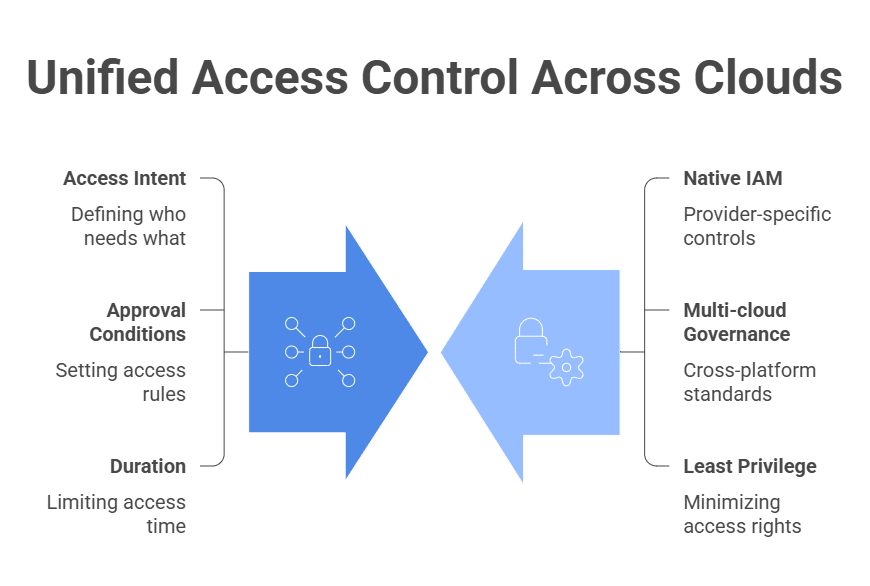
A strong strategy centralizes access intent: who needs access, to which resource, for what purpose, under what approval conditions, and for how long. Enforcement still happens through each provider’s native IAM controls, but governance becomes consistent across environments. Teams can apply the same least-privilege standards without manually translating every access decision across platforms.
This is where native cloud IAM and multi-cloud identity management diverge. Native IAM and authorization tools govern access within their own platforms. Multi-cloud identity management governs consistency across providers, clusters, applications, databases, and data systems.
It helps answer questions that individual IAM tools can’t answer alone:
- Are engineers accumulating standing access across multiple clouds?
- Are production permissions equivalent across environments?
- Is access revoked everywhere when someone changes roles?
- Can auditors see who had access, why it was approved, and when it expired?
In practice, strong multi-cloud identity management depends on visibility, automation, and time-bound access. Teams need to discover privileges across environments, automate approvals and revocations, and replace static permissions with Just-In-Time access wherever possible. That reduces access risk without forcing engineers back into slow ticket queues.
For cloud-native teams, the goal is not just to centralize identity. It is to eliminate standing privilege across every environment and to create access only when needed, for as long as needed.
Why Multi-Cloud Identity Management Gets So Complex
Each cloud provider was designed with its own permission philosophy. Because these models aren’t semantically equivalent, teams can’t enforce least privilege across AWS, Azure, GCP, Kubernetes, databases, and SaaS tools by simply copying roles between platforms.
Manual access management amplifies the problem. When engineers request access via tickets or spreadsheets, approvals become informal and inconsistent. Review cycles lag behind infrastructure changes. Under delivery pressure, broad roles get granted “temporarily” and never revisited. In multi-cloud environments, standing privilege compounds quickly across providers.
Governance, risk, and compliance add another layer of strain. Audit logs are spread across AWS CloudTrail, Azure Monitor, GCP Audit Logs, Kubernetes audit events, and SaaS activity feeds. Approval evidence may be buried in email threads or ticketing systems. When auditors ask who had access to production data during a specific window, teams often have to stitch together evidence from multiple control planes.
The hardest risks are often cross-system paths. A developer may authenticate through an IdP, assume an AWS role, access a Kubernetes cluster, query a production database, and trigger a CI/CD workflow from the same session.
Together, they can create a privileged path that no single native cloud IAM console will fully expose.
Table 1: Key Access Problems in Multi-Cloud Environments
| Access problem | What happens in multi-cloud environments | Better approach |
| Standing admin roles | Privilege accumulates across AWS, Azure, GCP, and Kubernetes | Use JIT, auto-expiring access |
| Local cloud users | Identities drift from the source of truth | Use federated identity and lifecycle automation |
| Manual approvals | Tickets and ad hoc Slack requests create inconsistent evidence | Use policy-based access workflows |
| Fragmented logs | Audit evidence is spread across multiple systems | Centralize approval, grant, activity, and revocation logs |
| Over-permissioned service accounts | Automation gets broad access that is rarely reviewed | Use just-enough access and short-lived credentials |
Multi-Cloud Identity Management: 10 Best Practices
1. Centralize Identity Visibility Across Every Cloud
Multi-cloud identity management often starts with privilege discovery: identifying who has access, what access is unused, and where accounts are overprivileged before teams can right-size permissions.
In multi-cloud environments, risk often lurks in the gaps between platforms. Reviewing AWS IAM, Azure RBAC, or GCP roles independently gives you only a partial view of privilege.
What matters is effective access across providers: who can access production data, how that access affects cloud data security, and whether infrastructure can be modified or privileged roles assumed when entitlements are combined.
Centralizing identity visibility means aggregating identity and entitlement data across clouds, clusters, databases, and SaaS tools so you can evaluate exposure across the full access path, not platform by platform.
2. Use Federated Identity and Single Sign-On
Federation moves authentication to a single authoritative identity provider so access changes and deprovisioning events propagate consistently. When someone leaves or changes roles, federated access should be removed across every connected environment, while local users, service accounts, and break-glass accounts should be governed separately.
Separate local users in AWS, Azure, GCP, and SaaS platforms inevitably drift out of sync with real-world role changes. Minimize local cloud users wherever possible, tightly govern unavoidable break-glass accounts, enforce MFA through the identity provider, and automate lifecycle updates.
3. Standardize Access Policies
Each cloud provider handles permissions differently, making it risky to copy roles between platforms. A role labeled “admin” in one platform does not necessarily translate cleanly into another.
Standardizing access means defining intent: what production write, infrastructure management, or data access should actually include. Then, map that intent to provider-native constructs.
Governance should live above individual IAM systems, even if enforcement happens within them. Build a common access taxonomy, such as read-only, production read, production write, admin, break-glass, and vendor access. Then map those access levels to provider-native roles instead of copying role names across clouds.
4. Eliminate Standing Privileges with Just-In-Time Access
Just-In-Time access reframes elevation as temporary and contextual. Instead of granting enduring admin rights, organizations provide time-bound access for specific tasks, with automatic expiration. This narrows the window in which compromised credentials can be abused.
JIT access is how teams move toward Zero Standing Privilege. Instead of assigning admin, production, or database permissions permanently, access is created only when there is a valid reason, approved through policy, and removed automatically when the session expires.
For non-human identities, focus on just-enough access: each workload, service account, CI/CD role, and automation token should have only the permissions required for its specific function. Where possible, replace long-lived credentials with short-lived tokens and scope access to the workload, environment, and pipeline stage.
5. Enforce Least Privilege for Every Human Identity
Least privilege means giving people only the permissions they need to do their work. It breaks down quietly in multi-cloud environments because trust becomes portable. When someone is trusted in one production environment, teams often extend similar authority elsewhere.
Over time, those assumptions flatten boundaries between providers. Regularly compare assigned roles with actual activity and remove access that has not been used for 30–60 days.
Table 2: Best Practices at a Glance
| Best practice | What to do |
| 1. Centralize identity visibility | Aggregate identity and entitlement data across clouds, clusters, databases, and SaaS tools to see effective access across the full path. |
| 2. Use federated identity and SSO | Use one authoritative IdP, minimize local users, govern break-glass accounts, enforce MFA, and automate lifecycle updates. |
| 3. Standardize access policies | Define access intent centrally, then map it to provider-native roles instead of copying role names across clouds. |
| 4. Eliminate standing privileges with JIT access | Grant time-bound access only when needed, with policy-based approval and automatic expiration. Use just-enough access for non-human identities. |
| 5. Enforce least privilege for human identities | Compare assigned roles against actual activity and remove access that hasn’t been used in 30–60 days. |
| 6. Secure non-human identities | Inventory service accounts, CI roles, workload identities, and machine credentials. Replace long-lived secrets with short-lived tokens where possible. |
| 7. Automate access workflows | Automate requests, approvals, provisioning, and revocation through tools engineers already use, such as Slack, Teams, CLI, or developer platforms. |
| 8. Audit and remove excess access | Use activity data and continuous risk monitoring to detect stale, excessive, or high-risk access. |
| 9. Create controlled break-glass access | Define emergency access paths with time-bound activation, justification, audit logs, and automatic expiration. |
| 10. Map controls to compliance | Correlate approvals, grants, activity logs, and revocation events into one audit trail across every provider. |
6. Secure Non-Human Identities, Service Accounts, and Machine Credentials
Securing non-human identities means governing the machine credentials that power automation across your cloud stack. CI roles, workload identities, Kubernetes service accounts, and SaaS integrations routinely execute actions across providers. If over-permissioned, they create rapid and silent escalation paths.
Continuously inventory machine identities, replace long-lived secrets with short-lived tokens where possible, and scope permissions to the specific workload, environment, or pipeline stage they support.
7. Automate Access Requests, Approvals, Provisioning, and Revocation
Manual processes introduce delay and inconsistency. Under pressure, teams grant broader access than necessary to avoid repeated friction.
The practical shift is to move access control into automated, policy-backed workflows that provision and revoke permissions programmatically. Define approval rules in advance, embed access requests into tools engineers already use, such as Slack, Teams, CLI, or internal developer platforms, and grant permissions automatically when policy conditions are met.
For cloud-native teams, the goal is not another approval portal. It is to replace legacy PAM workflows with contextual, automated access that fits how engineers already work.
8. Continuously Audit Permissions and Remove Excess Access
Multi-cloud access accumulates through migrations, troubleshooting, and shifting responsibilities. Permissions granted during one project often linger into the next, and multi-cloud environments make stale access harder to spot.
Review permissions against actual usage data, not just assigned roles. You can use continuous risk monitoring to detect stale, excessive, or high-risk access. Remove access that has not been used in 30–60 days, and prioritize high-risk permissions such as IAM modification, secret access, production database access, and Kubernetes admin rights.
9. Create Controlled Break-Glass Access for Incidents and On-Call Workflows
Break-glass access means defining pre-approved, high-privilege access paths that can be activated during incidents without granting permanent admin power. In multi-cloud environments, outages can span providers, so teams may default to giving on-call engineers standing super-admin rights “just in case.”
The safer approach is to design emergency elevation deliberately. Define which roles constitute true incident-level access in each cloud, gate them behind time-bound activation, require explicit justification at the moment of use, and ensure automatic expiration once the incident window closes.
10. Map Identity Controls to Compliance and Audit Requirements From Day One
Compliance and data governance become difficult in multi-cloud environments because audit evidence is scattered across multiple logging systems. Without centralized enforcement and traceability, proving control becomes reactive and manual.
Correlate approvals, access grants, activity logs, and revocation events into a single audit trail. The goal is to answer who accessed what, when, why access was approved, and when it expired across every provider.
For example, Caris Life Sciences used Apono to manage secure access to sensitive health data across hybrid on-prem and AWS environments, including granular access to S3 buckets and folder-level resources.
Common Multi-Cloud Identity Management Challenges to Avoid
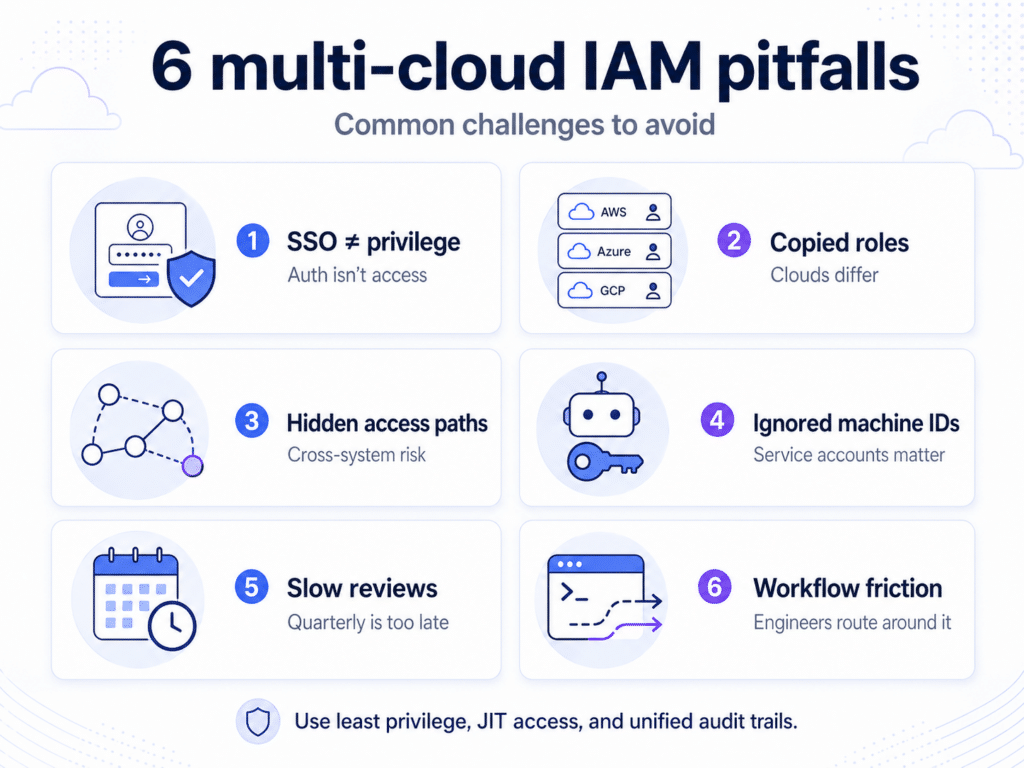
- Assuming SSO Solves the Problem
Like traditional perimeter security, SSO centralizes login, not privilege. Use SSO as the authentication layer, then govern authorization separately with least-privilege policies, time-bound access, and centralized audit trails. - Copying Role Structures Between Clouds
Lifting AWS role logic into Azure or GCP without rethinking semantics creates hidden over-permissioning. Role names may look similar, but enforcement boundaries are not. - Ignoring Cross-System Privilege Paths
A SaaS token that writes to a cloud bucket, or a CI role that deploys into Kubernetes, creates chained access paths that many teams never model. - Treating Machine Identity as a DevOps Detail
Service accounts and workload identities are often created inside pipelines without security oversight. When they’re viewed as implementation artifacts instead of access subjects, governance gaps widen. - Relying on Annual or Quarterly Access Reviews
In fast-moving cloud environments, access changes weekly. Review cycles measured in quarters can’t keep up with infrastructure velocity. - Separating Identity Strategy from Engineering Workflows
- If access control is imposed externally rather than integrated into developer tooling, engineers will route around it. Often, they’ll do this by broadening roles for convenience.
Make Multi-Cloud Access Temporary, Auditable, and Developer-Friendly
Multi-cloud identity management fails when access decisions are manual, inconsistent, and built around standing permissions. As environments expand, privilege becomes harder to see, harder to govern, and easier to overgrant. The goal isn’t just to manage more identities. It’s to enforce least privilege everywhere without slowing the teams building, deploying, and troubleshooting production systems.
Apono helps cloud-native teams eliminate standing privileges across AWS, Azure, GCP, Kubernetes, databases, and supported SaaS platforms. Instead of relying on static roles, ticket queues, and manual approvals, Apono creates granular Just-In-Time access that expires automatically when the work is done.
Developers request access through Slack, Teams, or CLI. Security and DevOps teams get centralized visibility into who accessed what, why access was approved, when it expires, and what actions were taken.Assess your multi-cloud access posture. Book a meeting with Apono to see where standing privileges, unused access, and overprivileged accounts create risk across your cloud stack.