How to Manage AI Agent Access Control

The Apono Team
June 19, 2026
Abstract
AI agent access control is about governing what autonomous software agents are allowed to do and access across your cloud infrastructure, data systems, and internal tools at runtime. It’s about identity ownership and action-level authorization, so your AI agents operate within tightly scoped, time-bound, and policy-enforced permissions that you can keep track of.
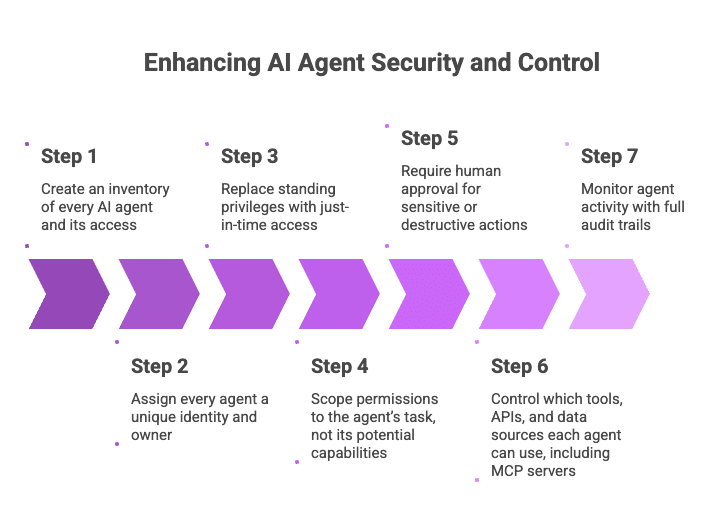
We’ll walk through how to implement AI agent access control by covering how to:
- Create an inventory of every AI agent and its access
- Assign every agent a unique identity and owner
- Replace standing privileges with just-in-time access
- Scope permissions to the agent’s task, not its potential capabilities
- Require human approval for sensitive or destructive actions
- Control which tools, APIs, and data sources each agent can use, including MCP servers
- Monitor agent activity with full audit trails
Beyond just helping human users, AI agents now make changes on their own. Teams let agents update infrastructure, modify Kubernetes resources, query production databases, and trigger workflows across internal tools.
Cloudera’s Future of Enterprise AI Agents report found that 63% of enterprises already deploy security monitoring agents. But many teams still haven’t clearly defined what those agents are allowed to touch, modify, or trigger.
In many environments, agents run with whatever permissions were easiest to assign: a senior engineer’s role, a broad service account, or a long-lived token no one revisits. That lets automation act far beyond its intended task. Agents reduce toil, but without clear guardrails, they also introduce standing authority across systems that were never designed for autonomous decision-making.
What is AI agent access control?
AI agent access control defines what agents can access, what they can change, and whether that scope matches the job they were given. It also gives teams visibility into agent activity and a record of why each action was allowed, so automation can scale without creating invisible privilege across the stack.
For AI agents, context matters as much as identity. Access decisions should account for the agent, trigger, task, environment, resource sensitivity, business context, and whether the requested action matches the agent’s approved purpose.
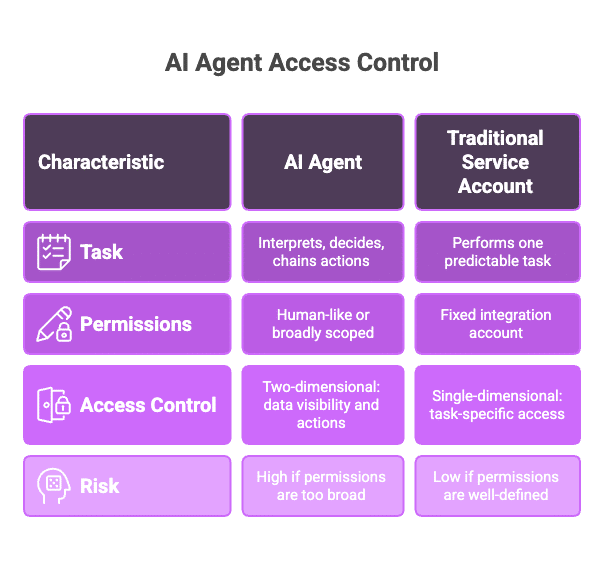
Remember that AI agents differ a lot from traditional software service accounts. A fixed integration account usually performs one predictable task. AI agents interpret inputs, decide which tools to call, and chain actions together.
That makes AI agents a growing source of NHI sprawl, especially when teams keep adding agent identities, service accounts, API keys, and tokens without clear ownership or lifecycle controls.
If an agent runs with a human’s accumulated permissions or a broadly scoped service account, you’ve effectively handed it access to everything that identity can reach.
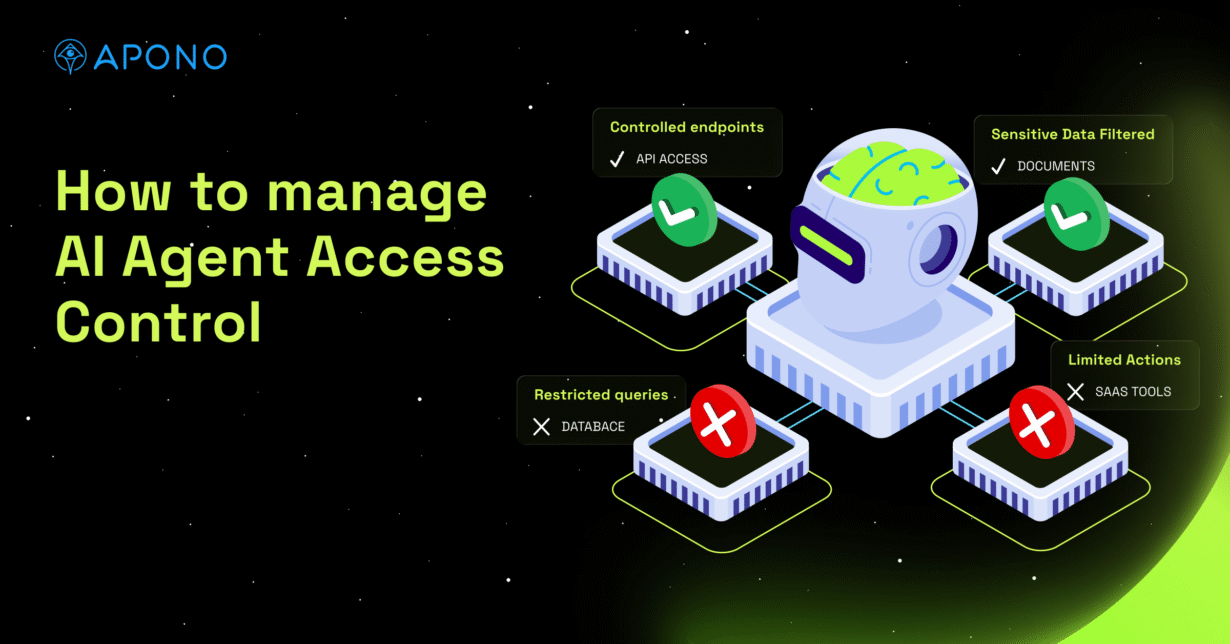
You also need to think in two dimensions: what data can the agent see, and what actions can it take? Production tables, secrets, customer logs, infrastructure changes, credential rotation, role assumption, CI/CD workflows, and MCP tools all need controls. An agent with read-only access can still expose sensitive data, while an agent with write access can damage production even if its data access is narrow.
Why Static Access Control Breaks Down for AI Agents
Most access control models were built for stable users and predictable applications. You assign a role, review it periodically, and assume the scope still matches the job. That model doesn’t hold up in an agentic identity crisis, where autonomous identities can interpret inputs, choose tools, and combine permissions across systems.
Agents often run under shared service accounts or inherited human roles. When something changes, like a database update or a configuration rollback, it becomes difficult to answer who authorized the action, which policy allowed it, and whether the scope matched the original intent. That’s why agent access can’t rely on static roles. It needs to be scoped to the task, granted only when required, and revoked automatically once complete.
Table 1: Traditional vs AI Agent Access Control
| Traditional access control | AI agent access control |
| Assigns static roles to users, groups, or service accounts. | Grants task-scoped permissions based on what the agent is trying to do right now. |
| Gives access before the task is known, often through standing privileges. | Provides just-in-time access only when the agent needs it, then revokes it automatically. |
| Assumes the identity behaves predictably. | Accounts for agents that interpret prompts, call tools, and chain actions across systems. |
| Focuses mainly on who has access to a resource. | Evaluates identity, intent, action, resource sensitivity, environment, and risk. |
| Often relies on shared service accounts or inherited human permissions. | Requires each agent to have a unique identity, clear owner, and tightly scoped permissions. |
| Makes auditing difficult when actions happen through generic credentials. | Logs who triggered the agent, what it accessed, what it changed, and why the action was allowed. |
| Uses periodic access reviews to find overpermissioned identities after the fact. | Enforces runtime guardrails that prevent excessive access before the action happens. |
Key AI Agent Access Control Risks
- Overprivileged agents
Agents granted broad roles to make things easier can modify or access far more than their task requires, increasing blast radius if they misfire or are compromised. - Agents using human credentials
When agents run under a developer’s account, they inherit accumulated permissions across systems, making unintended actions far more impactful. - Prompt injection and indirect instruction attacks
Malicious inputs can trick agents into executing unintended actions, such as exposing sensitive data or triggering infrastructure changes. - Overprivileged MCP servers
If an MCP server exposes tools through a broad backend identity or over-scoped token, any connected agent may be able to invoke actions beyond its intended purpose. The risk comes from the tools the agent can call, the backend permissions those tools use, and whether those calls are scoped, logged, and approved. - Agent-to-agent access chains
In multi-agent AI workflows, multiple agents can call each other, combining separate permissions into a broader, unintended control path. If the original human trigger, agent identity, and downstream agent actions aren’t preserved in the audit trail, teams lose accountability across the chain. - Shadow agents with no clear owner
Experimental agents often persist without governance, operating with credentials that no one actively reviews. - Accidental data changes or destructive actions
Misinterpreted instructions can lead agents to modify or delete resources, especially when write permissions are overly broad.
How to Implement AI Agent Access Control
The following AI agent security best practices focus on limiting privilege, improving accountability, and giving teams enough visibility to let agents operate safely across production systems.
Step 1: Create an inventory of every AI agent and its access
Before you tighten permissions, you need a clear list of what actually exists. Agents don’t only live in one place. Some run inside CI pipelines. Others sit behind internal APIs. Some are wired into monitoring systems or Kubernetes operators. Others are embedded inside tools that platform teams don’t even fully own.
Start by identifying every agent process, what identity it runs under, and which cloud accounts, clusters, databases, or SaaS tools it can reach. This is especially important in multi-cloud identity management, where one agent may interact with AWS, Azure, GCP, Kubernetes, databases, and SaaS tools through different identities or inherited roles. Don’t stop at role names; map effective permissions too.
Track who owns the agent, what system triggers it, which tools it can call, whether it has write access, and whether its credentials are short-lived or long-lived. Without that clarity, you’re guessing at exposure instead of managing it.
Step 2: Assign every agent a unique identity and owner
If an agent runs under a shared service account or a senior engineer’s credentials, you’ve already lost clarity. Every agent should have its own identity. This is not to make it look neat on a spreadsheet; it’s because isolation limits damage.
Tie that identity to a named technical owner. Someone should be responsible for reviewing its permissions, understanding its purpose, and decommissioning it when it’s no longer needed.
That owner should also define the agent’s approved tasks, risk tier, data boundaries, and escalation path when the agent needs elevated access. If no one can answer who owns an agent or why it exists, it shouldn’t be running with production access.
Step 3: Replace standing privileges with just-in-time access
Permanent access is obviously convenient, but it’s also unnecessary and risky for most agent tasks. If an agent only needs elevated permissions during a remediation flow or deployment window, grant them at that moment and revoke them automatically when the task completes.
Use temporary credentials, short-lived role assumptions, and enforced expiration policies. The point is to shrink the window in which a compromised or misdirected agent can cause harm.
Step 4: Scope permissions to the agent’s task, not its potential capabilities
AI agents are flexible in what they can do, but their permissions shouldn’t be. Define what the agent is supposed to do in concrete terms. If it analyzes logs, it doesn’t need write access to infrastructure. If it deploys code, it doesn’t need broad read access to customer data.
Avoid granting permissions based on what it might need later. Revisit the scope when capabilities change instead of pre-approving a wide envelope just to prevent friction.
Where possible, validate intent at runtime. The declared task should match the permissions requested and the action the agent is about to perform. If an agent says it needs to summarize logs, it shouldn’t be allowed to change Kubernetes RBAC, export customer data, or assume an admin role.
Step 5: Require human approval for sensitive or destructive actions
Some actions carry more risk than others, and humans in the loop are an effective guardrail. Set policy thresholds that trigger human validation for high-impact operations. This doesn’t mean forcing everything through a ticket queue. It means defining which categories of actions require confirmation and enforcing that boundary consistently.
Examples include deleting production resources, changing IAM policies, modifying Kubernetes RBAC, exporting customer data, rotating secrets, disabling security controls, or assuming administrator-level roles. It’s about placing guardrails around irreversible and risky changes.
Step 6: Control which tools, APIs, and data sources each agent can use, including MCP servers
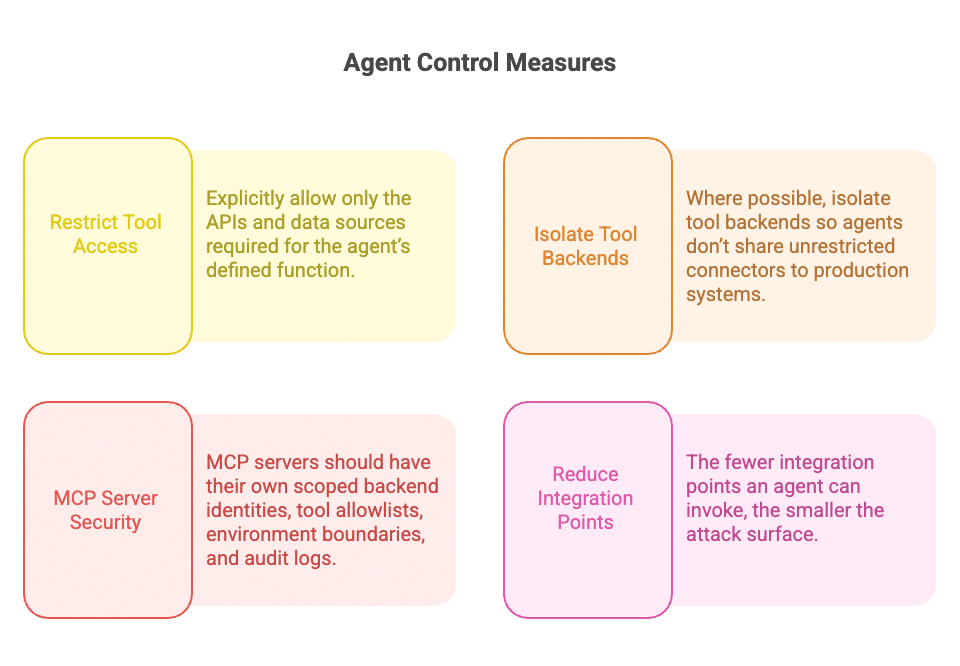
An agent’s power comes from the tools it can call. If you expose an MCP server with broad backend access, every connected agent inherits that reach. Restrict tool access explicitly. Allow only the APIs and data sources required for the agent’s defined function. Where possible, isolate tool backends so agents don’t share unrestricted connectors to production systems.
MCP servers should have their own scoped backend identities, tool allowlists, environment boundaries, and audit logs. Otherwise, you can restrict the agent on paper while still giving it indirect access through an overprivileged tool server. The fewer integration points an agent can invoke, the smaller the attack surface.
Step 7: Monitor agent activity with full audit trails
Authentication logs aren’t enough. You need to see what the agent actually did. Log which permissions were granted, which APIs were called, which resources were modified, and how long elevated access existed.
That activity data can feed AI security posture management by showing where agents are overprivileged, which actions create the most risk, and where guardrails need to be tightened.
Also, distinguish agent-initiated activity from human actions so investigations don’t turn into guesswork. A useful audit trail should show the triggering user or system, the agent identity, the declared task, the permission granted, the resource accessed, the API or tool called, the approval decision, the session duration, the action taken, and when access was revoked.
If something changes in production at 2 a.m., you should be able to trace it back to a specific agent, task, and approval context without pulling logs from five different systems.
What to Look For in an AI Agent Access Control Solution
If you’re evaluating tooling, agent control needs to operate at the execution level, not just for identity provisioning. At a minimum, you should expect:
- Zero Standing Privilege for human and agentic identities, so neither runs with permanent, always-on elevation.
- Just-in-time and just-enough permissions granted specifically for the task the agent is performing, then revoked automatically.
- Context-aware runtime authorization that evaluates identity, intent, business context, environment, and resource risk before allowing access.
- A unique identity and accountable owner for every agent, eliminating shared credentials and orphaned automation.
- Human approval workflows for high-impact actions, without forcing everything into ticket queues.
- Granular control over tools, APIs, and data sources, including MCP servers and internal connectors.
- Unified audit logs that clearly show who triggered the agent, what it accessed, what it changed, and under which policy. For agent-to-agent workflows, the audit trail should preserve the full chain of delegation so teams can trace every action back to the original trigger.
Letting AI Agents Act Within Effective Guardrails
AI agents don’t fit neatly into the access models most teams built over the last decade. They act autonomously, chain tools together, and operate across systems in ways that your static roles and inherited human permissions were never designed to constrain. If you want to scale automation safely, access has to match that reality by being narrowly scoped to the task, granted at the moment it’s needed, evaluated against context, and removed as soon as the work is done.
That’s where Apono fits. Apono is a cloud-native privileged access management platform built on Zero Standing Privilege principles. Instead of relying on standing admin roles or long-lived credentials, Apono enables task-scoped access for both human and agentic identities at runtime.
With Zero Standing Privilege, context-aware guardrails, and runtime authorization, Apono helps teams validate what an agent is trying to do before sensitive actions are allowed. With Apono Agent Privilege Guard, teams can give AI agents task-scoped, just-in-time access without standing admin privileges or long-lived credentials.
Explore Apono Agent Privilege Guard to see how runtime authorization and context-aware guardrails help agents act safely across production systems.